SQL is a database scripting language. It is designed to allow users to ask questions to a database. A typical example might be: How many employees work more than 60 hours per week? If the database has information about the name of an employee and the number of hours worked, SQL can provide the data.
Why are Databases Necessary?
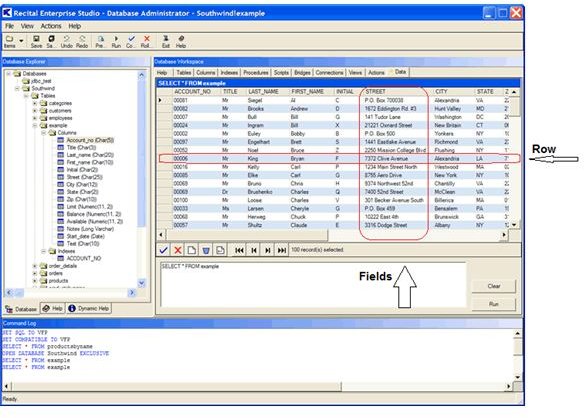
Databases organize raw data. A database is made up of records. A record is made up of fields. If a record is a row of information, the the fields are columns of information. If five fields have information, then all five fields together make up one row, and all rows make up the database table.
Without databases, the raw data will not be organized and it will not be available in any manner that can be easily accessed.The easiest way to organize the data is using the concept of normal forms.
Normal forms break down information to its bare components so there is no duplication, repetition, or redundancy. For example, suppose a student enrolls in a college and signs up for four classes. The information contained might be name address, social security number, major, Class #1, Class #2, Class #3, Class #4, the day and time of Class #1, the day and time of Class #2, the day and time of Class #3, the day and time of Class #4, the teacher for Class #1, the teacher for Class #2, the teacher for Class #3, and the teacher for Class #4. As you can see, the database gets very big very fast.
But if you break it down by student Information, class information, and teacher information instead of one large database, you can have three smaller databases. You can link them by what they would have in common, namely the student.
Now you’ve made the database information accessible as well as manageable.
The Structure of a Database
Databases are organizational units made up of tables, and the tables are made up of rows and (fields) columns.
Image Source: Recital Corp
Next you have to give a structure to the fields (columns). For instance, in some fields, you may want to restrict the information to date information, such as 02/04/2010. In another field, you can only enter integers, in another alpha-numeric information is permitted. By restricting the type of information entered, you eliminate incorrect information; you filter the information allowed.
At this point now you have the basis to create a SQL database operation.
SQL Database
SQL (pronounced See quel) is a scripting language that allows you to access the information in the tables. So let’s create a SQL script that will give us the information about what courses a student is taking.
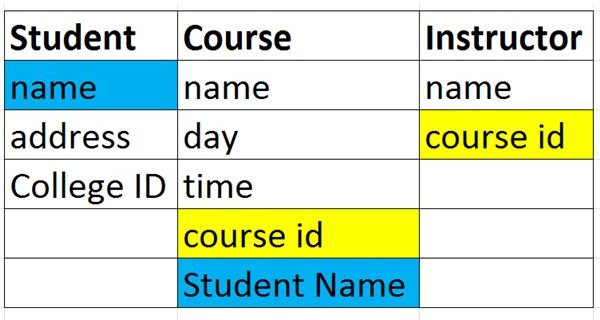
In this database, there are three tables, student, course, and instructor. The student table is linked to the course table with the student name. The Course table is linked to the instructor table with the course-id.
The Select query statement would read as follows:
Select student name, course title, course day and time, teacher name
from Student, Course, Teacher
where student.name = course.student name and course.course id = teacher.course.id
That simple, three line select statement is all that is needed to generate the list of students their coursed, and their instructors. It will work with a table of one thousand students, 40 instructors and 300 courses, or more.
That is SQL at work. So now, let’s take it to the next level, the SQL Engine and the SQL Server.
SQL Engine and the SQL Server
The SQL Engine is the program that runs SQL. Microsoft has three such engines available, although one is set for retirement. They have SQL Server 2000, SQL Server 2005, and SQL Server 2008. The 2000 version is set to be retired.
These engines provide the developer with a consistent central point where tables can be created, fields can be organized with the right data framework, and SQL statements can be analyzed for correctness. In addition, the engine allows scalable tables, which means that a table will be allowed to grow and handle up to several million records.
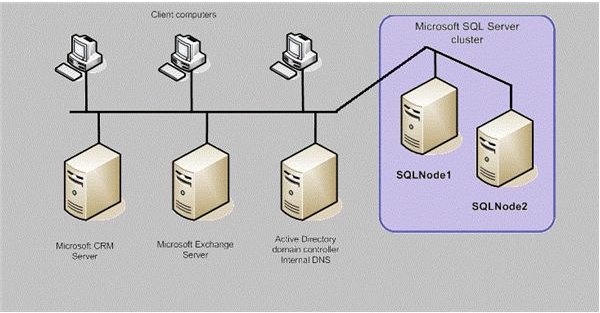
But now we come to the SQL Server - the hardware part. Since a SQL database has a tendency to grow and to be accessed by many users, the SQL Server must be advanced on the hardware side to handle the frequent hits. SQL queries like the one above can be time consuming if the table is very big, or if the number of users is also very big. Frequent hits, updates, modifications, and reports can create bandwidth issues on the network, and also on the server. So it would be beneficial to have a server with 8 gigabytes of RAM or more, a quad core processor, and multiple hard drives.
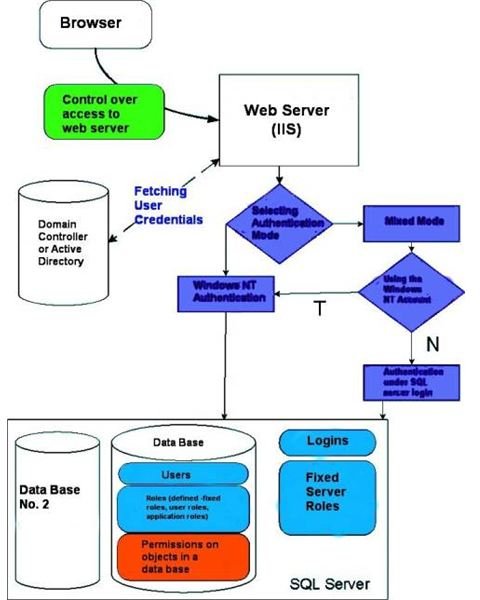
Image Source: WindowsSecurity
Summary
In this introduction to SQL Server, we covered the structure of a database, how records and fields create the tables, and how a select query statement can be created. SQL is a scripting language used to access information from the tables in the database. A SQL Server is an engine that runs the scripting software and a hardware server that manages and scales the databases of the organization.
This post is part of the series: How Servers Work - Bringing Together Different Applications
Servers are the workhorses of a network. There are different kinds of servers,application, file, print; and there are specialized servers like finance, engineering, or database. In this series we look at different servers and their function.


