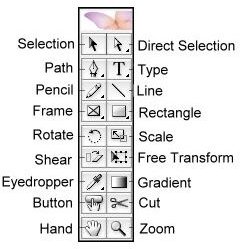
Whether you are new to using InDesign or have used it for a while, keyboard shortcuts can help your speed. Learn the InDesign keyboard shortcuts and how they function in your workspace. Download a complete list of InDesign quick keys for your reference.
The Software
InDesign is a software application for desktop publishing created by Adobe Systems. It is widely used by designers and graphic artist for projects like calling cards, invitations, brochures, posters, magazines, books and other printable materials. It has advanced features to maximize creativity in dealing with text and images.
Using the shortcut keys for repetitive functions is one way to make your work with InDesign projects quicker and more efficient. Instead of using the mouse to click and drop down the menus, you can make your work easier by simply pressing the InDesign keyboard shortcuts. Listed below are InDesign-specific quick keys.
Useful Keyboard Shortcuts for Windows
Ctrl Alt O – Browse in Bridge. Using this command allows you to browse your files directly using Adobe Bridge which is another creative application for managing media files by Adobe.
Ctrl Shift V – Paste without formatting. This command applies primarily with text. For example, if you copy a word or a line from another location with a different text format (size or font) and you paste it using Ctrl V (paste), the text would appear as it is from what you have copied but by using Ctrl Shift V, the copied text will adopt to the original text format used in your story.
Ctrl Alt Shift V – Paste in place. When using the Ctrl C (copy) or Ctrl X (cut) to copy part of an image from different page, it will usually be pasted in the center of your page but by using Ctrl Alt Shift V, the copied object will be pasted on the exact area of your desired page.
Ctrl Alt U – Step and repeat. By simply using the Ctrl Alt Shift D (duplicate), another copy will appear but by using Ctrl Alt U, you can modify how many rows or columns of duplicates you want in your page. This is much helpful if you want to print labels or business cards for multiple copies in one print.
Ctrl G - Group Objects. Using this command will merge your selected objects to one group.
Ctrl Shift G - Ungroup. Undo the grouping of a grouped selection.
Alt → – Increase kerning. Kerning refers to the adjustment of spaces in between characters
Ctrl Alt → – Increase kerning by 5
Alt ← – Decrease kerning
Ctrl Alt ← – Decrease kerning by 5
F1 – InDesign Help
Image Editing Tools
A – Direct selection. Used for selecting an object within the page to work on.
C – Scissor. It is intended to cut in between and reshape paths and objects.
D – Apply default fill and stroke colors to the selected objects.
E – Free transform. It is used to transform the selected object through scaling to reduce or increase size. It is also used to rotate the object in its place.
F – Rectangle frame tool. It is a photo box tool used for rectangularly selecting an area to insert your image or text.
G – Gradient swatch tool. It is a pattern of multiple blended colors for filling objects, text or the whole page as background
H – Hand tool. Used to grab the page for easy page navigation.
I – Eyedropper. Used to copy the exact color of a certain point in the workspace.
J – Toggle text and object control. Switching from text to object control or vice versa.
K – Measure tool. Used to measure the distance between two points by dragging. Learn how to measure units and use ruler in InDesign.
L – Elipse tool. For creating circles and ovals.
M – Rectangle tool. For creating rectangles and boxes
N – Pencil. Writing tool.
O – Shear. Used to split path and objects.
P – Pen. Writing Tool
R – Rotate tool.
S – Scale. Used to resize object.
T – Type tool. A tool used to insert text.
V – Selection Tool
W – Toggle setting between default and preview. It is used to switch from default workspace to preview.
X – Swap fill and stroke activation. a shift between fill and outline use.
Z – Zoom tool. To view larger (Zoom In) or to view smaller (Zoom Out)
Practice Makes Perfect
Don’t be overwhelmed with the number of InDesign keyboard shortcuts listed because you won’t be memorizing them all at once. As you work with your desktop publishing and layout assignments, take note of the common commands you always use and practice using the shortcut keys as much as possible.
Download a copy of the keyboard shortcuts for your own reference.


