
Creating a JavaScript mailto function is simple and requires only a basic knowledge of JavaScript. Read more on learn more and see a complete example of the code you would use.
HTML vs. JavaScript
JavaScript mailto links are used in webpages to allow feedback from the visitor. Creating a mailto function using JavaScript is similar to creating the HTML mailto. The only difference between a HTML mailto and a JavaScript mailto is that the HTML mailto uses the mailto attribute in the anchor tag and is present in the body of the webpage, whereas the JavaScript mailto is present in the form of JavaScript. It is enclosed within the script tags. The script tags can be placed either in the head part of the web page or the body part of the webpage.

How to Create and Configure the JavaScript Mailto Function in Your Webpage
For sending an email, three main fields are required. They are:
-
The email address of the person to whom the email will be sent,
Advertisement -
The subject, and
-
The body of the email.
Advertisement
In addition to the above three fields, fields like Cc(Carbon Copy), Bcc(Blind Carbon Copy), etc can also be included.
The mailto link should be displayed in the webpage by using JavaScript. For this, the document.write() method has to be used. Create variables for email address, subject, carbon copy, blind carbon copy and body. Concatenate the variables using the concatenation (’+’) operator and insert them inside an anchor tag. Insert the string in the document.write() method and display it in the web page. The following code shows an easy format in which a mailto link can be created using JavaScript
The JavaScript to create the Mailto Function:
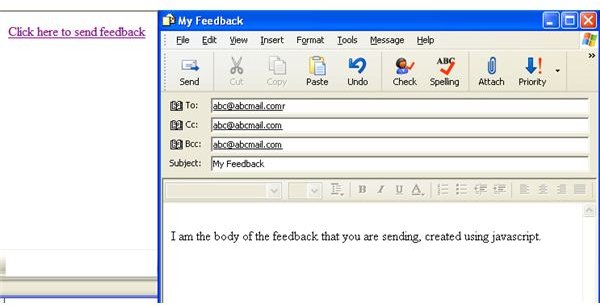
The above code will display a link in the web page that will read “Click here to send feedback”.
Complete Code:
Caution for the visitors of the website:
-
Be aware of spammers.
Advertisement -
Don’t write any passwords or bank account numbers, or any other important information for that matter.
- You cannot use the mailto attribute if you don’t have an email client.


