Most digital cameras come with two semi-automatic modes. One semi-automatic mode is called Shutter Priority (or something similar). Usually this mode is indicated by an S or a Tv on the camera dial. This mode allows the photographer to have more control over the shot without requiring the full scale setup of the manual mode.
Understanding Shutter Speed
When a picture is taken in a fully automatic mode, the camera detects the amount of light using its light meter. Based on that, it calculates what aperture and shutter speed to use and takes the picture. This is fine, but in most cases, there is more than one combination that provides the same exposure. For example, an aperture of f/8 and a shutter speed of 1/30 produces the same exposure as f/5.6 at 1/60 shutter speed. However, this does not yield the same picture.
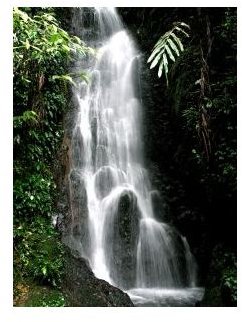
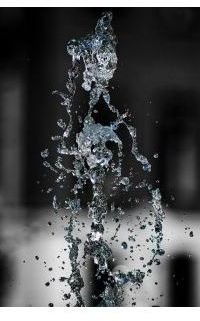
With a fast shutter speed, the camera stops or freezes the action. This is great for photographing things like plants outdoors (keeps the breeze from making your flower petals blurry). With a slower shutter speed, you can produce intentional blur. More common for the average photographer is the get a “soft” affect for moving water. With a fast shutter speed you can see individual drops (see Fountain Picture). With a slow shutter speed the water’s motion causes those individual drops or lines to disappear and produces a more cloud-like affect (see Waterfall Picture). Many photographers prefer this look for things like fountains and waterfalls.
How do you get the picture you want? By using the shutter priority mode, the photographer gets to choose the shutter speed. The camera will automatically select the aperture to produce the proper exposure according to its light meter. If you want to stop the action you can set a fast shutter speed. If you want to allow for blur or softening you can set a slower shutter speed.
Shutter Priority and Camera Shake
There are other instances when the shutter priority mode can help. When you are shooting in lower light conditions and have your camera on a tripod, you can set a longer shutter speed to avoid using the flash or needing to increase the ISO. Since the camera is on a tripod, a longer shutter speed will not increase the blurriness of the picture. But, your camera doesn’t know that you are inside in calm conditions with your camera on a tripod. By using the shutter priority setting you can inform your camera in a way.
The opposite condition can occur when you must hand hold your camera. Because a hand held camera can induce blurriness via camera shake, you can use shutter priority mode to set a faster shutter speed to eliminate the affect any shake has on the shot. As a rule of thumb, a shutter speed higher than your zoom length is appropriate. For example, a shutter speed of 1/125 if your camera is set at a focal length of 100mm for your shot. Of course, this number can go up or down depending on how steady you are and if you have an image stabilizing lens.
Example Images