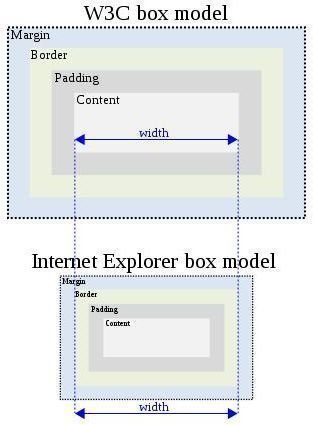
In order to understand how to determine the dimensions of an HTML element, it is very important to understand what the CSS Box Model is. This article examines the CSS Box Model in detail.
Introduction
Understanding the CSS Box Model is very important for every web developer because of two things. First, it will help web developers understand how to calculate the dimensions of a particular HTML element and second, it will also help them understand how to position that element on a website.
Dimensions of Block-Level Elements
In order to calculate the dimensions of a particular block-level element, several properties should be taken into account. These properties are width, height, padding, margins and finally the borders that surround that element.
Defining Width and Height
Width and height are determined with well known CSS properties (for example height: 200px;). If these values are not defined within the CSS stylesheet, they will use the default auto value that is dependent on the way a particular block element is positioned. Therefore, if a block element is using floated, absolute or fixed position, a width property will be determined according to the dimensions of content inside that block element. If a block element is using static positioning, width will be determined in the following way: width of the containing block minus borders, padding, horizontal margins and scrollbars.
CSS Box Model
If the above explanations are summarized, we will get two formulas that can be used for calculating both total width and height of the block element:
width = left margin + left border + left padding + width + right padding + right border + right margin
height = top margin + top border + top padding + height + bottom padding + bottom border + bottom margin
In practice, the CSS code looks like this:
.boxModel {
width: 800px;
height: 1200px;
padding: 5px;
margin: 10px;
border: 5px solid #FF3;
}
Visually, the box model looks like this:
This picture shows where the content will appear, but it also shows how “small” the portion of total dimensions it takes. Therefore, before defining total dimensions of the block element, web developers are encouraged to visualize the box model in order to ensure that there will be an adequate amount of space for content.
Edges
As seen in the previous image, there are some “edges.” An edge is a perimeter of each of the areas defined within the box model. The content edge is surrounded by a rectangle given by the width and height of the box, the padding edge surrounds the box padding, the border edge surrounds the box’s border, while the margin edge surrounds the box margin.
Mixing 100%, and Other CSS Properties
If the width property is set to 100%, there shouldn’t be any margins, padding or borders defined. The reason for this is simple; if these values are defined, the block element will not have enough space to fit in. As a result, a layout of the block element would likely be crippled, but it would also push other elements on their non-standard positions.
Image Credits
https://en.wikipedia.org/wiki/File:W3C _and_Internet_Explorer_box_models.svg


