
There are several different ways to copy music into your iTunes library and then transfer it to your iPod, and this article explains how it works.
Getting Music from the Computer to the iPod
Only a small portion of the music on my iPod was actually purchased through iTunes. The rest came from CD’s that I imported into iTunes or from MP3 files that I manually copied into my music library. How do I transfer music from iTunes to my iPod? There is more than one way to do it, and each section below I will show you how.
Note: Before you get started with this, visit Apple.com and get the latest version of iTunes, then connect your iPod and register it with your PC. This is required for you to use the iPod with your account on that particular computer.
How to Copy a CD onto Your iPod
I have a pretty decent CD collection that I started building long before anyone had even heard of an iPod , much less an MP3 player. For that reason, I wanted to copy my music into iTunes without having to go buy more copies of everything. Thanks to iTunes, this process is incredibly simple and painless, plus it’ll save you money if you own the CD.
In this example, I am copying my Best of Jimi Hendrix CD into iTunes. First, you need to open iTunes and get it fully loaded. Then all you have to do is insert the CD into your computer DVD/CD drive. iTunes will scan the track listing and quickly identify the album against its giant database of music, then it will ask if I want to import the CD. I just click Yes and let it run. The speed of the import process depends on your computer, but it generally takes about five minutes per album.
Once the import process is complete, connect your iPod and hit the Sync button in iTunes and it’ll copy all the new music over to your iPod.
How to Copy MP3 Files onto Your iPod
If you have a bunch of MP3 music files, they are very easy to import into iTunes so that they can be transferred to your iPod. Make sure you have them stored in a location that can be accessed again, as iTunes has a tendency to ‘forget’ their original location and all of a sudden they disappear. The My Music folder under your account is the best place for them. If you keep them on an external hard drive or flash drive and that drive is not connected when you sync iTunes with your iPod, it might not copy them over.
You have two ways of copying MP3’s into iTunes:
- Click File > Add File to Library to do individual MP3 files or click File > Add Folder to Library to do entire folders.
- Drag and drop your MP3 files into iTunes and they will import and show in the library.
Once you have the MP3 files imported into your main library, connect your iPod and hit the Sync button in iTunes and your MP3’s will transfer to your iPod.
iTunes Album Artwork
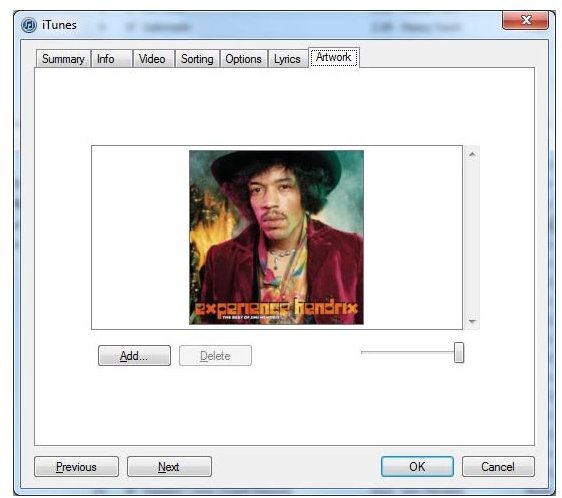
When you import a CD or copy over an MP3, it does not pull the album artwork along with it. If you want the album cover to show, just right click on a song in the library and select Get Album Artwork from the menu that shows up. Most of the time, this will show the correct album.
If the artwork is incorrect, you can manually add your own artwork by right clicking on the song name and then go to Get Info and click on the Artwork tab. From there, click the Add button to insert your own image. If you have to, visit images.google.com and find a graphic of the album cover.
For more information on how iTunes works, be sure to read this article on how to backup and copy your entire iTunes library from one computer to another.


