Sometimes you have to configure your PC to open .TIF and .TIFF file extensions, otherwise they will not display properly or sometimes not open at all. This article tells you everything you need to do in both Windows XP and Vista.
If changing the program associated with the .TIF or .TIFF file extension advice described below still does not work, you may need to go download some software to let you view the file. Just go to Download.com and search for ‘tiff viewer’ and you’ll see plenty of options for both free and commercial image viewer programs that will let you view those files.
TIFF Files
Opening a TIFF file on your computer can sometimes be a pain. Often you will get an error saying ‘no application is associated with this file type’ when you open the file. Other times you can get the first page of the image to load, but nothing else. This article will help you configure your PC to read those .TIF and/or .TIFF files every time.
TIFF is short for ‘Tagged Image File Format’ and has been around for many years. The format itself currently is copyrighted by the Adobe Corporation. It is a type of graphic format like a .JPG or .GIF, but uses a lossless type compression that makes it very well suited for high resolution images. To understand a few more differences, compare image file formats .
It is also prone to incompatibility problems and can sometimes result in large file sizes, which is why .JPG has become the more popular method of saving and sharing graphic files. Because it can support multiple pages the .TIFF file is preferred for Document Imaging in Microsoft Office.
Windows XP
For those folks who don’t have Microsoft Office Document Imaging, you will need to change the program associated with the .TIF and .TIFF file extension. You can do this in either Windows XP or Windows Vista, but the steps are a little different.
Windows XP
-
Just open up My Computer and click on Tools – Folder Options.
-
Click the File Types tab. You may have to wait a minute for it to load all the options.
Advertisement -
Scroll down the list of Extensions until you see ‘TIF’ with the label ‘TIF Image’ next to it. Click it once to highlight, then click the Change button Step 4) Windows will give you a list of recommended programs for opening the file. Just click a program name once, then click OK. You’ll have to do the same thing for the ‘TIFF’ file on the list, too.
Windows 7 and Vista
The steps are a bit different for Windows 7 and Vista users:
-
In Windows Vista, go into the Control Panel and open Default Programs.
-
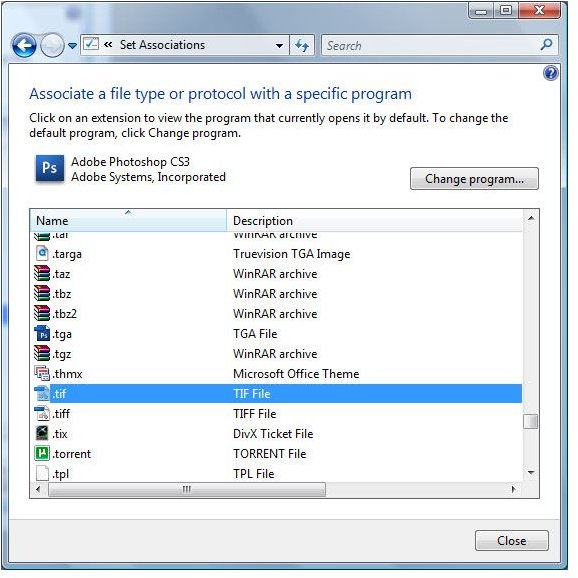
Click on the option for ‘Associate a file type or protocol with a specific program’ and wait for the list of file extensions to load.
Advertisement -
Scroll down the list until you see .TIF and click it once to highlight, then click the Change Program button and Windows will give you a list of recommended programs for opening the file.
-
Just click a program name once, then click OK. You’ll have to do the same thing for the .TIFF file on the list, too.
Advertisement
In either Windows XP or Vista, if the first program you chose didn’t work you may need to go through the steps again and pick a different recommended program. You may also have to browse to the desired program’s executable file if it does not show up in the list, but that’s only if you know what other program is supposed to open the file.
Instructions for Office 2007
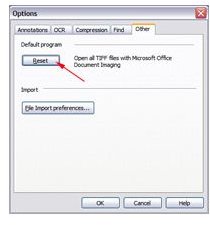
If you get a .TIFF file that you can’t open, the easiest fix is for those people who have Microsoft Office 2007. All you have to do is:
-
Click the Start button, then go to Programs – Microsoft Office – Microsoft Office Tools – Microsoft Office Document Imaging.
Advertisement -
When the program loads, go to Tools – Options and click on the Other tab. If you click the Reset button, it will change your Windows file associations so that .TIF and .TIFF files always open using Microsoft Document Imaging.
I’ve had to do this on several computers even after installing Microsoft Office 2007.
References
- Image credits: Screenshots provided by author. All rights reserved.


