Here we discuss a Windows 7 compatible antimalware suite plus 5 GB online backup in a great looking interface. Find here what you want to know about the Internet Security release 8.7 from BullGuard, and our valuable tips.
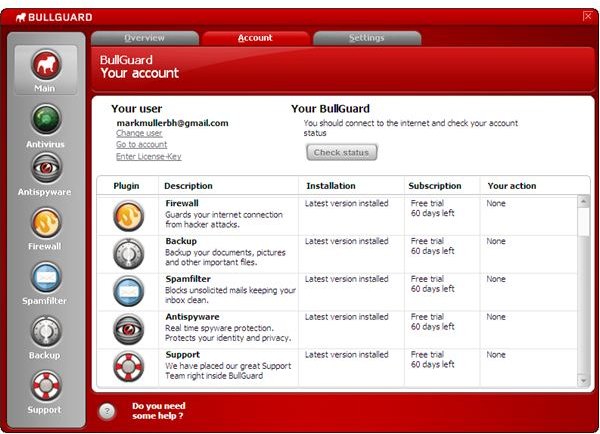
BullGuard is a Windows 7 Consumer Security Software Provider who does not sell standalone antivirus software, but has bundled malware protection and online backup into Internet Security , a complete PC security solution.
System Requirements (5 out of 5)
The 32-bit editions of BullGuard Internet Security is compatible with Windows 7, Vista, XP and 2000, whereas the separate 64-bit installer only runs on XP, Vista and Windows 7.
On our test system Internet Security 8.7 used 113 MB for the program files and updates; the application download is about half that much in size. The vendor recommends 200 MB of free disk space.
Installation & Setup (3 out of 5)
The installation of BullGuard Internet Security follows standard steps including EULA and install location, and requires a reboot. After that you have to register BullGuard with your email address. If you don’t want to receive a news letter then unpick this item before you click Register. You will then receive a confirmation mail with a personalized link to access your BullGuard account, but you can also make use of the automatically generated password display by the GUI when registration completes.
Users of Windows 7 right click the BullGuard icon and click Run as administrator. Those having XP and Vista can probably run the application by standard means. Hit Check & Update and note that if you have an always-on Internet connection then BullGuard will likely report that it has already initiated the update process in the background. Next run a scan for the sake of computer protection (please also see section interface below).
Interface (4 out of 5)
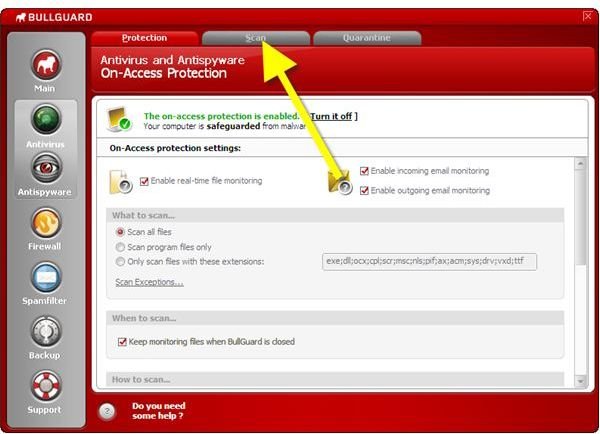
BullGuard Internet Security has really nice GUI, but some configuration items are a bit hidden. Scanning, for instance, can only be found in the middle tab of the right pane of the GUI if either Antivirus or Antispyware has been selected in the left pane of the interface; you simply wouldn’t find a scan item in the Main menu.
Features (3 out of 5)
BullGuard Internet Security key features are
-
Antivirus and Antispyware: On access protection and malware scanning to safeguard against viruses, rootkits and potentially unwanted programs
Advertisement -
Firewall: Intrusion detection and traffic detection with easy-to-use beginner settings as well as advanced rules
-
Spamfilter: To keep your inbox free of electronic junk and stop phishing
Advertisement -
5 GB online backup (*) and various offline backup options
-
Automatic updates every 2 hours
Advertisement
(*) If you are considering a online backup you may want to have a look at Bright Hub’s articles Is my Online Backup Safe?
Performance (3 out of 5)
The scan speed of BullGuard Internet Security is normal, and the software is VB100 certified. However, we disliked when BullGuard kept identifying Windows executables e.g.(svchost.exe) as a potential source of problem and automatically sent the file to the vendor of the antivirus software for analysis after a couple of seconds when we were to slow trying to overrule this automatism.
Windows 7 is still relatively new and BullGuard may soon release an update which fixes those things in which case we would give it 4 stars.
Help & Support (5 out of 5)
On the support tab on the vendor’s homepage there are comprehensive product guides and a forum. Furthermore, technical support can be reached 24/7 by chat and email, online or from within the BullGuard Internet Security interface.
Price to Value (3 out of 5)
The 69.95$ BullGuard price tag is that of a high-end internet security solution. Checking out Bright Hub’s article Top Antivirus Software for Windows 7 you will find better deals, and even better antivirus software which can be upgraded to complete Internet security solutions.
The Bottom Line
BullGuard Internet Security is a relatively easy to use Internet security suite many users will like for the excellent look. Under the hood are couple of things which should be ironed out, but we are very optimistic for future releases of BullGuard. The other point currently preventing the software for making it to our Top Antivirus Software for Windows 7 is pricing, and other big players in the antivirus market permit install of their software on up to three home PCs. On the positive side we note that BullGuard Internet Security 8.7 can (and, as a best practice, should) be tried free for 60 days.
References
- Author’s own experience
- Screenshots by the writer


