Spyware and legitimate programs can add component as Browser Helper Object in a browser and you might want to find out whether it’s a known safe BHO using BHO Remover.
Overview
BHO Remover is a standalone tool that will display the installed Browser Helper Objects in Internet Explorer. Using BHO Remover to identify and eliminate unwanted BHOs is easy to do. Find out how it works.
Installation and System Requirements (5 out of 5)
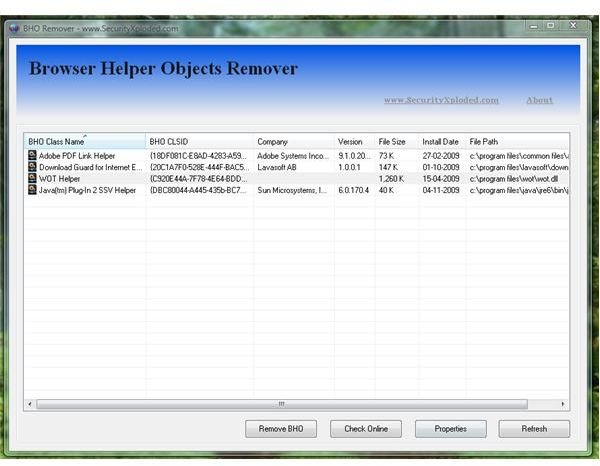
No installation is required to start using BHO Remover. The compressed BHORemover.zip contains BHORemover.exe and a readme.html files. Simply execute BHORemover.exe in XP, Windows Server 2003 or in Vista and you’ll be able to view currently installed helper objects for IE.
Options in Using BHO Remover (5 out of 5)
BHO Remover do not only list installed BHOs for IE browser, you can also:
- Check online the status of Browser Helper Object. The program is using processlibrary.com to identify the status of BHO item.
- Launch the properties of the helper object
- Sort the view of BHOs by class name, company, BHO CLSID, version, file size, file path and installation date
- Refresh the list of detected BHOs for IE
Performance and Usage (4 out of 5)
BHO Remover is easy to use tool to identify and eliminate a helper object but the program’s user interface is neat but you cannot adjust or maximize the UI so we don’t have to scroll from left to right when viewing the list of BHOs. BHO Remover will not detect
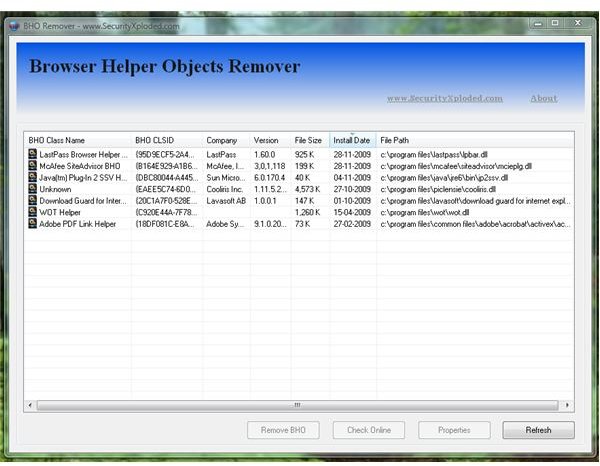
add-ons for Firefox.
I installed few programs that will add browser helper object for IE to test if BHO Remover will correctly identify the new BHOs. The programs I installed for this test are McAfee SiteAdvisor, LastPass and Cooliris for IE. The currently installed BHOs in IE8 are BHOs of Adobe Reader, Sun Java RE, Web of Trust and Download Guard for IE by Lavasoft. All items were detected by BHO Remover and it allows me to view their properties to continue identifying the helper objects.
If there’s malicious or unwanted BHOs for IE, BHO Remover will not highlight it but you have to use the Check Online feature and hope that processlibrary.com will identify it as bad or unsafe BHOs.
Tip: You can also use https://www.systemlookup.com/ to determine the status of any Browser Helper Objects, Toolbar or Browser Extensions.
Price to Value (5 out of 5)
Freeware and standalone tool.
Conclusion
BHO Remover is handy and easy to use tool. Recommended if you don’t have any programs yet to identify and remove unwanted helper objects in a browser.


