Backup files, folders or drives is a must task in addition to backing up your system drive. With regular backup, you will save time and money when trouble comes. Find out if Karen’s Replicator will meet your needs in backing up important data.
Overview
I can’t find any reason to not to have a backup program unless you don’t care about your data and computer or you don’t mind wasting time by starting from scratch. Karen’s Replicator is a free backup program that will run on Windows 95 to Windows Vista featuring automatic backup, scheduler and with option to exclude files or folders. You can backup a network drive or use it as your destination of the backup. This free program will help you attain one of the important defense against data loss.
Features and Options in Karen’s Replicator (5 out of 5)
Backing up the system drive is not enough especially if you only want to back-up or replicate some files without exploring the system backup (if explorer feature is available). With Karen’s Replicator, you can:
- Create a task to back-up – Choose any files and folders located in local or network drives.
- Automatic and Schedule a back-up.
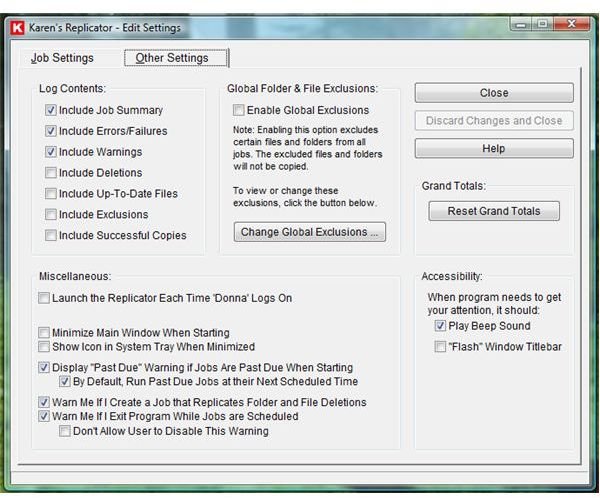
- Global Exclusions – create your own exclusion list when backing up using Replicator. Temporary Internet files or temporary files by other programs, pagefile.sys and hiberfil.sys are some files that you don’t need to backup (t will save you hard-disk space)
- Replicate files and folders by permanently deleting or moving to recycle bin the deleted items from the source. This feature is like synchronizing and updating your files by deleting what you’ve deleted.
- Option to backup the directory and sub-folders or drives. Store in a network drive, removable or another partition.
- Exclusion list per backup job.
- Log program’s task and events.
- Automatic start Replicator on Windows startup
Installation and Usage (5 out of 5)
Karen’s Replicator installer is only 2.03MB in size. You don’t have to reboot the PC to start enjoying this free and important utility for Windows. The program will only use 1.81MB of hard-disk space after installation. The program can be configured to copy or replicate only the files that have changed since your last backup (similar to incremental backup) but it can delete files that you’ve deleted from the origin or source. That is neat feature I find in Replicator!
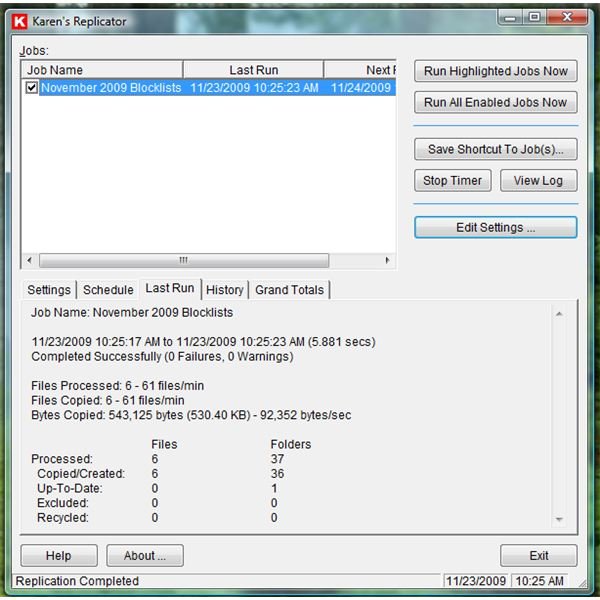
When I test to backup a 6MB folder with sub-folders and another directory that have little files (500,000 bytes only), it only took seconds for Karen’s Replicator to finished. The above-mentioned features are doing what it has to do and it is quite easy to use Replicator just how easy it is when using Karen’s Cookie Manager that I’ve been using for years.
Images
Price to Value (5 out of 5)
The program is free for personal use and updated often. What else can I say?
Conclusion
Replicator is a simple and easy to use backup program with neat User Interface and useful options. Highly recommended!


