File Shredder 2009 from Lavasoft lets you permanently delete files and folders on your files system or in the Recycle Bin using a variety of secure algorithms. Here’s all you want to know about it including shredding free disk and removing Windows Shadow Copies for example.
System Requirements (4 out of 5)
Lavasoft File Shredder 2009 runs on the following Microsoft operating systems: Windows Vista, XP as well as Windows 2000. The application uses only approximately 15 MB of free disk space and requires little RAM.
Installation & Interface (5 out of 5)
The installation of Lavasoft File Shredder 2009 is easy and involves the standard steps collecting information, EULA and choosing a destination folder. Reading page 3 of the manual accompanying the software is recommend if you not very familiar shredding parameters like the number of passes for example.
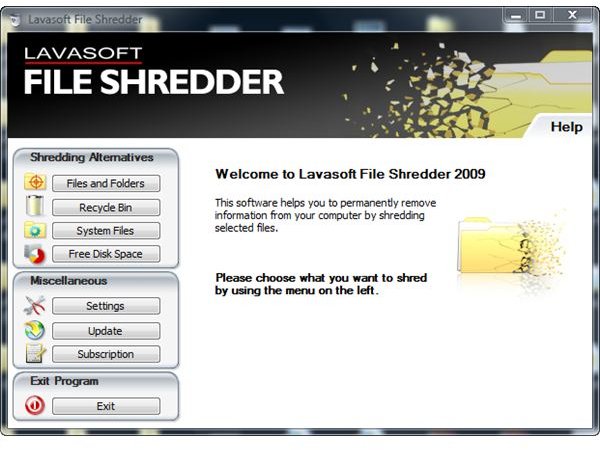
Lavasoft File Shredder 2009 has an easy-to-use modern GUI which allows for straightforward navigation. The menus are located in the left pane whilst details are given in the big pane where also the action buttons have been placed. For your convenience has a File Shredder context menu entry been placed into Windows Explorer.
Features & Performance (5 out of 5)
File Shredder 2009 let’s you securely delete files and folders on your computer. PC users need a file shredder because deleting items from Windows Recycle Bin and similar deletion operations merely remove a pointer to where the object resides on your disk. Thus, files and folders can usually be undeleted unless they have been shredded.
Lavasoft File Shredder 2009 places an icon on your desktop from which you can manage shredding files and folders or the Windows Recycle Bin. Additionally, Lavasoft File Shredder 2009 contains a menu entry named Shred System Files (a misnomer perhaps) which does protect your privacy and confidential information by shredding various temporary files as well as cookies.
Using Lavasoft File Shredder 2009 you can also shred free disk space as there might be residual data as explained in the beginning of this section, and the software additionally is able to detect and remove “previous versions” version Windows shadow copy files.
Lavasoft File Shredder 2009 supports a dozen algorithms with different number of passes including
- DOD 5220.22-M
- Peter Gutmann’s algorithm
- Bruce Schneier’s
- US Army AR380-19
- HMG Infosec Standard
The software checks automatically for updates once a week and optionally supports German and Swedish.
Help & Support (5 out of 5)
The File Shredder help file or reasonable length and depth has been placed in the program folder, and the GUI contains a help link to technical support or for downloading manuals. On top that does Lavasoft provide free 24/ 7 e-mail support for customers of File Shredder 2009, yet I don’t think you’ll need it for the software is fairly self-explanatory.
Price to Value (5 out of 5)
Lavasoft File Shredder 2009 costs $29.95 for the one year license; 2 and 3 years licenses are also available at the vendor web site and currently go for $39.95 $59.90 and $49.95 $89.85, respectively. Thus, Lavasoft File Shredder 2009 is more economical than BCWipe discussed in Bright Hub’s review BCWipe Military-Grade Secure File Deletion .
Important note: Lavasoft File Shredder has not been designed to wipe entire disks, in which case you may want to check out our tips found in How to Wipe an External Hard Drive .
References
- Author’s own experience
- Screenshots by the writer


