
Firefox is a free open source, cross platform browser where you can install add-ons to gain additional functionality in the browser. This article will discuss several add-ons that make it act and work like Safari.
Firefox versus Safari
Firefox, on its own, is a great browser. But for Mac users who are used to surfing the net with Safari, it’s a little disorienting when switching to another browser. Fortunately, there’s a way to bring the niceties of Safari right into Firefox.
Several UI differences between Safari and Firefox make them both distinctively different from one another. Safari’s stop and refresh button is combined into one single button, changing dynamically depending on the browser’s activity. When a page is loading, the button shows an ‘X’ icon to indicate a “stop loading” action. But when the page is already loaded, the button’s appearance and behavior changes to reflect a “refresh page” action.
Also, one of Safari’s unique design is that the progress bar is imbedded in the address field (called inline progress bar), reflecting the load progress of a website.
Firefox, by default, differs from these Safari UI innovations. Luckily, there’s a way to bring these favorite features of ours from Safari into Firefox to make your browsing experience in Firefox even better in Mac.
Install Add-Ons
There is a huge library of add-ons for Firefox . But these three small add ons can unify Safari and Firefox if you wish to.
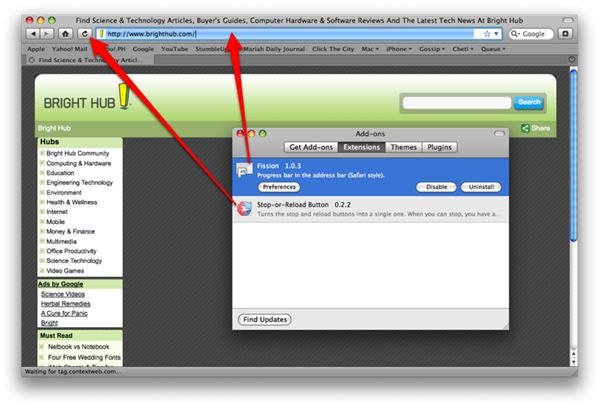
Fission combines the progress bar when loading pages and the address field into one. This add-on makes it easier to monitor a website’s load progress and mimics Safari’s inline progress bar. You can set a color of your choice for the progress bar or define an image to use. You can create your own image or simply use a photo similar to Safari’s, like
.
Stop-or-Reload Button is an add on that unifies the two separate stop and reload buttons of Firefox, mimicking the behavior of the same buttons in Safari. This add-on will display a stop button while a page loads and a reload/refresh button when the web page is already loaded.
You can stop here if you want, but if you want to extend the unification of Safari and Firefox, you can go as far as installing one of the many Grapple themes you find most appropriate for you.
After installing all of the add-ons in this article, you’ll end up with a Firefox that looks more or less like this.
Enjoy!


