There are many different open source dvd burning applications out there. That’s the fun of open source. This article covers just a few of the more popular ones.
K3B
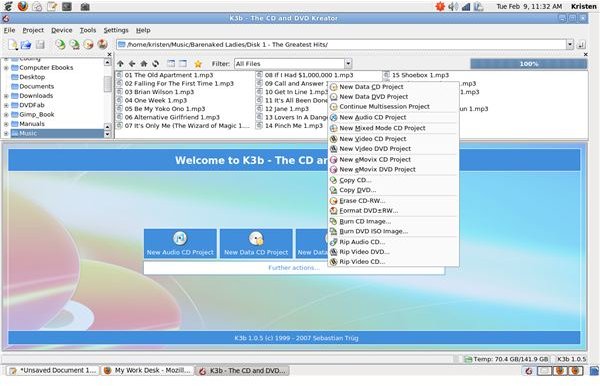
K3b is a CD/DVD burning application designed for the KDE desktop. However, I like it so much that I install it (and the appropriate libraries) on my Gnome desktop. It is the only KDE-centric application I use, that’s how good it is. It has a pleasant interface, and is not too difficult to figure out.
K3b handles many different types of burning projects including data cd/dvd, audio cds, mixed mode cds, video cd/dvd, emovix cd/dvd, and burning ISOs. The program also has a CD/DVD ripping utility. It has a drag and drop file manager, which makes choosing the files you want relatively pain free. The file size monitor ensures that you won’t over extend your media. Burning DVDs can’t get any easier.
Brasero

Brasero is the Gnome CD/DVD burning utility. Like many Gnome applications, it has a rather simplistic interface. This program has most of the same features as K3B including the ability to rip CDs and data DVDs, burning data cd/dvd, audio cds and ISO images. It can also be used to burn video CDs and DVDs if you install the libdvdcss library. Without that library, the videos will fail.
Brasero is fully integrated with the Gnome desktop. It supports “drag and drop” and “copy and paste” from the Nautilus file manager, file searching with beagle, and the display of playlists.
growisofs
If you prefer the command line, the “growisofs” command is the open source dvd burner for you. It can burn any type of information to a DVD just by changing the options. Actually, it’s the backend DVD utility for both K3b and Brasero (and most other open source DVD burners).
To burn an .iso file to a dvd, you would use the command:
growisofs -dvd-compat -Z /dev/hdc=file.iso
If you want to store a set of directories and files on a DVD () without first storing an image on the hard drive you would use the command:
growisofs -Z /dev/dvd -J -R path_to_disc_root
If you are burning a video DVD, the command would be:
growisofs -Z /dev/dvd -dvd-video path_to_video_root
In the case of the video DVD, the video root would hold the Audio_TS and Video_TS files for the video.
DVD Flick
The final open source dvd burner that I feel should be discussed is DVD Flick . This software is for the Windows operating system and is not currently ported to Linux. However, it should run under Wine just fine. (Or you can install VirtualBox (https://www.brighthub.com/computing/linux/articles/50837.aspx ) and run a complete Windows OS on your Linux box).
DVD Flick is a complete DVD authoring and burning tool. With support for over 45 file formats, 60 video codecs, and 40 audio codecs, it can take almost any video that you have stored on your hard drive and burn it to a DVD that will play in any DVD burner. It even allows you to create menus and subtitles for the videos.
If you want to do the same thing on a Linux machine, you will have to use a software like [DVD Author](/tools/Making a Personal Movie DVD Backup on Linux Read more: http:/www.brighthub.com/computing/linux/articles/34887.aspx#ixzz0f4EFNsDI) and one of the DVD burners.
Conclusion
Like I said, that’s by no means the complete list of open source dvd burners available. However, other than DVD Flick, these are the DVD burners that will be available on most Linux distributions. DVD Flick is added to this list simply because it’s a pretty cool open source software choice for the video enthusiasts.


