For many the ability to connect an iPod to their computer to manage their music is key to operating system choice. But many users are under the impression that using an iPod in Linux is nearly impossible. Wrong. In this article you will see just how easy it is to connect an iPod to Mandriva Linux.
Linux and iPods: Past, Present, and Future
Linux has come such a long way with regards to connecting multi-media devices. When I first started syncing an iPod with Linux it was a lengthy, confusing process that had a propensity for corrupting the data on the device. On top of that, finding an application that could do the work of syncing the device often sent you on a wild goose chase. Those days are no more. The USB sub-system in Linux has matured faster and farther than what I thought it could manage in a few short years. Gone are the days of having to manually mount your device via command line. Linux has become so good at detecting and auto-mounting devices like iPods, you might think you were using OS X or Windows instead.
And the situation is only getting better. There are fewer and fewer bugs showing up in the system, and using iPods in Linux is getting so easy even your grandparents can do it.
Connecting Your iPod
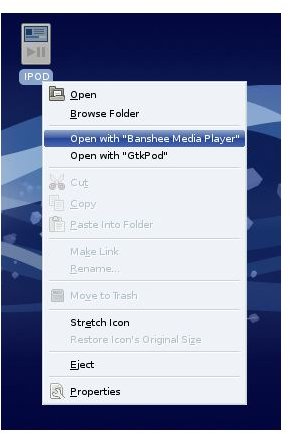
This is simplicity itself. All you need to do is plug the device into the USB port and, once the system detects the device, you will see an icon on the desktop. The icon located on the desktop will resemble an iPod.
When that icon appears, you want to do is right click it to open a menu that will allow you to select which application you want to use. The applications that appear will depend upon what you actually have installed on your system. As you can see (in the image below) I have both Banshee and GtkPod installed on my machine. If you are used to iTunes you will want to go with an application like Banshee or Amarok.
iPod Desktop Icon
iPod Desktop Icon
Now that you’ve managed your media (in Banshee, Amarok, etc) you need to unplug your iPod. Not so fast. Before you unplug that device you need to eject the device just like you would in OS X or Windows. To do this first close out the application you are using and then right click the iPod icon. When the menu appears you will see an entry labeled “Eject”. Click Eject and your iPod is now ready to unplug.
What About iTunes and Purchased Music?
One big issue with digitally downloaded music is music that was purchased with DRM (Digital Rights Managment). This will soon be a thing of the past as Apple is dropping DRM from iTunes, but what about the music you have already purchased that contains DRM? Your best bet for this is to burn your music to a CD and then use a tool like Grip or KAudioCreator to rip and encode the music from the CD to a suitable format. In some cases the DRM’d music will only allow you to burn the files to CD a set number of times. It’s best, when downloading music from iTunes, to instantly make a backup copy of the music.
Once you’re using Linux you can give services like Amazon.com a try. Amazon has a great downloader application for Linux that makes downloading DRM-free mp3 files a snap.
And it was recently announced that Apple is moving towards a DRM-free iTunes store. So soon you won’t even have to worry about iTunes purchased music!
Final Thoughts
If you had ever used an iPod in Linux just a few short years ago you will gladly welcome the improvements the developers have made in the system. And not only is connecting and disconnecting the device easy, you will be surprised how much more you can do with your iPod in Linux than you ever could in OS X or Windows.


