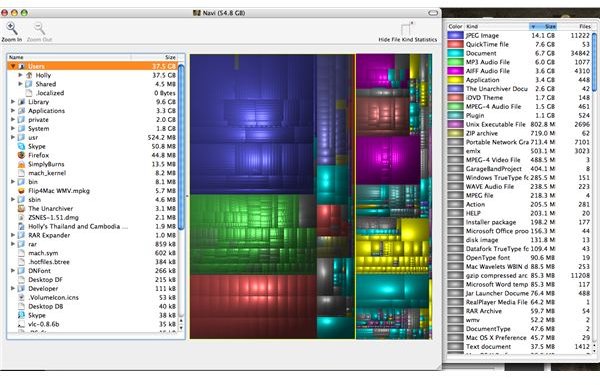
A cool application that gives you a nice visual of your disk space.
Ever wonder how all of that space on your hard drive is divided between your files and programs? If you find yourself a bit short on space you want to know what is taking up so much room, right? But there is no way to see a breakdown of the space on your Mac. For someone like me who is constantly fighting for extra space, every GB is worth its weight in gold. That’s why Disk Inventory X is so helpful. It maps your hard drive and shows you what is taking up space and exactly how much space the files and folders are taking up. Not only does it show you where the space on your hard drive has gone, it also gives you a nice colorful visual in the form of a tree-map.
The first time you run it, Disk Inventory X will take several minutes to map your hard drive. It will take a longer or shorter amount of time depending on how large your hard drive is and full it is. Once it is complete you will have a colorful diagram of how your hard drive is divided (see the picture below). Also, Disk Inventory X shows you exactly how much each file and folder is taking up, all in one place. This is really convenient if you are trying to free some space on your hard drive but you need to know who the biggest offenders are and if you can get rid of them or not. In my case, iPhoto and iTunes take up a huge chunk of my MacBook’s hard drive space. Not only does it show the largest chunks of space, but is also shows the smallest. This is really helpful for removing smaller files which really add up and take up precious space on your hard drive.
This is a great application for anyone who is curious about the space on your hard drive. And, it’s free, so why not try it out?
Download Disk Inventory X .
Disk Inventory X Tree-map
This post is part of the series: Freeware for Mac OSX
There are plenty of cool applications designed specifically for Mac OSX which are completely free. I will introduce you to the best of what’s free for Mac OSX, why it’s so cool and where to download it. Go ahead and keep your money for something more important.
- Freeware Word Processing Programs for Mac OS X
- Senuti Review: Copy Songs from iPod to Mac
- Pac the Man and Quinn Review: Classic Freeware Games for the Mac
- Audacity Review: Audio Freeware for the Mac
- MacJanitor Review: Clean Up Your Mac
- iPhoto Diet Review: Reorganize Your Photos and Save Space
- SizzlingKeys Review: Super iTunes Shortcuts
- Disk Inventory X Review
- Beautiful Dorena Review: A Cow-Filled Paint Program
- Armand and the Foppish Hat Review: Freeware Action Adventure Game
- Pixen Review: Free Graphic Editing Software
- GraphicConverter Demo Review: Convert Your Image Files
- VLC Player Review: All-Purpose Media Player


