What is New in IE9: Explore Many Features You May Not Know About

We’ll start with the user interface in Internet Explorer 9. The latest browser from Microsoft got rid of several elements from the traditional Internet Explorer interface to make it easier to browse. Yes, there are plenty of changes in the user interface that you can easily notice when opening IE9 for the first time.
To check out the different aspects of IE9, I suggest upgrading your copy by downloading IE9 from beautyoftheweb.com. The website also offers you a peek into what is new in IE9 by presenting several websites. You can browse these websites to check out the difference between the browsing experience as offered by previous versions of IE and the new Internet Explorer 9.
Where Are All The Bars?
Coming to the user interface in IE9, you will not find the traditional bars. There is only one bar - the Address bar. The same bar carries different tabs for different pages.
Towards the rightmost end of the bar, Microsoft places the Home, Favorites, and Tools icon. The Internet Explorer team says this concept allows users to view more of the website portion as removing all the other bars will save on the useful screen space.
However, some users may not be able to feel comfortable without the Favorites bar and the Status bar. Others many want to install custom toolbars - the Google toolbar being one of them.
To show/hide Internet Explorer 9 toolbars
Right click on any empty space of the Address bar and select the toolbars you want.
You can also get access to the traditional menu bar temporarily, by pressing the ALT key. Press the ALT key again or click elsewhere in the browser to hide the menu bar.
Integrated Address Bar and Search
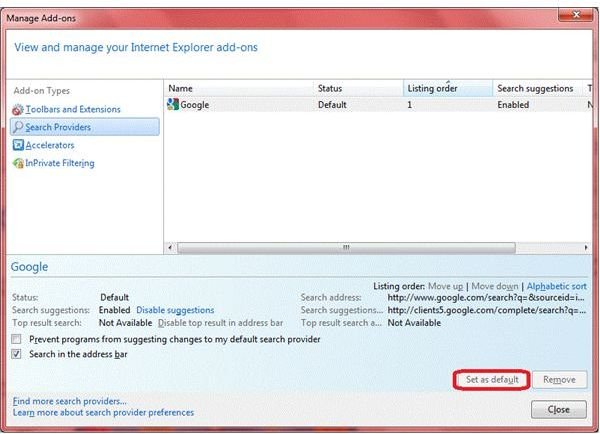
Among one of the major upgrades to IE is the integration of search facility into the address bar. The IE team has removed the Search bar completely and integrated the feature into the Address bar.
The Address bar in IE9 is not simply an Address bar. It is now an integrated box that allows you to enter URLs while also offering search from the same bar. You can type in keywords in the Address bar instead of any URL and the default search engine (Bing) will return the results for the keywords.
You can change the default search engine using Tools icon -> Internet Options -> Manage Add-ons -> Search Providers. Just select the search provider that you wish to make default and click on Set as Default. If you wish to remove other search providers, select the search provider and click on Remove.
Tip: Sometimes when you type a URL (mostly in case of internal networks) in the address bar, IE9 would start returning search results related to the URL. To avoid this and to directly go to the URL, add a ‘/’ at the end of the URL. For example, if your URL is www.url.com, type url.com/ and hit Enter.
New Tabs - On Address Bar Or As A Different Bar?
The Internet Explorer 9 new tab page is not a simple thumbnail holder anymore. It shows the history of your browsing with an activity indicator. Unlike Google Chrome, the IE9 can display 10 website thumbnails at a time.
NOTE: If you want more thumbnails, please use the ready-to-use code for adding more sites to IE9 new tab.
Tip: If you are concerned about your privacy and don’t want anyone to know how you have been using IE9, just follow these two steps:
- In the Internet Options dialog (Tools menu), go to the General tab and click to check Delete Browsing History on Exit.
- In the Manage Add-ons dialog (Tools menu), select Search Providers and click to uncheck Search in Address Bar. Once you disable the search feature, if anyone tries to search from Address bar, s/he will get an error message saying “Page Not Found”.
When you check Delete Browsing History on Exit, IE9 deletes all the data as soon as you close the browser. When anyone opens the browser again and goes to the new tab page, there exist only empty thumbnail placeholders!
NOTE: You can change the settings so that the tabs are displayed on a different bar. This is particularly useful when you often open up several tabs. To change the location, right click on any empty space of the menu bar and select Show Tabs in a Different Row.
IE9: The Fastest Browser From Microsoft
You may not be much satisfied with the new look of IE9 if speed matters to you. Previous versions of IE have proven to put a lot of pressure on your computer resources - taking much time to load all the add-ons, etc., before presenting you with the home page.
The best answer to the question - what is new in IE9 - would probably be that it employs 100 percent hardware acceleration. No other browsers use this method except Google Chrome, which employs partial hardware acceleration.
NOTE: For a side-by-side comparison of IE9 and Chrome, please read my article IE9 vs Chrome.
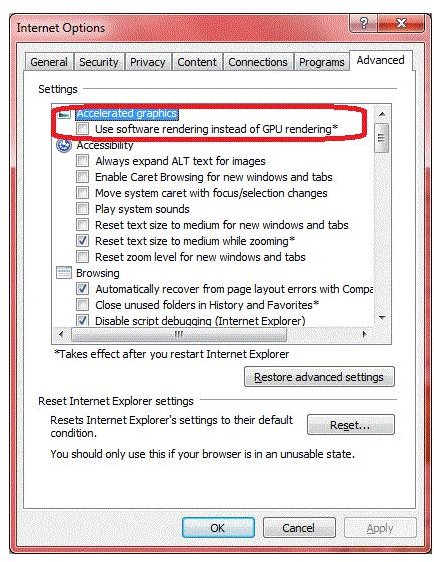
Speaking honestly, the IE team has set a trend that other browsers now need to follow if they are to remain in the market. If you experience slowness in speed, check out the very first option in the Internet Options. If the option saying Use Software Rendering… is grayed out, either your graphics device is not compatible or you need to upgrade the graphic drivers.
Reduced Add-ons
For maintaining the speed, IE9 does not contain many add-ons as in the previous versions.
If you install add-ons and components to the browser, a notification bar pops up at the bottom of the window asking you if you wish to manage your add-ons. It allows you to open the Manage Add-ons dialog that shows the load time of each IE Helper (add-ons and other components).
You can check the time and disable certain add-ons that you may not want to use all the time. Thus, the IE9 allows a faster startup and speedy browsing when compared to the previous versions of Internet Explorer.
The Notification Bar May Be Annoying: The Notification bar also appears when you are downloading something or when IE9 blocks a popup. It also helps you store passwords for each site you visit. However, there is something negative that I noticed about the notification bar. The placement and color of the notification bar is such that it almost dissolves into the background and many a times, I miss it. Obviously, other users too might miss it, thereby ignoring the prompt to save password or missing out when it asks about a new add-on. To close the notification bar, you will have to use the mouse and click on the X button. I am still looking for a keyboard shortcut that closes the notification bar.
Add Those Sites To Windows 7
In my opinion, IE9 is more oriented toward Windows 7 even though it also runs on Windows Vista. When it comes to new features in Internet Explorer 9, you get better answers if you are using it on Windows 7 as opposed to Windows Vista.
There are a range of IE9 features that just fit well into the shell of Windows 7, as if they were integrated with the operating system itself. A few of these features are the ability to integrate websites into the Taskbar and Start menu. When pinned, they look more like the components of Windows 7 instead of IE9 new features.
You can pin a website to the taskbar using two methods. Both involve dragging and dropping to the Taskbar. If you drag the Favicon (the symbol of a website, preceding the URL) to the Taskbar, you get the homepage of the website when you click on the pinned site on taskbar.
Instead, if you wish to get a particular page and NOT the homepage, drag the IE9 tab and pin it to the Taskbar. You can also use the same method to pin these sites to Start menu. Just drag the tab of favicon to the Start button. The Start menu opens automatically. You can further drag it into the menu and release it to use the website from the Start menu. Isn’t that great?
For more information on how to pin websites, check out our article “Pin Websites to Windows 7 Taskbar”. For a comparison of features in IE9 and IE8, please read my article, “Comparing IE9 to IE8”.
This was a small introduction to the new features of Internet Explorer 9. If you think I missed something or need further information, please feel free to contact me.
Must Read for IE Fans: IE9 Review
References
- Based on the writer’s experience.
This post is part of the series: Exploring IE9: Reviews and Features
IE9 beta is Microsoft’s new, fast and innovative version of Internet Explorer. In this series we review the IE9 beta browser, and some of the special features capable through the browser. We teach you to pin tabs on the taskbar in IE9 to act like applications, uninstall it, and more.