In this part of the Colorful Movie Editor series, I will show you how to add music files to your movie you are creating.
This is part two of the Colorful Movie Editor series. In this part of the series, I will show you how to add music to your video clips and movie. You can add music to each clip or you can add it to the entire video. Assuming your program is still open, click the Music tab in the top right box and we will go from there.
Opening Your Music File in Colorful Movie Editor
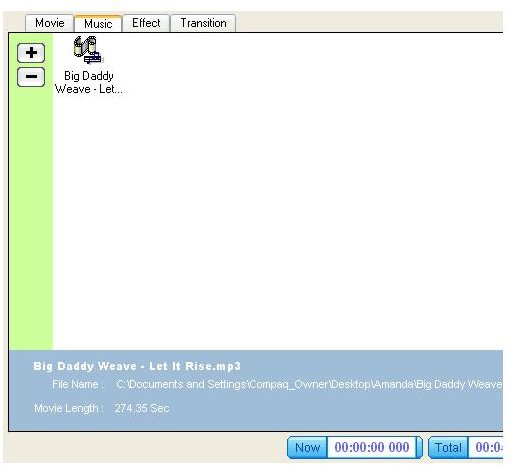
You will first need to open the music file you want to use. Click the Plus Sign in your top right panel and the window will open. In the window you will need to locate the music file you want to add. Click the music file and click the Open button. Your music file will appear in the preview window at the top right of your window.
Adding the Music File to your Storyboard in Colorful Movie Editor
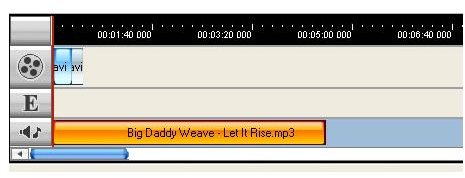
To add the music file, you will need to click the file and drag it to the music section of the storyboard. The music section is the last row in the storyboard. At the beginning of the row, you will see the sound and music icon. Position the music file where you want it to appear. You can drag it around the board to reposition it.
Previewing Your Music File in Colorful Movie Editor
To preview your music file, click the play button in the preview window. Your movie will play and you will be able to preview the move and music you have added. You can stop it by clicking the stop button.
Note
It is not a good idea to add a music file to video clips, because you will hear the music playing while you are watching the movie. The music kind of interferes with the movie you are creating. However, music files do work great if you are creating a video using photos only. If you are only using photos to create your movie, using a music file is great. While your photos are playing, you can listen to the music. I will leave that decision up to you.
Move on to part three of this series to learn how to add and apply effects to your video clips and photos.
This post is part of the series: Colorful Movie Editor Series
In this series, you will learn how to create movies using Colorful Movie Editor.
- Colorful Movie Editor Series – Introduction Article
- Importing and Adding Movies to Your Storyboard in Colorful Movie Editor
- Adding Music to Your Video in Colorful Movie Editor
- How to Add Effects to Your Video in Colorful Movie Editor
- How to Apply Transitions Effects to Your Video in Colorful Movie Editor
- Saving Your Video in Colorful Movie Editor


