This article series is a beginner’s guide to Adobe Lightroom and shows what can be accomplished using the various modules within Adobe Lightroom. The first article discusses the Adobe Lightroom software interface. The subsequent articles cover each of the individual modules within Adobe Lightroom.
Introduction
Adobe Lightroom is a software for photographers which provides an integrated image management database + a post processing application. It is not a replacement for image browsers (such as IrfanView) or graphic editors (such as Adobe Photoshop or GIMP ).
Lightroom provides the user with a system to seamlessly manage the entire digital photography process, from importing images to editing and post-processing eventually leading to printing and online publishing.
Lightroom provides the user with a database for organizing and storing the images , presets to perform frequent edits, additional editing tools in the develop module, a facility to prepare a slideshow for presentations, the ability to print images and also publishing on the web.
For further details, check this detailed review of Adobe Lightroom
Various Modules within Adobe Lightroom
The various modules within Adobe Lightroom are listed below
- Library Module
- Develop Module
- Slideshow Module
- Print Module
- Web Module
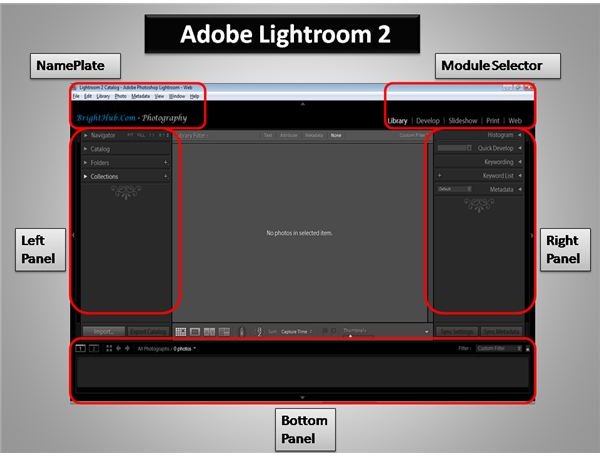
Software Interface
The Adobe Lightroom software interface is shown below.
Keyboard Shortcuts within Adobe Lightroom
Some of the shortcuts for the commonly used functions within Lightroom are
- F5 - Toggles the visibility of the Top Panel (Nameplate & Module Selector)
- F6 - Toggles the visibility of the Bottom Panel (Film Strip & Filters)
- F7 - Toggles the visibility of the Left Panel
- F8 - Toggles the visibility of the Right Panel
- Tab - Toggles the visibility of the Side Panels
- Shift + Tab - Toggles the visibility of all Panels
- L - Dims the brightness level (Used to view the pictures)
- G - Shows the images in Grid Mode
- E - Shows the selected image in Loupe Mode
There are many other module specific shortcuts available within Lightroom. However, providing an extensive list in this introductory guide will be of little use.
For those who are interested, the module specific shortcuts can be viewed under Help –> (Library) Module Shortcuts
Alternatives to Lightroom
Some alternatives to Adobe Lightroom are
However, as per a 2009 survey by InfoTrends, Adobe Lightroom is the most extensively used digital image management software tools, and has the largest user base both amongst Windows and MAC users (in spite of the presence of Aperture). Linux users can read this review of various image viewing and image editing softwares for Linux .
Adobe offers a trial version of Adobe Lightroom over here .
This post is part of the series: Beginner’s Guide to Adobe Lightroom
This article series is a beginner’s guide to Adobe Lightroom and the various modules within Adobe Lightroom. It discusses the Lightroom interface, the five modules and the various tools available within Adobe Lightroom and is a must-read for all photographers interested in using Adobe Lightroom


