Creating a rubric with tables is another web tool for teachers to add to their toolbox. Rubrics are used for assessments and designing rubrics is based on how a teacher will evaluate their students. This is beneficial for the teacher, student and parents.
Web Tools for Teachers
Creating a rubric helps answer students’ questions “why did I get this grade. “ Designing rubrics are more than just a checklist; it is an authoritative rule that defines precise requirements along with adding a value to each level of criteria. Rubrics simplify teacher’s assessment of student’s work which is valuable not only to the students but also to parents and administration. A rubric, like a syllabus is another web tool for teachers. The syllabus is an outline of the main points for a course of study. And a rubric is short explanation of how an assignment will be evaluated.
Why Make a Rubric?
Teachers create rubrics for a variety of reasons. One reason is that it allows the student to know how their work will be evaluated; another is for the teacher to be consistent when grading. Rubrics help to identify specific areas to determine the quality of work submitted and also helps to reduce grading time.
Appropriate Use for Tables
A table is appropriate to use when creating an online rubric. Tables are intended for tabular data and separation of content from presentation is still possible through CSS . This separation allows for easy maintenance. Tables should be treated with the same usability techniques as content. Fonts should be easy to read, colors should be soft and the style should be the same as the rest of a web page.
Creating a rubric template as a web tool for teachers can be easily updated with a few steps. Rubrics for assessments can be used for any activity a class might be completing. This rubric is based on the WebQuest article.
CSS Code
Add the following code to the CSS file. “th” represents the headings and the code includes adding a bold font, white font and a color background.
table, td, th { font: Verdana, Arial, Helvetica, sans-serif
font-size:12px; }
th { font-weight:bold; background-color:#5f3b42;;
color:white; }
HTML Code
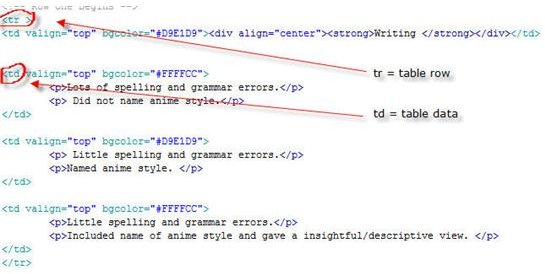
Add the following code to the html file. The table has been centered align and is set to 100%. For the sample file this is 100% of the div “mainContent.” If this is place under the body html area it would span and adjust to the size of the browser. “tr” represents the table row and “td” represents the table data. Valign has also been added to align the text to the top of the row.
Notice that a table heading has been added in place of the table data for the “Writing” topic that the rubric is based on. This helps for usability by allowing it to stand apart from the evaluation area. Soft colors are used to separate the columns for easy reading.
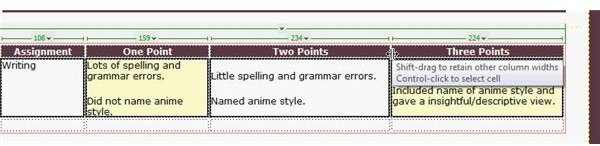
Lots of spelling and grammar errors. Did not name anime style. Little spelling and grammar errors. Anime style was named. Little spelling and grammar errors. Included name of anime style and gave a insightful/descriptive view.
Assignment One Point Two Points Three Points
**
Adjustments
To add another area to be graded – copy and paste the code between the rows,
Resizing columns may be accomplished by changing the code “width” code or in Dreamweaver by holding the mouse between two columns and dragging.
WebQuest and Assessment Rubrics for Teachers
This concludes the WebQuest tutorials that started with creating a syllabus, then a WebQuest and a rubric as an evaluation tool. A rubrics will help to anwers questions for students on how they will be graded. For more information on creating online classes see “The Characteristics of a Good E-Learning Site.”
Work Cited
Images and Rubrics created by Joy Campbell
This post is part of the series: Creating an Online Course
Creating an Online Course article series covers the characteristics of a good e-learning site that is based on proven techniques, Lesson include creating a Syllabus, WebQuest and Rubrics. Future articles will cover using usability techniques in Blackboard. Images and an example file are included.


