How to Import Email from Incredimail to Outlook - Tips for Email Migration
Incredimail’s Proprietary Storage Format
Incredimail is fun… as far as e-mail clients go. But Incredimail is the Fisher-Price of e-mail. It has backgrounds, emoticons, animation, and even sound. But it is not a professional e-mail client.
Incredimail has its own proprietary storage format, very similar to Outlook Express, with .imm and .imh extensions. On Windows Vista, you would the message store at c:\Users\
Exporting Content To A Standard Format
Incredimail does not offer a mechanism to export content to a standard format that can be used by other e-mail clients. The exception to this is contacts, which can be exported to a .csv file. This inability to play well with others may prevent some from moving away from Incredimail to some extent. Thankfully, there are third party applications that have taken up the cause:
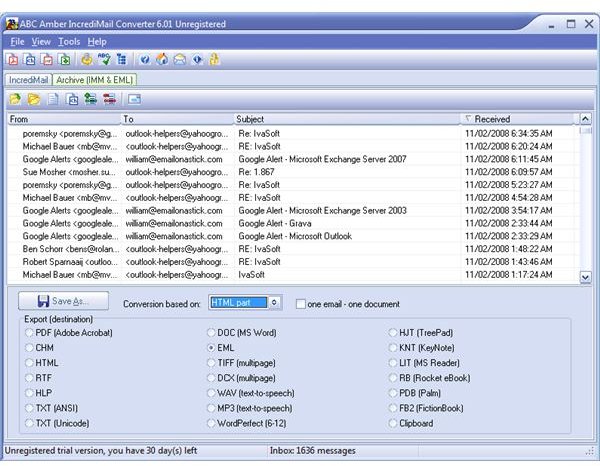
- ABC Amber Incredimail Converter can parse the message store (.imm file) and convert individual e-mails to various formats, as Figure 1 below shows us. The one most valuable for a migration is the .eml format. ABC Amber worked for the latest version of Incredimail in my testing.
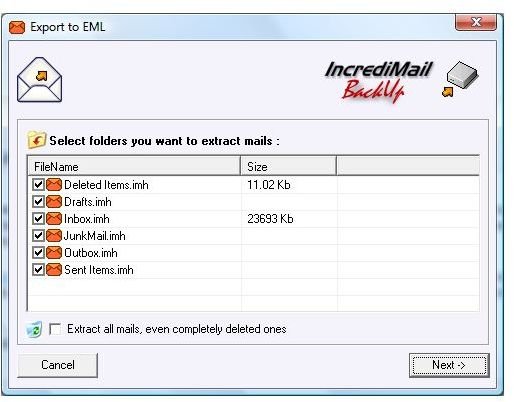
- Incredmail Backup PRO is another application that can archive Incredimail content to .eml files. Figure 2 below shows the Backup PRO interface to select the .imm files to archive. The focus of the program is to backup or archive content, but because it uses the .eml format it can be imported into a number of other e-mail clients.
- IncrediConvert is an older utility that is no longer being developed. If you have an older version of Incredimail and you are not using Windows Vista or Windows 7, then it may still be helpful in your migration efforts.
Screenshots
One More Step - Windows Mail / Outlook Express
All of these tools have one thing in common - export to .eml files. Outlook can not import .eml files directly; however, Outlook Express (Windows Mail on Vista) can import them.
With Outlook Express open, select all the .eml files in Windows Explorer and drag and drop them in the Outlook Express folder where you want to import them. From Outlook Express, it is easy to migrate to Outlook. In Outlook 2007, use File | Import and Export and select Import Internet Mail and Addresses to move Outlook Express content.
You have now successfully moved all your email from Incredimail to Outlook.
This post is part of the series: Microsoft Office Outlook 2007 Tips
A series of Tips and Tricks for working with Microsoft Outlook 2007 both as a user and an administrator.
- New E-mail Account Configuration in Microsoft Outlook: Tip #1
- Use AutoComplete “Nickname” Cache in Outlook: Tip #2
- Configure Outlook Custom Message Views: Tip #3
- How to Configure RSS Feeds in Outlook: Tip #4
- Tip #5 - Making Changes to the Custom Dictionary in Microsoft Outlook 2007
- Tip #6 - Configure Outlook Autosave Settings
- Microsoft Outlook Keyboard Shortcuts: Tip #7
- Microsoft Outlook 2007 Tip #8 - Outlook.exe Startup Switches
- Microsoft Outlook Instant Messenger Addons: #9
- Tip #10 - Using Outlook 2007 to Access GMail
- Showing Full Message Headers in Microsoft Outlook 2007: Tip #11
- How to Re-Send an E-mail Message in Outlook: Tip #12
- How to View Animated GIFs Embedded in an E-mail in Microsoft Outlook 2007: Tip #13
- Telling Outlook How to Handle Messages: Tip #14
- Microsoft Outlook 2007 Tip #15 - How to Color Code the Task List in the To Do Bar
- Tip #16 - Importing from Incredimail to Microsoft Outlook 2007
- Viewing Multiple Outlook Calendars: Tip #17
- Removing Cancelled Future Appointments in Microsoft Outlook 2007: Tip #18
- Tip #19: How to Create New Outlook E-mail from the Command Line
- How to Configure Outlook AutoArchiving: Tip #20
- Using Custom Categories in Microsoft Outlook 2007: Tip #21
- How to Manage Outlook Add-ins: Tip #21
- Microsoft Outlook 2007 Tip #23 - Attachment Previewing Options