Add Color to Black and White Photographs with the AKVIS Coloriage Plugin for Paint Shop Pro and Photoshop
Overview
AKVIS Coloriage is a digital photograph color-changing plugin that is compatible with Paint Shop Pro, Photoshop, and a number of other image editing applications. It’s also available as a standalone product so anyone can take advantage of its abilities.
One of the major applications of the utility is to colorize black and white photographs in a natural-looking manner, but it can also be used to change colors in a photo, recolor selected areas, and convert color images to black and white.
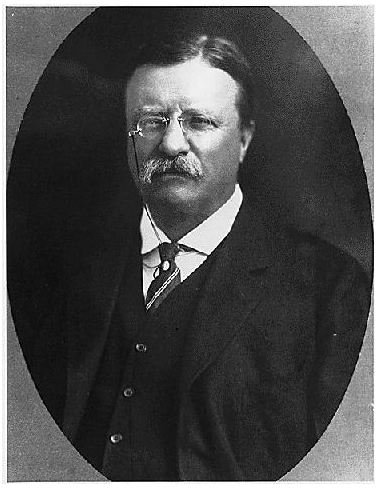
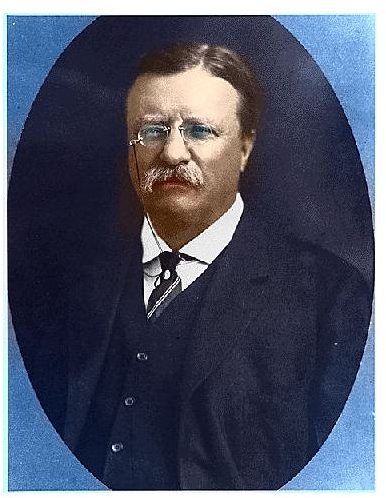
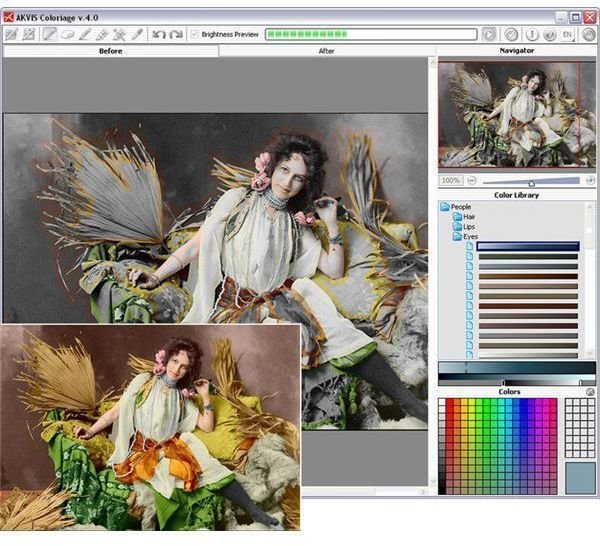
To see how easy the software was to use, I downloaded a black and white photograph of Theodore Roosevelt from the National Archives and Records Administration. The images below show the original photo along with the colorized one that was created in Coloriage in less than five minutes. (Click any image for a larger view.)
Download and Installation (5 out of 5)
There were no problems that appeared in the download of AKVIS Coloriage, and the installation of both the standalone and plugin versions of the application was quick and simple. Depending on which directory you choose to use when installing the application, you may have to perform an extra step or two so that your photo editing program can access the plugin. If you’re using Paint Shop Pro, see Installing Paint Shop Pro Third-Party Plugins for more details.
Ease of Use (4 out of 5)
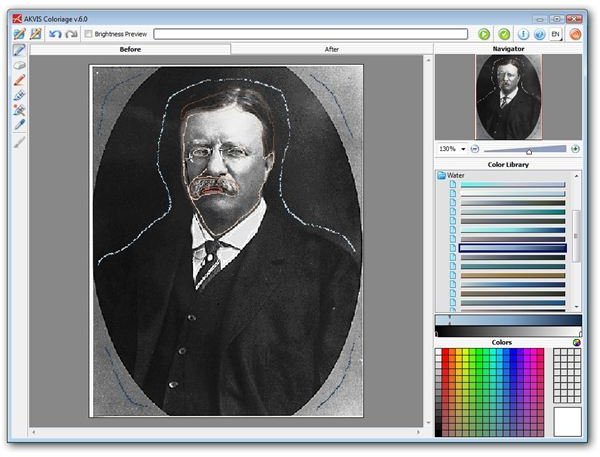
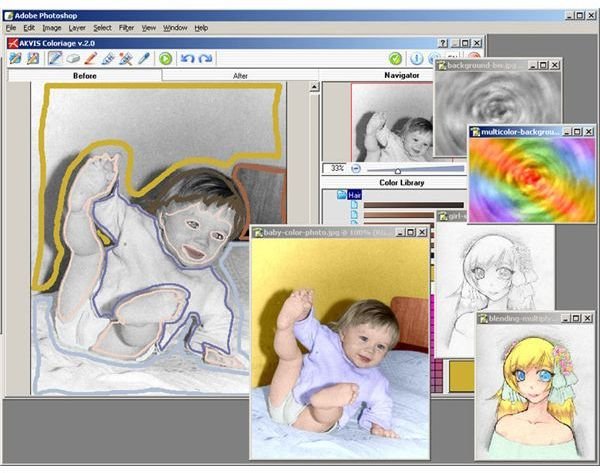
Overall, Coloriage has a very intuitive user interface even though it may take a little bit of practice to learn how to get the best results when editing a photo. Basically, all you have to do is choose your colors, outline the areas that you want to change, and apply the changes. The process is the same whether you use the plugin or the standalone version.
Performance (5 out of 5)
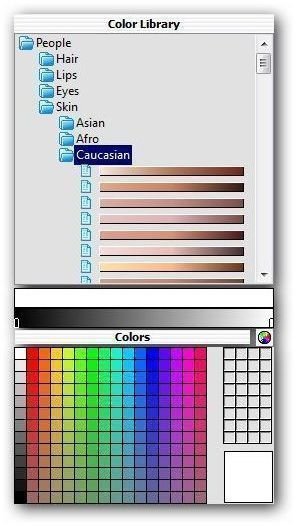
One of the things that can make colorization very time-consuming and tedious in other image editing programs is the actual choosing of the colors. With its vast Color Library, Coloriage offers a distinct advantage over many other applications. While you still have the option of defining custom color shades, the Color Library includes a number of palettes that allow you to quickly and easily choose a color for common items such as eyes, skin tones, wood, water, stones, and metals.
The diameter of the tools used to apply and remove the color strokes can also be easily modified by clicking on the tool and adjusting a slider. However, this method of adjustment can be a little unwieldy when you’re trying to pick an exact setting, and it would be nice if there were also the option to type in the precise value here.
Coloriage does an excellent job of both blending colors and recognizing edges, allowing you to change the colors of overlapping objects so that each one is distinct without any bleed over from surrounding items. Although that may sound simple enough in practice, it’s actually a lot harder than many realize and it can take a long time to manually achieve such results when constrained to working with standard photo editing tools.
In the end, I found Coloriage extremely impressive for the quality of the results that can be achieved with the minimal input of effort and time.
Price to Value (3 out of 5)
There are several different licenses with varying prices for AKVIS Coloriage. You can purchase a Home license for either the plugin or standalone version of the application for $97. If you want both versions of Coloriage, you can save quite a bit by purchasing the Home Deluxe license for $121. These licenses are for personal use only. The Business License, which includes both the plugin and the standalone product, is $246. Those with any plans of selling images modified by Coloriage will need to purchase the Business License.
While I prefer to use the plugin version of Coloriage so that I can integrate its features with the other editing tools in Paint Shop Pro, I think the price for the plugin alone is on the high side, especially since it costs the same amount as the standalone version. Even if you only plan on using the product for personal projects, I recommend spending the little bit extra to purchase the Home Deluxe version so you won’t be reliant on another application whenever you want to use Coloriage.
Overall Rating (4 out of 5)
Coloriage is fast becoming one of my favorite plugins, and I love how easy it is to modify colors in a photograph or any other image using the software. The only thing preventing me from giving it a perfect rating is that I do feel the price puts the application out of budget range for most amateur users.
On the other hand, if you have a little bit extra to spend and you’re shopping for several plugins, Coloriage is included in the AKVIS Alchemy bundle along with 12 other utilities such as Retoucher and Magnifier. This package is an incredible deal, especially since all AKVIS plugins were designed to work seamlessly with one another.
If you’re a “try before you buy” person, AKVIS does offer a 10-day free trial of Coloriage along with all its other products. These trial versions are fully functional so you can get a true idea of each plugin’s capabilities before making the actual purchase.
For information on other products and features in Paint Shop Pro, check out the collection of user guides and plugin reviews available here on Bright Hub’s Digital Photography Channel.