GoldWave Digital Audio Editor exceeded my expectations from start to finish. I’m interested in audio editing from a movie-making perspective, so I was thrilled to have GoldWave rip the audio tracks from my movies. I could fix and enhance tracks and then easily return them to their original form.
Introduction
GoldWave Digital Audio Editor is an excellent software offering. I’m a video editing guy and I’ve been telling everyone for years that the audio of a movie is more than half of the viewing experience. But good audio requires a lot of behind-the-scenes work. Many of my movies have wind noise and snaps, crackles, and pops. These are things I can’t effectively deal with using my entry-level video editing tools.
I expected GoldWave to open my audio files, but was pleasantly surprised to find it also easily opened the sound tracks of my typical video file types (DV-AVI and WMV movies). When I dragged and dropped some movie and story files into the GoldWave Digital Audio Editor, it handled them beautifully. I didn’t have to rip or convert the audio first.
That was the start of many positive experiences with this audio editor.
I smiled and tossed it more video files that weren’t in GoldWave’s pick list of supported files such as; an MPEG2 file, a VOB file copied from a DVD to my hard drive, and a VOB file still on the disc in my drive. Digital Audio Editor opened them all with ease. I was higher than high before I even started working with the files.
GoldWave’s outstanding performance continued, and by the time I finished my initial review of the software, I was a new member of GoldWave’s active online forum.
Price to Value (5 out of 5)
What’s Hot: At $45, GoldWave Digital Audio Editor sets my personal performance bar for not only working with the standard array of audio file types, but handling common video file types without ripping or converting to get the audio channels.
Once you own a license, updates of GoldWave are free. It has a long history of creating new revisions and they show no signs of slowing down.
GoldWave has a long way to go feature-wise to be at the level of Sony’s Sound Forge, but the price disparity is quite large. The product is really a terrific value even compared to other audio editing software products
.
Installation & Setup (4 out of 5)
What’s Hot:
System requirements are reasonable, unless you’re using a Mac and you want to use GoldWave instead of GarageBand. You’ll need Windows ME, Windows 2000, Windows XP, or Windows Vista (Windows NT/95/98 are not supported and will not work; use v4.26 instead). Mac OS X is not supported. You’ll also need a 700MHz processor, 256 MB RAM, 200 MB of available hard drive space, an accelerated video card running at 16-bit or true 32-bit color, and a DirectX-compatible sound card driver (DirectX 8 or later may be required on Windows ME/2000).
A trial version is available. I like this touch on their website when you decide to purchase the software:
“Before purchasing a license, please download and install the evaluation version… you are welcome to evaluate the program over several days to ensure it performs the tasks you require.”
Of course, they’ll sell you the app if you really want to skip the trial.
Version 5.19 updated the help info to include Vista, added an eject button to the CD Reader, and added M3U support for batch processing.
The installation on both XP and Vista systems went well.
What’s Not:
The full-featured evaluation version is limited to 150 commands in each session and 2,000 commands total.
The images and figures for the GoldWave Manual are not included with the evaluation version. And if you purchase the software, you need to do a special download and install to get to the images and figures.
Registered customers with old name or password-based licenses must request an ID-based license. Being new, I started with an ID-based one.
User Interface (4 out of 5)
What’s Hot:
To get a feel for the overall process of opening files, working on them a little, and saving them to new audio files, I went through a set of test files.
The file types accepted by dragging and dropping them into the working window far exceeded my expectations. For example, the wmv video file type wasn’t listed as an accepted file, but worked like a charm. It encouraged me to try other video files. Beyond the basic audio file types, I found these to work:
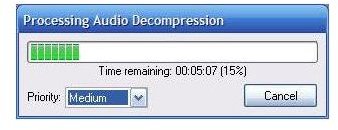
• avi (video) – both older type II and newer type I. A nice touch is being able to lower the process priority when opening a larger file. It lets you continue doing other work on the computer at normal speeds. [GoldwaveFigure11-PriorityWhenRipping.jpg]
• avi (video) Canon – Motion JPEG – Hard Drive Camcorder.
• mov – from Premiere 6.
• VOB – DVD video file; worked when the file was on the disc or when copied to the hard drive. Very nice.
• wmv - movie from Movie Maker.
• wmv – Photo Story 3 file.
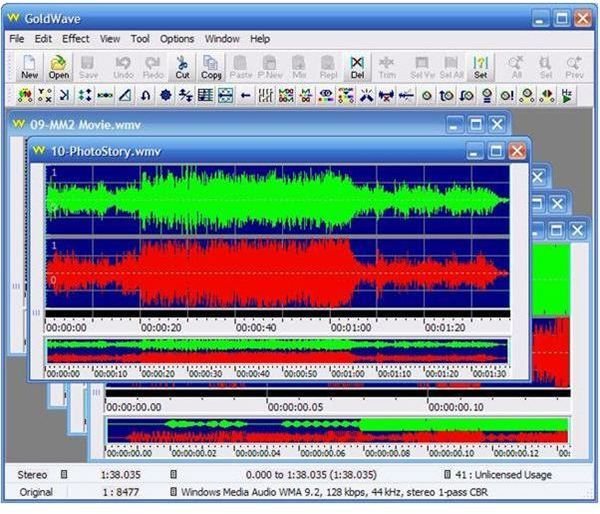
You can open multiple files. GoldWave info says you’re only limited by system memory and free hard drive space.
This screen shot shows the main working window with five sound windows open. [GoldwaveFigure12-AllSamplesOpen.jpg]
The Control window goes hand in hand with the sound windows; use it for the controls and some visualizations.
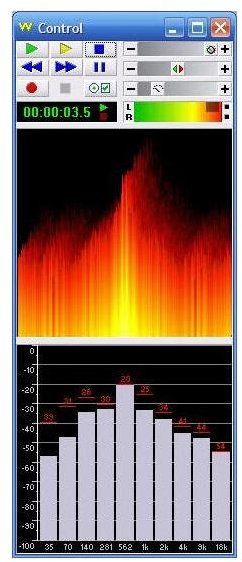
[GoldwaveFigure13-ControlWindow.jpg]
What’s Not: Here’s a look at files that didn’t open, had issues in GoldWave, or couldn’t be saved to a working wav file:
• avi – DV-AVI files larger than about 2-1/2 GB opened sometimes but not always. (The jury’s still out on how large a DV-AVI file can be for GoldWave to consistently open it. I haven’t seen any documented limits, but files less than 2-1/2 GB seem to always open while larger ones are spotty. Maybe it’s just my computer.)
• flv – Flash videos, the kind from YouTube, opened but didn’t work right.
• m4v - iTunes free video files; got an error message, didn’t open, but the app didn’t crash.
• m4p - iTunes Protected.m4p; error; didn’t open.
• mid - MIDI: This window asked about the settings to use; perhaps giving a little hope to those who understand such settings. MIDI
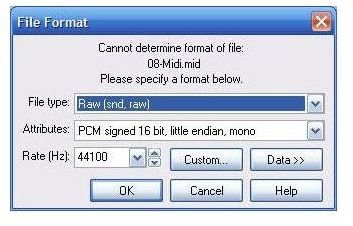
technology is different. I convert MIDI files by playing them in one player and recording them with another tool via my sound card. [GoldwaveFigure14-ImportingMidi.jpg]
• rm – Real Media video. The process went through the motions but results were not good.
[GoldwaveFigure15-ImportingRM.jpg]
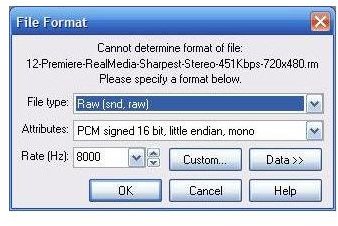
This tally is fine, with the only open question the size issue for DV-AVI files. As there are two main DV-AVI file types and Movie Maker captures to the newer type I, there may be sub-issues that relate to file types or other things like which DV codec was used to make it.
Continue onto the second page to read about all the features GoldWave includes, it’s performance, and the help and support the company offers to users.
Product Features (4 out of 5)
What’s Hot:
Let’s look at some of the more interesting features from the menu. Your choices of effects include the basic ones and more. [GoldwaveFigure02-EffectsMenu.jpg]
The filter branch in the effects menu includes noise reduction and pop/click removal, features I need often. [GoldwaveFigure03-Filters.jpg]
Other features I rely on are automatic snap, crackle, and pop removers for my camcorder files. GoldWave has an excellent Pop/Click feature. I go with aggressive removal. [GoldwaveFigure04-Pop-ClickFilter.jpg]
An equalizer is perhaps the most common feature found in audio editing apps. Even users coming right from the analog environment are familiar with it. [GoldwaveFigure05-Equalizer.jpg]
GoldWave’s Shape Volume control is one of my favorites. It lets you set the volume levels through the full audio track, or the segment you select. It’s a must-have feature for video editing, more so in Vista’s version of Movie Maker than in XP. Vista pegs the volume level of each clip at the max and only lets you lower it, making it hard to deal with the ‘too quiet’ scenes. [GoldwaveFigure06-ShapeVolume.jpg]
The Tool branch in the main menu offers other interesting and useful choices. [GoldwaveFigure07-Tools.jpg]
An Effect Chain Editor lets you create a personal set of effects and apply them to the sound files you want. If you like a chain, you can save it for future use. [GoldwaveFigure08-Chain.jpg]
Math and music skills go hand in hand. The Expression Evaluator lets you explore the interplay between math and sound. In this screenshot it is set to play Twinkle, Twinkle, Little Star on a xylophone. Just extrapolate it to other tunes and instruments [GoldwaveFigure09-Expressions.jpg]
Under the file open and close menu is a selection for Ba
What’s Not: My first attempt at a batch conversion, essentially ripping the audio tracks from a dozen DV-AVI files of an hour each in duration, didn’t work. It created the new wav files but didn’t fill them with content.
I opened one of the DV-AVI files in GoldWave Digital Audio Editor and saved it to a wav file to confirm it would do the conversion that way, and it did.
Performance (4 out of 5)
What’s Hot: Using external plugins is one dimension of scalability. Select the plugins you want to use and restart GoldWave Digital Audio Editor to make them effective. [GoldwaveFigure16-DirectXPlug-ins.jpg]
Here’s a chorus effect from Sony’s Sound Forge, working in GoldWave Digital Audio Editor.
[GoldwaveFigure17-SonyEffect.jpg]
What’s Not: As good as computers and computer software have become, any active user will experience error messages that they don’t understand. Most of the time the item is benign and simply trying to tell you something to help, but the communication isn’t always effective. [GoldwaveFigure18-Error-importingiTunesFreeorProtected.jpg]
This is more apt to happen when reaching out to try new file types such as one from iTunes, or when using external plugins. Help info in GoldWave says the only limits are the system’s memory and free disc space. I did some testing.
My video work often starts with a camcorder tape, then moves to a captured DV-AVI file. Initially, opening the captured files in GoldWave was successful, but I ran into some issues which I still don’t understand. Sometimes on my XP system I can open a one-hour DV-AVI file of 13-plus GB, but at other times it seems the largest one I can open is 2-1/2 GB.
I’m trying to open a big file now on my Vista system, reaching across my network to an external drive on an XP computer for a one hour-plus audio track from a DV-AVI file. It’s taking more than an hour to get it, but I’m in no hurry and the audio decompression is chugging along fine as I work on another
computer (P.S. It finished fine, sometimes it works).
I set up a batch conversion process in XP to rip the audio from a dozen one-hour DV-AVI files; the process gave me a dozen wav files with file names, but with nothing in them in the way of audio content.
Help & Support (5 out of 5)
What’s Hot: GoldWave Digital Audio Editor’s local help file is effectively integrated with additional online material.
There’s also an online Frequently Asked Questions (FAQ) page.
GoldWave hosts a very active online forum with over 1,800 members and over 8,000 posts, with active GoldWave participation and moderation. I joined.
What’s Not: Pictures for the full manual are available only to registered users. The process for getting them is to download an executable module only after providing the email address of the license holder.
As GoldWave Digital Audio Editor was purchased by someone else for this review, I had the User ID and License number, but didn’t know which email address was associated with the purchase. I took a guess and lucked out. If you use multiple email addresses, keep a note of which one you use when you purchase the app, or contact GoldWave for assistance.
Alignment with Video Editing Apps (5 out of 5)
What’s Hot: If I haven’t already said it often enough, my primary interest in audio is the routine tossing back and forth of the sound tracks between audio editing software like GoldWave and movie and story making software such as Windows Movie Maker and Windows Photo Story.
Movie Maker and Photo Story have no audio editing features, so it’s important to have a strong synergy between audio editors and these products.
With GoldWave, the process is easy and works well; something I didn’t expect to find in software at this price level. GoldWave handles all of the file types I need, and makes new files that are easily used in the movie and story editing apps. Tweaking audio is easy with GoldWave.
Beyond writing this review, I’ll be using the GoldWave product routinely in my video work.
Images


Suggested Features
The full path and file name displayed in the active decompression or sound window would be helpful.
The file I opened on my Vista system as I was writing this review still had 20 minutes until finished. It was on an external drive in a network location, and I wasn’t sure which parts of my network I could shut down as I headed to bed, leaving it to finish by itself.
Software that has (or lacks) a Project Saving feature is a favorite subject of mine. As software gets more robust, a Project Saving feature lets the user go back to where things were when the app or system was shut down for any reason. During my tests with GoldWave, for example, I had to restart the software in the middle of something I was editing in order to make another external plugin available. I’d have much preferred saving my work to a project file rather than having to start over or save my unfinished work in a new file.
Conclusion
GoldWave’s audio editor stands out in the crowd as a great audio software product. I’ve often spent lots more for much less than what GoldWave offers for the price. I recommend GoldWave to anyone seriously interested in audio editing, to movie makers looking for easy and effective ways to edit their sound tracks, and to anyone who wants to have fun and learn about digital audio .


