Customer satisfaction has always played a major role in defining the success of a business, and more so in the present business environment marked by heightened customer awareness and responsiveness. Read on for an overview of some great resources to create surveys and capture customer feedback.
Online Survey Building Tools
One good resource for creating a survey questionnaire is online survey building tools. A Google, Bing, or Yahoo search throws up many such survey sites, both free and paid, but by far the most popular one is Surveymonkey.com.
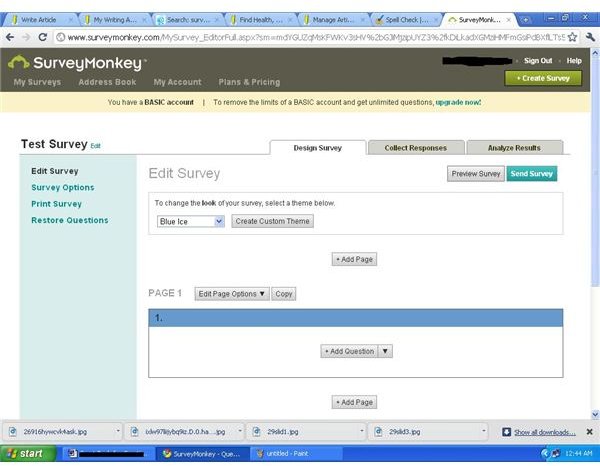
The process of creating questionnaires using Surveymonkey.com is simple. Just create an account, design the survey, send the survey to the target, and wait for responses to come before viewing the ready-made analysis. Surveymonkey requires either a Google or Facebook account, making the sign up simpler.
The first step in creating a survey using Surveynmonkey.com is designing the survey. Surveymonkey provides a host of functionality such as selecting the background theme, creating new pages, and selecting the type of questions. The functionalities come with many options. For instance, the options under “create a question” include multiple choices with many/one answer, text box answers, rating scale, matrix of choices, demographic information and so on.
The next step is to add the actual questions . Clicking on “done” creates a link to the ready made survey!
Use the “collect response” option to send the link of the survey to the target people, embed the link in a website, create a custom list of email addresses, or share the survey on Facebook. Each option requires configuration of the desired setting. For instance, when opting to embed the survey in a web page, identify the size of the embodiment.
The “analyze response” options allow for viewing the response, and include options such as rating averages, and response count. The more advanced options to filer, download, PDF reports, print, and share the response with others comes with the paid “Pro” version of the software. The basic free account has some limitations, such as a maximum of ten questions and 100 responses per survey.
Google Docs
Another option for creating survey questionnaires is Google Docs .
So how does one create a survey using Google Docs?
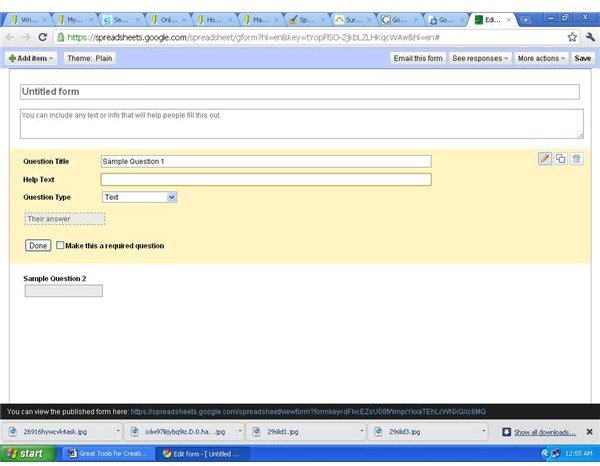
The process is simple. Simply go to Google Docs, create a new form from the main “Create” option, and add questions or options in the template that comes up. Click on the option “email this form” when done, and add the email addresses of the intended recipients.
Another option that allows a greater degree of customization is to open a spreadsheet instead of a form from the “create” option. From the spreadsheet drop down menu, click on “Tools,” select “Form” and “Create a Form,” and continue with the same process as above.
Save the form. To view the responses, click “See responses” at the top-right of the form. Accessing the option “Form> Show Summary” allows for a quick view of the number of people who have filled out the form and their response summary.
The advantage of Google Docs over Surveymonkey and other survey websites is it comes free and without any restrictions on the number of questions, number of respondents, template, or other functionality. Features such as the Equation Editor allows incorporation of calculations in the survey. Google Docs also allows for a greater degree of command, control, and flexibility over the survey design.
A disadvantage of using Google Docs is that much of the functionality provided by survey sites, such as sharing the survey in Facebook, populating an email list, and others require manual completion. Moreover, Google Docs does not prevent a single respondent from submitting multiple responses, requiring the survey owner to sift through responses to identify duplicates.
EduForm
Advanced tools such as EduForm provides a higher level of assistance in creating surveys by helping create adaptive questionnaires. EduForm builds a model from previously gathered data and employs it for profiling new users.
Leveraging such resources help in creating quality customer service surveys and questionnaires, improving the interactive dynamics of the enterprise and contributing to overall efficiency.
References
- Surveymonkey. www.surveymonkey.com . Retrieved April 29, 2011.
- “Google Docs Help.” https://docs.google.com/support/bin/answer.py?answer=139706 . Retrieved April 29, 2011.
- Helnsiki Institute of Information Technology. “EduForm - A Tool for Creating Adaptive Questionnaires.” https://cosco.hiit.fi/Articles/hiit-2004-7.pdf . Retrieved April 29, 2011.
Image source: screenshots of Surveymonkey.com and Google Docs


