The Native Instruments Traktor Pro may be a relatively new competitor in the DJ software market, but it comes with a plethora of options, which make it worth the money; here’s a review of the Native Instruments Traktor Pro.
Overview
Recently, there have been many competitors in the DJ software market. The tough competition for the top position was between Stanton’s Final Scratch and Rane’s Serato until the launch of Native Instruments Traktor. The first edition of this music package was launched way back in 2000. With many changes incorporated, more versions were released during the past few years. Lately, Native Instruments has launched its new version Traktor Pro.
The New Trackor Pro
Traktor Pro, the result of a decade of DJ software improvement, is designed to meet the requirements of a professional DJ. It is integrated with industry standard workflows and a stylish interface. The software is very easy to use with its jam-packed features that absolutely flatter the audience. Give it a try to redefine the art of DJing.
Features of Traktor Pro (5 out of 5)
-
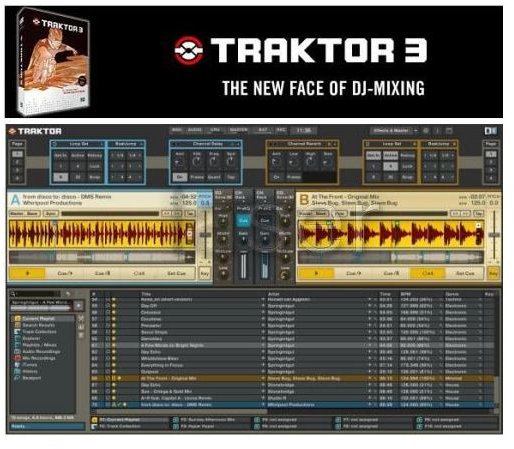
High contrast Graphical User Interface with four playback decks
 Advertisement
 -
Two independent FX slots with a facility for flexible routing
-
21 high quality professional effects
Advertisement -
FX parameter settings that are storable
-
Chain until 3 FX/slot
Advertisement -
Visual browsing of the complete music collection
-
Highly developed tempo synchronization
Advertisement -
Automatic beat gridding of tracks
-
Pre-mapped with top controllers for plug n play
Advertisement -
Advanced file management and search
-
Supports advanced MIDI assignments and multiple MIDI controllers
Advertisement
Ease of Use: Importing Tunes and Doing More (4 out of 5)
Any kind of DJ platform requires some music; so the first thing that you need to do with Traktor Pro is to import tunes. This can be done by right-clicking the ‘Track collection’ key, which displays a menu for importing from the music folders.
This menu also includes options for importing iTunes playlist and file browsing tools on the left. The information bar at the top enables to change layouts quickly; this also includes ‘browse’ option, which is extremely useful when working with lengthy music libraries.
User Interface (5 out of 5)
The renovated modular user interface makes Traktor Pro easier to be used in real club surroundings. The display has an increased contrast for low lighting background with variable font sizes.
Digital files can be merged on the four playback decks by making use of the external hardware and internal mixer. All the four decks incorporate Allen & Health Xone, thus providing complete control of the frequency spectrums.
The New Tracktor PRO is included with 21 sound effects that can be chained and controlled in groups of six at the same time for drastic sound conversion.
Extra Functionalities: Check Out the Waveform Function (5 out of 5)
Native Instrument’s pioneering ‘Reaktor’ technology is used in the design of Traktor Pro to provide all the features right from exclusive tempo synchronized performance to studio quality reverb & delay. The innovative ‘waveform function’ is also one of the outstanding features of Traktor Pro. This function overcomes the lack of manual control of waveforms in the previous versions of Traktor. The feature allows you to move the mouse in the required direction thus making it simpler to find exact samples.
Pros and Cons
Native Instruments Traktor Pro has received excellent reviews from critics and professionals alike; it has gone well beyond the expectations with its terrific features and performance. However, it is only the pitch control and the annoying blips with BPM that have disappointed the users.
But, it is pretty evident that users are more than satisfied with the DJ software on the whole.
Pricing
Native Instruments Traktor Pro is priced at $229 and is available online at the company’s website: www.native-instruments.com
Overall Verdict (4 out of 5)
Traktor Pro is undoubtedly one of the best DJ solutions available; it will greatly benefit DJs who use this software to take their DJing skills to the next level. The product derives the ‘Studio’ concepts from its predecessors with uncomplicated but efficient tools for recording and options for internet broadcasting.
In a nutshell, the new Traktor Pro is more stable, refined and easy to use; it is not the outcome of a day’s work but involves years of DJ software development. Traktor Pro has been devised to meet a professional DJ’s requirements perfectly.


