This article reviews the popular professional audio editing software program, Sony Sound Forge Pro 10. It explains all the new features and whether or not they justify the hefty price tag. Sony Sound Forge Pro 10 makes audio editing a breeze.
What is Sony Sound Forge Pro 10?
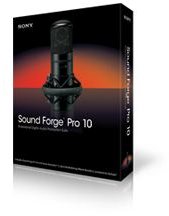
Sony’s Sound Forge Pro 10 is a professional digital audio editing software program. This means that it can manipulate, master, and mix existing audio tracks . Sound Forge Pro 10 is an immensely powerful tool that can help musicians turn an unpolished track into a masterpiece. This update of Sound Forge features a number of powerful enhancements that make this update even more useable than its older generations such as event-based editing, integrated CD burning, musical instrument file processing, and clean audio conversion and time stretching. Unfortunately, Sony Sound Forge Pro 10 still only works on Windows with no Macintosh ports in the works. The good news is that it now works seamlessly on Windows 7.
System Requirements of Sony Sound Forge Pro 10
• Microsoft® Windows® XP (SP2 or later), Windows Vista
• 1 GHz processor
• 512 MB RAM
• 300 MB hard disk space for program installation
• Windows-compatible sound card
• DVD-ROM drive (for installation from a DVD only)
• Supported CD-recordable drive (for CD burning only)
• Microsoft .NET Framework 2.0
Features (4 out of 5)
One of the most important updates to Sony Sound Forge Pro 10 is Zplane élastique Pro timestretch and pitch shift plug-in. This is the exact same time-stretching plugin that programs such as Ableton Live 8 and Native Instrument’s Traktor uses. Earlier versions of Sony Sound Forge included the Sony Time Stretch effect, which often generated mixed results that would sometimes give a flanger quality to audio. With this new timestretching pitch shifting plugin, time stretching now sounds more professional and suffers less from the artifacts of Sony’s old time-stretching engine. Thus, the ability to manipulate audio in Sound Forge Pro 10 is top notch and comparable to its competitors. This plugin enables the user to stretch the audio up to 10 times its original length. It also allows the user to specify what tempo that audio clip will be played at. Along with the addition of the élastique Pro timestretch and pitch shift plug-in, the effects menu now boasts a new resonance filter that has great potential. This effect sounds terrific and is exactly what you would expect out of a resonance filter.
Event-based editing is also a huge new feature in Sony Sound Forge Pro 10. This allows a clip to be edited in blocks of audio as opposed to a continuous stream. Blocks can easily be split in two with a simple key command. Event-based editing makes editing audio extremely more convenient since you no longer have to hunt around for which section contains what.
With a new disc-at-once burning option and CD-Text functionality included, putting files on a CD is less of a hassle. Another new improvement in version 10 is the replacement of the old file properties editor with the more comprehensive Metadata editor , enabling you to tag each file with relevant information. This is important for when you are mastering for a CD and using CD text.
Although Sony Sound Forge Pro 10 now supports soundfonts and DLS formats, it still has no support for Native Instrument’s Kontakt or Emulator X sample libraries.
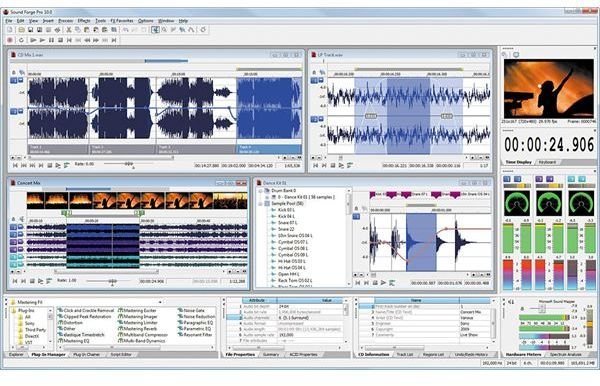
Click on above image for larger view. Photo credit: Sony Creative Software
Ease of Use (5 out of 5)
Sony Sound Forge Pro 10 is extremely user-friendly and almost everything is drag and drop. This does not mean that it is not a powerful tool, it has advanced options for more experienced users. Selecting and editing a track is usually just a few clicks away.
Sony Sound Forge Pro 10 also boasts a genuinely useful help menu and many helpful interactive tutorials. Along with the intuitive interface, this makes Sony Sound Forge Pro 10 ideal for beginners. When I first started using this program, the built in tutorials got me on my feet rather quickly.
Value (3 out of 5)
Despite all the upgrades and features, the hefty price tag may be a turn off. At $374.95, Sony Sound Forge Pro 10 is no small investment. Considering that Sony Sound Forge Pro 10 is simply an ancillary program, the hefty price tag may not justify the features and plugins that you get.
Overall (4 out of 5)
Sony Sound Forge Pro 10 is much better than its predecessors. However, the $374.95 price tag definitely will turn off a good amount of people. The best new features are definitely the addition of the élastique Pro timestretch and pitch shift plug-ins and event-based editing. These features make Sound Forge Pro easier to use and will ultimately lead to a more satisfying track and experience. You can learn more by visiting the Sony Sound Forge Pro 10 webpage .


