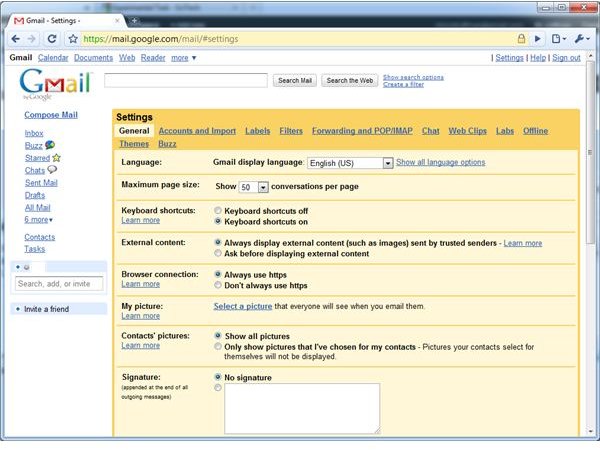
Learn how to make Gmail default to SSL mode, how to verify it’s running in SSL mode, and why it’s important for the privacy and confidentiality of your email.
How to Make Gmail Default to SSL Mode
Google now has all Gmail accounts default to SSL mode, but it’s still a preference. If you don’t have this preference enabled or just want to make sure it’s set properly, you can configure it on the Gmail settings page.
1. Log in to your Gmail account and click “Settings” at the top-right corner of the Gmail window.
2. Click the “Always Use HTTPS” radio button next to “Browser Connection” under the “General” tab.
3. Click the “Save Changes” button at the bottom of the Gmail Settings page.
How to Tell if Gmail is Running in SSL Mode
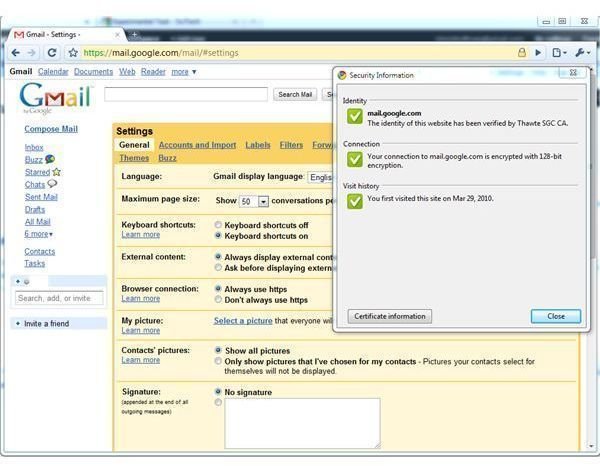
It’s easy to tell if Gmail is running in SSL mode. Look for the lock icon on your browser’s address bar or status bar, or the prefix “https://” before “mail.google.com” in the address bar. You can also click the lock icon for more information.
You can also use this method to verify other pages are running in encrypted SSL mode. If you’re ever entering private information like credit card numbers on an online shopping site, verify that the site is running in SSL mode so your transaction can’t be eavesdropped on.
Advantages of SSL Mode
The advantage of running Gmail in SSL mode is privacy. SSL encryption protects the communication between your web browser and Gmail’s servers so that other computers can’t eavesdrop on it.
If SSL mode is not enabled, SSL is only used for logging in to Gmail so that your password cannot be intercepted. However, once you’re logged in to Gmail and you start reading your email, your emails would be transmitted unencrypted. Anyone between you and Gmail’s servers or eavesdropping on your wireless network could read your emails, which is a problem if you’re dealing with sensitive, private information.
In fact, it was discovered that Google’s street view vans were accidentally set to record bits of wireless traffic as they drove around. These fragments of wireless data contained portions of emails. It’s not only Google’s street view vans that could intercept this information, anyone in the physical area could, too.
SSL mode ensures that your emails can’t be read by others; it makes the transmission of email just as secure as the transmission of your Gmail password.
Learn more about SSL encryption here .
Disadvantages of SSL Mode
The one disadvantage to having Gmail default to SSL mode is a slight slowdown. SSL mode requires more overhead for the encryption. However, Google did a detailed examination before deciding to make all Gmail accounts default to SSL mode as the default preference. Google’s engineers found that this slowdown is very minor; it’s worth it for the increase in security and privacy that SSL mode brings.


