Advertisement
Tech

A Guide to Stopping Google Analytics

Bloggers and webmasters can take advantage in using Google Analytics to generate detailed statistics about the visited pages and about their visitors. There are people who do not want Google to track their IP address but stopping Google Analytics is fairly easy. Read this article to find out how.

By Donna Buenaventura
Desk Tech
Reading time 3 min read
Word count 631
Google Internet Google analytics
A Guide to Stopping Google Analytics
Advertisement
Quick Take

Bloggers and webmasters can take advantage in using Google Analytics to generate detailed statistics about the visited pages and about their visitors. There are people who do not want Google to track their IP address but stopping Google Analytics is fairly easy. Read this article to find out how.

On this page

Overview

Google Analytics records every IP address by people who visit a website containing the JavaScript code for Google Analytics. The webmaster or bloggers will add Google Analytics’ JavaScript codes in their pages to track which of their pages is popular. It can also record where you came from known as the referrer. If Google AdWords and AdSense codes are in the website, the webmaster will be able to know what are the popular search queries and keywords their visitors has entered. If you find Google Analytics unacceptable, below is a guide to stopping Google Analytics.

How Google Analytics looks like and where is Google Analytics placed?

Google Analytics is placed by webmaster or bloggers on their page with an example JavaScript code similar to this:

Advertisement

It is placed before the

tag of a webpage and can be customized. The unique Google Analytics account number of the webmaster or blogger will replace the xxxxxx-x characters in the above sample GA code.
Advertisement

How to Detect if a Website Uses Google Analytics?

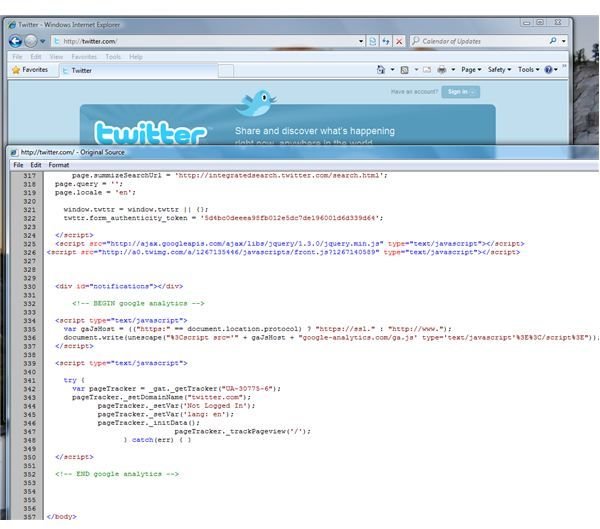
Google Analytics in Twitter.com

Many website or blog uses Google Analytics e.g. linkedin.com, twitter.com, answers.com, myspace.com, brighthub.com, krebsonsecurity.com, dslreports.com, msmvps.com etc.

Advertisement

You can check if a website owner or blogger have placed Google Analytics on their site by viewing the site or blog, and then view the page source. Locate the similar and above-mentioned JavaScript codes for Google Analytics. If the page is too long, you can simply bring up the “Find” tool in a browser to search for “google-analytics.com” within the source code of the webpage.

Another method to check if a webpage or blog has Google Analytics code is by using NoScript for Firefox or any other tools that logs the web-contents.

Advertisement

Stopping Google Analytics codes

To prevent Google Analytics in recording the pages you’ve visited or who referred you to visiting a website or blog, you can use any of the following method:

Final Words

Google Analytics is like any other web analytics service helps the webmaster know what popular sites and keywords that their visitors have entered. It also helps to identify who their referrers are but it can pose privacy and security risk. An example is the recent security and privacy incident when Google, Intel, Adobe and other big company have become victims by hackers that attacked them via the flaw in a very old version of IE, and the attack has been dubbed as “Operation Aurora ”. The IP addresses of the visitors of those affected company or websites has been released to hackers, as per reports. You don’t have to prevent visiting the website, forum or blog who uses Google Analytics. Simply block Google Analytics code, if you wish.

Advertisement
Keep Exploring

More from Tech

Filed under
Google Internet
More topics
Google analytics
Advertisement