A JavaScript bookmark in Firefox allows a script to be called, performing a specific action rather than a traditional bookmark that merely opens up a particular website. Here we learn more about JavaScript bookmarks in Firefox and how they can help the average user.
About JavaScript Bookmarks
Firefox gives users the ability to save JavaScripts as bookmarklets that perform actions within the Firefox environment. This
functionality gives users the powerful ability to easily perform repetitive or complex tasks with just a click of the mouse. The addition of a JavaScript bookmark in Firefox can massively expand the capabilities of the Firefox browser, adding an almost unlimited range of new actions.
Users can perform searches, extract texts, resize windows, access URL shorteners, reformat pages, and even send e-mails using JavaScripts saved as bookmarks inside a Web browser. In these cases, bookmarks inside Firefox act in a way similar to desktop shortcuts in Windows.
Although JavaScript bookmarks will work in most browsers, this tutorial only discusses their use in Firefox. Here, we will review information about creating JavaScripts for use as bookmarklets, finding pre-fabricated bookmarks, and a step-by-step process for adding a JavaScript bookmark to the Firefox browser.
Image Credit: Wikimedia Commons/Perhelion
Creating a JavaScript Bookmark
Users interested in creating a JavaScript bookmarklet need to have a working knowledge of JavaScript. For those willing to learn, a good tutorial can be found online here or by searching Google, Bing, or Yahoo.
Those who are interested in the concept of JavaScript bookmarks in Firefox, but don’t wish to learn how to create JavaScripts, can find solace in the fact that hundreds of websites online have libraries full of scripts that users can bookmark and use inside their Firefox web browsers.
Although Firefox is supposedly designed to contain the behavior of scripts, users probably will still benefit by approaching any active scripts online with caution. This means that only scripts on sites that are reputable should be trusted.
One more thing: for JavaScript bookmarks to work, JavaScript processing must be enabled in a user’s browser.
The following procedure shows users how to add a bookmarklet to Firefox.
Using JavaScript Bookmarks in Firefox
JavaScript bookmarks can be found online at websites such as Mozilla Links and others. At these sites, users can find the JavaScript bookmarks they like and then add them to the Firefox browser on their computer.
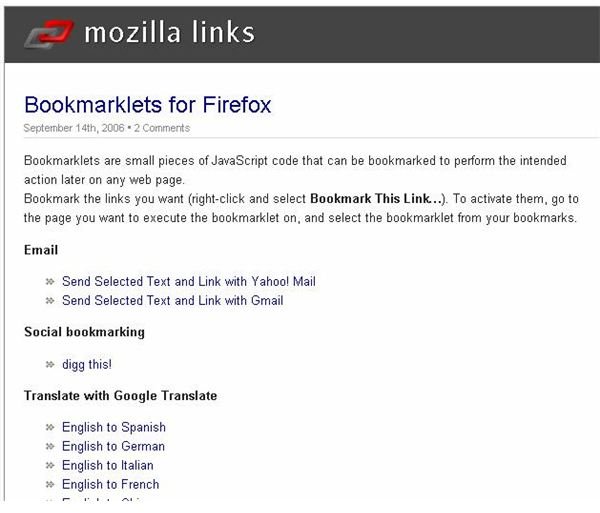
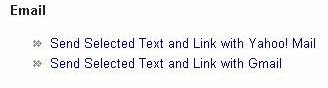
To demonstrate how this works, suppose that users want to try the “Send Selected Text and Link with Gmail” JavaScript bookmark shown below.
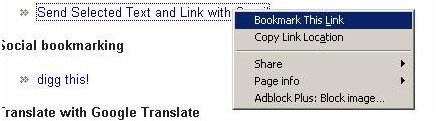
Users only have to right click on the link and then choose the “Bookmark This Link” option from the context menu.
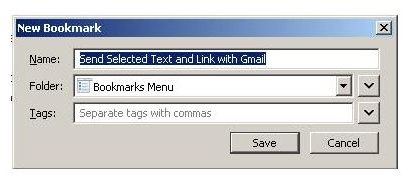
When the “New Bookmark” window opens, users can then name their JavaScript bookmark, add tags, and click the “Save” button as if it were any other bookmark.
Now, users can select some text and then choose the JavaScript bookmark from the bookmarks menu in Firefox as shown below.
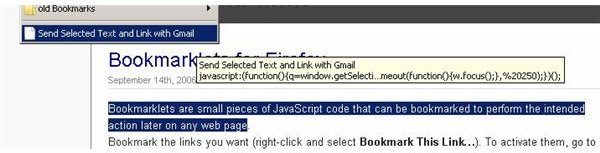
The JavaScript action will open Gmail and paste the selected text and add the URL to a new messages. Users can then modify the message, select recipients, and send it when ready.

References
“Mozilla Links”,https://mozillalinks.org/wp/resources/bookmarklets-collection/
“JavaScript bookmarklets”,https://strangej.detrave.net/jb/
Screenshots by author


