Yippy search engine, formerly known as the Clusty - Vivisimo search engine, is an anonymity search engine that was family friendly designed for all users of age above eight. Learn how Yippy and the other leading search engines compare.
What is the Yippy Search Engine?
It has become the primary default search engine in public libraries, schools, and universities , throughout the US and Canada.
Yippy protects families from explicit adult content such as pornography, gambling, and hate-groups, and also protects your computer from unsafe downloads such as spam and viruses. Yippy is also concerned about keeping your privacy online. As an anonymous search engine , Yippy doesn’t track your online activities or sell any personal information to third parties.
Yippy’s Menu Bar
Yippy offers a menu bar such as email, search, Yippy Wii (only calibrated for easy use with your Nintendo Wii), Shakespeare Searched (a search engine to find passages from Shakespeare’s plays and sonnets), Ben Franklin Search (a search engine to find the writings, works, and educational resources of Ben Franklin), wikipedia, news, your city news & events, games, radio, videos, weather, video conferencing & chat, MapQuest, social networking, etc.
Preference Settings
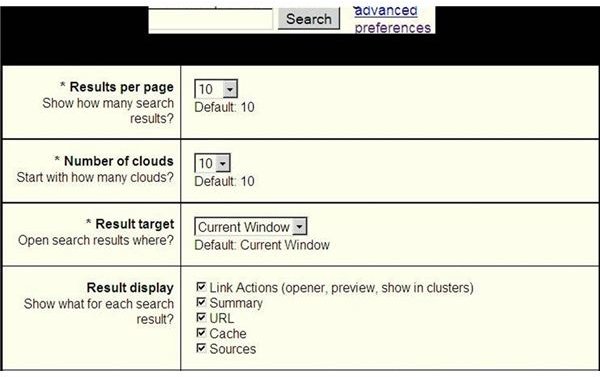
To change the preference settings, click Preference link (see the screenshot).
- Results per page – show how many search results. For example: select 10
2. Number of clouds - Start with how many clouds? For example: select 10 (see the screenshot).
Note:
Yippy groups similar results into “clouds” (categories) - see red
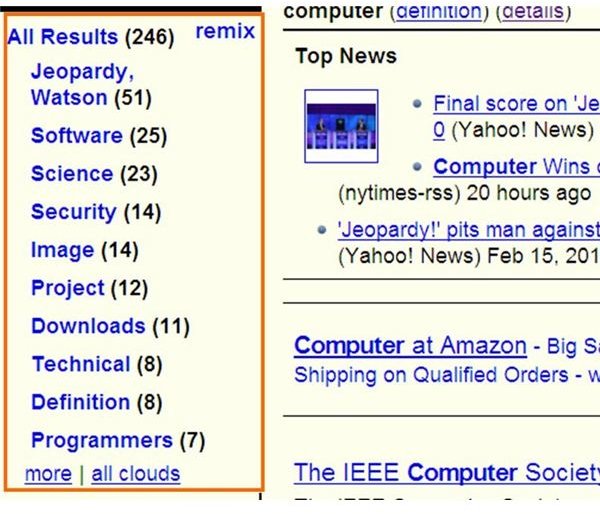
rectangle in the screenshot, instead of showing search results in a long list. The clouds are used to find results you may have missed or that were ranked in the end of a long list.
3. Result target - Open search results where? Select Current window.
- Result display - Show what for each search result? Check all the options - Link Actions (opener, preview, show in clusters), Summary, URL, Cache, and Sources.
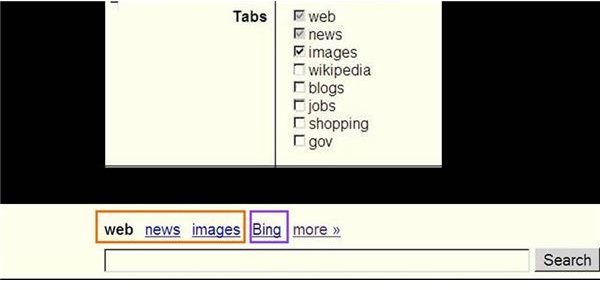
5. Tabs, for example,
a. Check web, news, and images (see the screenshot),
b. Uncheck wikipedia, blogs, jobs, shopping, and gov
c. See the result: only web, news and images are shown (see red rectangle in the screenshot).
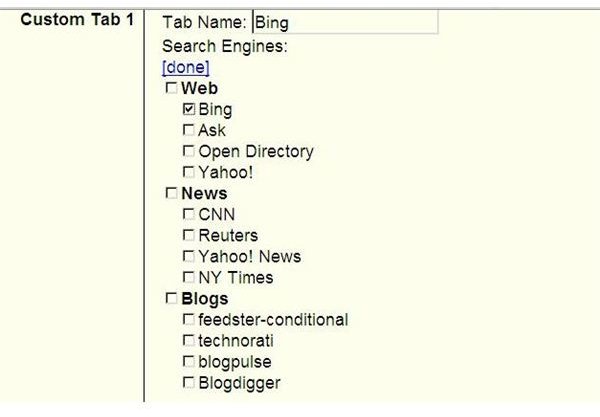
- Custom Tab1
a. In Tab Name section: for example, type: Bing
b. Search Engines: Click Edit link, for example, check Bing then click done link.
c. See the result: Bing is shown (see blue rectangle in the ‘Yippy search engine pic 4’ screenshot).
7. You can add Custom Tab 2, Custom Tab 3, and Custom Tab 4 if necessary.
8. Click Save button
The Comparison of Yippy and Other Search Engines
You can do the comparison by typing the same keywords on Yippy (Vivisimo Search Engine ) and other leading search engines (Google, Yahoo!, Bing) then see the total number of search results.
Example: The keyword is “computer”.
The search results: (at this moment)
Google 1,360,000,000
Yahoo 873,000,000
Bing 868,000,000
Yippy 233,465,946


