Curious about CATVids? Well, this video organization program has a lot to offer, but it does have some drawbacks. Learn more about this video organization software program here.
CATVids is a video collection organizational software program for both consumers and commercial users. This program is relatively inexpensive at arounf $40, and you can try it for free. Despite the price, there are some minor quibbles, which are potentially deal breakers for a certain segment of the population.
Features (5 out of 5)
The CATVids software program manages all types of videos: home videos, clips, DVDs, laser discs and even VHS tapes. You can catalog
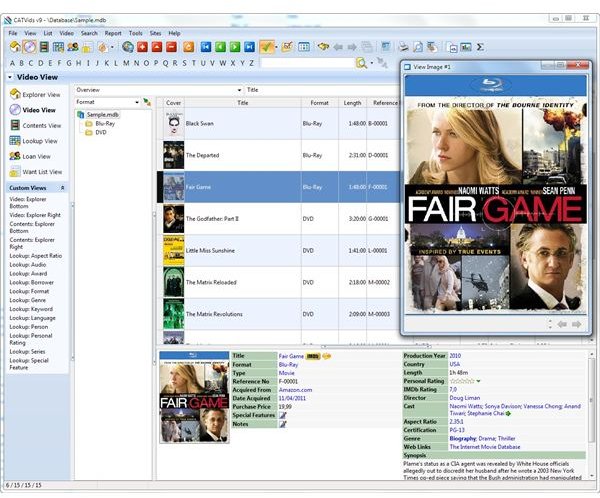
data by different fields of information, including title, writer, director or cast. You can also create custom fields with your own information. For example, you can list the location of your family’s home movies.
This program also allows you download data from the Internet. Once all of your data is entered into the system, you can search for movies by keywords. You can keep track of movies that you have rented from video stores or friends, and see when they are due back.
If you want a list of all of your movies, create a report using the report designer, which is exceptionally easy to use. You can save your report in over 100 report formats, including HTML . Then, you can save this data on your computer, or print it out so you have a hard copy on hand.
But, you can do more than just create reports for print out. You can archive this data, and then pull it back up without having to run a new query.
The best part of this program is that you can customize the program to your needs. The program has a lot of predefined data fields, which makes it quite easy to quickly input your data. But, sometimes you need more than just the predefined fields, and this program allows you to easily manipulate your data. It also finds titles quite fast.
Data Backup (5 out of 5)
Users will also find the ability to backup their data quite attractive. You’ll never lose your video data or reports. The program supports all major media types. You can create data about any and all videos that you have, and you can figure out how much free space you have left on your tapes.
Compatibility (3 out of 5)
Users will also find the ability to backup their data quite attractive. You’ll never lose your video data or reports. The program supports all major media types. You can create data about any and all videos that you have, and you can figure out how much free space you have left on your tapes.
Bang for Buck (5 out of 5)
Despite not being available for Mac, the CATVids video software program doesn’t have any major drawbacks. It’s easy to use and quite powerful. Plus, you can try it for free to see if you like it. And, if you do like it, it’s not going to break the bank.
References
Screenshot: FNProgramvare, https://www.fnprg.com/catvids/
CNETDownload.com, https://download.cnet.com/CATVids/3000-2130 _4-10029039.html