
A Blu-ray disc may appear to be the same as a DVD, but don’t let your eyes deceive you. There are substantial differences and improvements that have been made that allow the Blu-ray disc to serve as a high-definition source for home theater viewing.
Build of Blu-ray
A Blu-ray disc shares the physical shape of a DVD and is around the same thickness. But unlike a DVD, a Blu-ray disc does not sandwich the data between two layers of polycarbonate. Instead the data is placed on top of a single layer. This removes a problem called “birefringence” in which the laser can be refracted from the disc and made unreadable. Also ”disc tilt,” which can occur if the DVD is not flat, is not an issue with a Blu-ray disc because the data is on the top and closer to the objective lens of the reading mechanism. Due to the positioning of the data, a hard coating is added to the disc to prevent/minimize scratches and fingerprint markings.
Because the manufacturing of the Blu-ray disc is more akin to that of a CD than DVD, it results in a shorter production time and lower production costs per disc.
How Data is Added
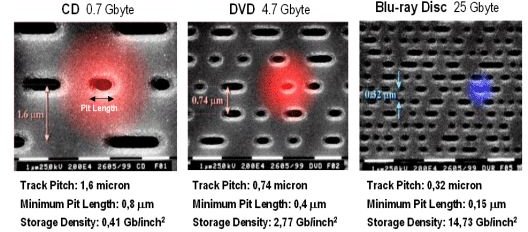
Data for a Blu-ray disc is put on the disc as a series of pits holding the digitally encoded audio and video. These pits are spiral grooves that circle from the center of the disc out to the edges. A laser then reads the bumps (which is the other side of the pits) in order to decipher the information. More data storage is possible by having the pits be as small and densely packed as possible, and this obviously requires the laser reading them to be extremely precise.
© 2008 Blu-ray Disc Association
How Data is Read
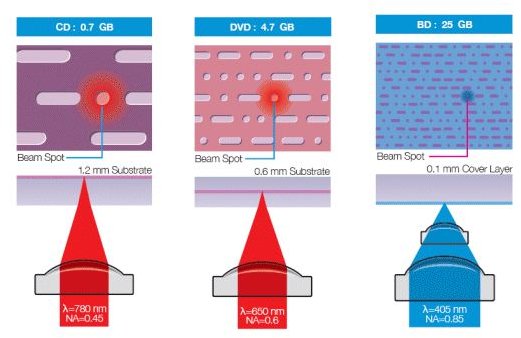
The name Blu-ray is taken from the blue-violet laser that is used to read the disc in the Blu-ray player. Unlike that of the red laser that reads DVDs at 650 nanometre, the Blu-ray laser uses a shorter, 405nm wavelength. This enables it to read the smaller bumps. Because the laser is backwardly compatible, DVDs and CDs can be read as readily as Blu-ray discs.
© 2008 Blu-ray Disc Association
Types of Blu-ray Discs
Blu-ray discs come in three “flavors” - prerecorded discs (BD-ROM), recordable discs (BD-R), and recordable and rewritable discs (BD-RE). All three types are either single layer (holding up to 25 gigabytes of data or video) or double layer (holding twice that of a single layer, or up to 50 gigabytes).
Why Blu-ray?
It hasn’t been that long that the format wars have been over (remember HD DVD, anyone?). With the coming of more Blu-ray movies, along with less expensive Blu-ray players, home theaters are rapidly turning towards high-definition movies as a right. Compared to compressed HD from cable and satellite, Blu-ray provides a stronger and more potent viewing experience. Who can complain about that?
Resources:
Related Links
Blu Ray Decrytion & Encryption in Blu Ray Movies - How it Works
Blu Ray Comparison Review Upgrading to Blu-ray - Moving from DVD to Blu-ray


