Netflix video can’t easily be recorded like YouTube videos. Even a software program like Replay Media Catcher which works well for recording streaming videos does not work for Netflix. Find out the reason and check out the workaround..
Folks these days are not content with just viewing their favorite shows over the Internet. They want to go further and download videos to watch them offline. Some want to convert these videos to formats that could be played back in their mobile devices or over their television sets.
Downloading videos from video streaming sites is no big deal these days. There are numerous software programs (some even offered for free ) that not only help you download streaming video but also convert it to a format of your preference. Then there are add-ons for browsers like Mozilla to capture online videos. With these utilities it seems that one could download any online video.
Netflix Exception
If you’re wondering how to record Netflix, however, you should know that it is an exception. If you’re a Netflix subscriber, you would have come away frustrated after using the utilities mentioned above to download your favorite videos. You may be wondering why you can’t download videos from Netflix when you can do so at sites like YouTube and other video streaming sites.
The reason is because Netflix uses Silverlight , a streaming video player developed by Microsoft . Silverlight sends tiny packets of different video streams to your computer instead of a single stream.
When you try to download a Netflix video captured using programs like Replay Media Catcher and Streaming Video Recorder you will end up with numerous files with sizes ranging from 400kb to 800kb. Worse still, users have found that they were unable to play back these files in Windows Media Player or even in VLC.
This setback doesn’t mean that it’s the end of the road when it comes to capturing Netflix video for future viewing.
Let’s look at a workaround if you’ve no idea on how to record Netflix. The easiest solution to the problem is using a video screen capture program to record. Video screen capture programs record anything that plays on your computer screen and you bypass the need to download anything from Netflix.
Replay Video Capture
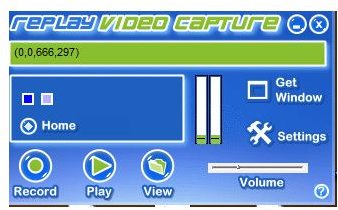
If you intend to capture high quality video which you could burn into DVD, this is the program you should go for. Replay Video Capture grabs any web video no matter what the streaming protocol is. What’s more, you can even use it to capture PowerPoint presentations and even videos from webcam sites. It has a simple interface you can figure out within minutes. The procedure to record Netflix or any unrecordable web videos is pretty straightforward.
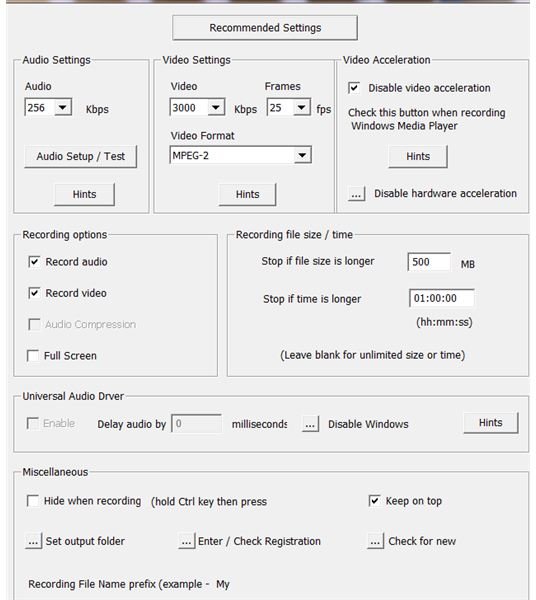
You get started by tweaking your audio and video settings by clicking the Settings icon,
The next step would be to click the Get Window icon which helps locate the video window. Alternatively, you can set the markers manually.
Once you’re ready, you can click on the Record button. Then click Stop when you’re done with your recording. You can then view your recorded file in the folder where it is saved. You can rename the file and convert the video file to the format you desire.
Apart from Netflix, you can use Replay Video Capture to record videos from sites that don’t allow you to download them.
Now that you’ve learned how to record Netflix, you can check Replay Video Capture which retails for USD 39.95. You can download a trial version of the program to see if it’s your cup of tea. It allows you to record video for up to two minutes.
Article information based on writer’s experience of capturing streaming videos. Additional information from writer’s exploration of Replay Video Capture.
Screenshots by writer.