We looked at the need for a utility and examine one method of solving our disk space issues. Now, take a look at how different freeware developers give you meaningful options for the same kind of utility.
Freeware Development
While all of these tools provide similar functionality, they do so in different ways which gives us a great way to look into how the world of freeware can generate not only better tools, but the tool that is right for you.
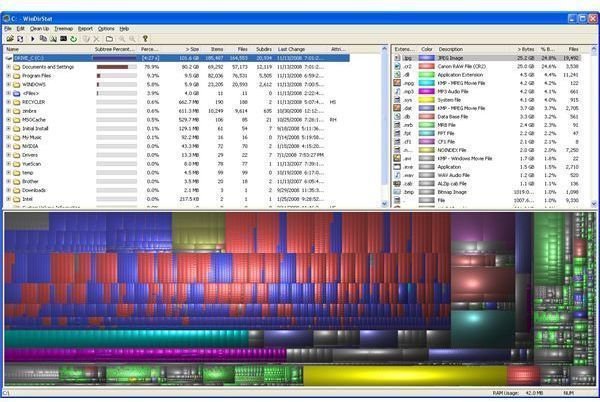
WinDirStat scans your drive and comes back with a lot of detail about exactly what is taking up disk space and where it is.
As you can see from this screenshot, I could delete temp files and empty the recycle bin until the cows come home and never make a dent in my space issue. All those photographs I have on my hard drive are the real culprit. (If you know anything about digital photography you might notice that one of the problems is all those RAW files and JPG files. Chances are I don’t need both!)
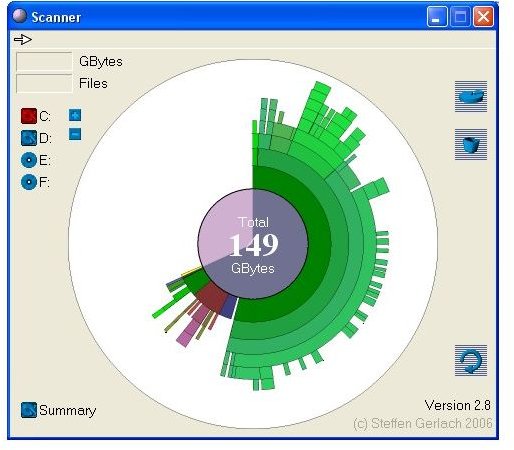
If the WinDirStat screen seems a little overwhelming, then you are going to love Scanner. Scanner does the same kind of thing as WinDirStat, but goes the simple route. You can see the same issue for my disk drive but it is a lot more basic.
So, which one is better?
That is exactly the point. In the commercial software world, focus groups, marketing studies, and executive decisions would determine which interface survived. But, thanks to the world of freeware, you have a choice. Use WinDirStat if you like seeing “everything”, use Scanner if you like to see a cleaner interface.
So, you like SpaceMonger’s approach, but you would like it to be a bit more detailed?
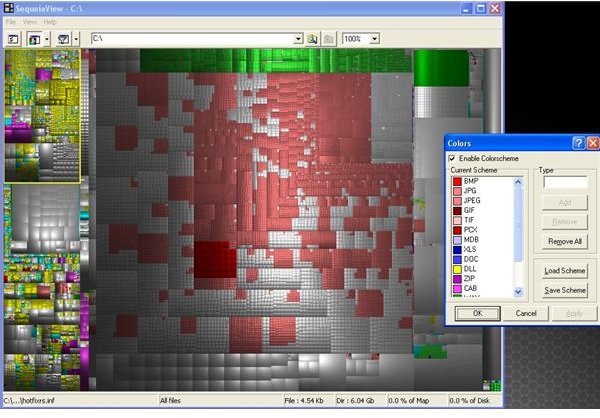
Welcome to SequoiaView. Which borrows the tree map concept and then takes it to a different level by “padding” the maps so that they can be more visually representative. Notice there isn’t word on the screen, just colors. (By the way, all that rust colored area denotes JPG files.)
As you can see, the world of Freeware offers more than just a way to get software and utilities without having to pay. The design and programming tastes of each developer come through in a variety of products which can likewise match up with the tastes of each user.
Now, if you will excuse me, I have some image files to clean up :)
Disk Visualization Utilities Review
By now, you have seen the power of the freeware marketplace in creating special solutions to common problems. If you want to take a closer look at these great utilities, check out these reviews:
- WinDirStat
- Scanner
- SpaceMonger
- SequoiaView
- All Part of the Disk Visualization Utilities Series
This post is part of the series: Monthly Freeware Universe Update
Examining the world of freeware programs and utilities, highlighting some of the best of what’s out there and examining the environment for freeware design and development.


