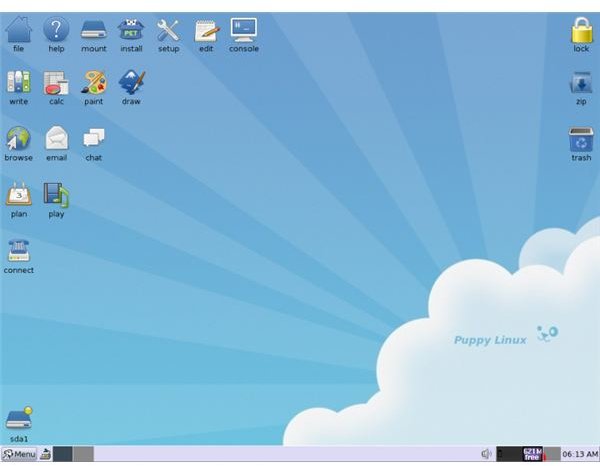
While larger distros like Ubuntu might offer a greater depth of user interface configuration options and support for a wider selection of hardware, it is good to know that there is still a market for lightweight distros such as Puppy Linux.
Choosing a Lightweight Linux Distribution
There are Linux distros and there are lightweight Linux distros. But why would you choose the light option?
After all, storage is hardly getting more expensive, quite the opposite in fact, so a larger distro should run without a problem on most computers, and those that might require more resources than your computer can offer can usually be scaled down.
Distros such as Tiny Core Linux, Damn Small Linux and Puppy Linux are the other side of the coin however. Ideal for low-end computers, older devices and netbooks, these operating systems can be installed in just a few minutes, and are very easy to use.
- Minimum Hardware Requirements for Linux
- Linux: Choosing The Right Distribution For Your Needs
- Choosing the Best Linux Distribution for Slow Computers
- Linux: Which Distribution Is Best for Me?
- Not Just a Pretty Penguin!
- An Introduction to Tiny Core Linux
- Top 6 Linux Distributions for Children
Why Do I Need Linux to Be Light?
By now you have probably chosen Puppy Linux, but what is the real thinking behind a lightweight distro? Why would such an operating system be developed in this age of powerful laptops and PCs?
The answer comes in the shape of choice; it’s basically an extra option, something that is particularly ideal for any computer, regardless of its hardware spec. Of course, you don’t have to choose Puppy Linux – countless distros are available, after all – but if your computer is low spec than installing a lightweight distro will help you to squeeze the best performance out of your PC or laptop.
- Overview of Linux for Small or Outdated Computers
- Choose a Linux Distribution That’s Right for You
- What Is the Best Version of Linux for Newbies?
- Puppy Linux: A Powerful Linux Distribution
- Puppy Linux 4.2 “Deep Thought”
Installing Puppy Linux
After you have selected the hardware for your Puppy Linux installation, the computer will need preparing. This might mean formatting the hard disk drive on a device that will be running Puppy as the only OS, or creating a new partition on a dual booting computer.
Installation of this OS should be simple and straightforward; most people don’t experience any problems, but if you do there are workarounds that can be used.
Don’t be restricted to CD or DVD for installing Puppy Linux. This OS is designed to be installed from a USB Flash drive, and you can even run directly from such a device. If you’re on holiday and only have access to a computer via a cyber café, this is particularly useful if you wish to have all of your own applications setup and ready to use when you insert the device.
- Puppy Linux: Selecting Your Hardware
- Puppy Linux: Preparing Your Computer For The Distro
- Puppy Linux: Installing The Distro
- How to Work Around Puppy Linux Install Problems
- Most Common Puppy Linux Installation Problems and Their Solutions
- Set Up A USB Linux Jump Drive
- Portable Linux: Run Linux from a Portable USB Key
- Puppy Linux: USB Flash Drive Portability
The Ultimate Small Linux Solution?
You won’t be able to do much with Puppy Linux without adding some additional software, however. While there is a nice selection of bundled apps included, your first task should be to find and install software that will help your productivity.
Of course, you might not have any intention of being productive. In this case, you’re probably looking for video games to download and install. As well as standard Linux games, you will also have access to browser-based titles and games that can be played via Facebook.
- Puppy Linux: Initial Setup
- Puppy Linux: Installing New Applications
- Puppy Linux: Standard Applications
- Top 10 Puppy Linux Games
Wireless Networking in Puppy
No modern computer system is complete without access to the Internet, and Puppy Linux is capable of various connection types. While Ethernet is present on all computers (few developers would drop support for this connection) wireless networking can be tricky to set up – but not with Puppy Linux, which strives to make all Internet connectivity options simple and effortless.
In the event of your computer not having a built-in wireless card, Puppy Linux is also compatible with USB wireless devices.
- Puppy Linux Wireless Networking How-to
- Puppy Linux 4: Connecting Internet Wifi, Puppy Linux
- USB Wireless Drivers In Linux
Caring For Your Puppy
There is more to Puppy than Internet connectivity, however. The operating system can be used with the majority of current printers, and for improved usability you can set up widgets that make the operating system easier to use.
Meanwhile, if you plan to adopt your Puppy for full-time computing, one of the things you will require is your Internet favorites from your preferred browser. These links can easily be copied across to your Puppy installation using the bookmark file.
- How to Use CUPS To Access a Linux Printer Driver
- Puppy Linux Widgets
- How to Use the Puppy Linux Bookmark File
Performing Common Linux File Management Tasks in Puppy
Ultimately, Puppy Linux is a distribution like the others, and therefore can be used largely in the same way as other distros. If you need to rename files or delete files or directories, alter file permissions and all of the other functions that you would expect to use.
Even though Puppy is a stripped down distro you can be sure that you will be able to use it like any other version of Linux!
- An Introduction to the Linux File System
- How to Use the Linux Create User Function
- How to Use the Linux Delete Directory Function
- How to Use the Linux Rename File Function
- How to Use the Linux Delete File Function
- Understanding Linux File Permissions
- The Basics of the Linux Shutdown Command
References
- Screenshot via Wikimedia Commons/Vishy1618


