If anyone had asked me what I would like to see in the new release of Corel Paint Shop Pro Photo X2 Ultimate, I would have mentioned something about a better way to remove backgrounds. Well, guess what?
Highlights and System Requirements
Corel Paint Shop Pro Photo X2 Ultimate, the latest version of the popular photo editing software, has been on the streets for a couple of weeks now so it’s about time we take a look at it to see how it performs. Among the new features in the Ultimate edition are raw camera support, a fresh background remover plug-in, and a large collection of new creative content for those who like to dress up their photos.
In addition, the Ultimate package comes bundled with a ton of bonus items including, but not limited to, Corel Painter Photo Essentials 4 which allows you to turn photos into paintings, a media recovery software package that can recover lost files from memory cards, and a 2GB USB flash drive.
While the new release still works fine on Windows XP, it’s also officially certified for Windows Vista. The system requirements for Corel Paint Shop Pro Photo X2 Ultimate are as follows:
- Windows XP or Windows Vista
- 512 MB RAM (768 MB RAM if using Vista)
- 1 GHz processor (2 GHz recommended)
- 1.5 GB hard disk space
- 24-bit color display, 1024 x 768 resolution
- DirectX 9.0c or higher
For information on the latest release, see Bright Hub’s review of Corel PaintShop Photo Pro X3 .
User Interface (5 out of 5)
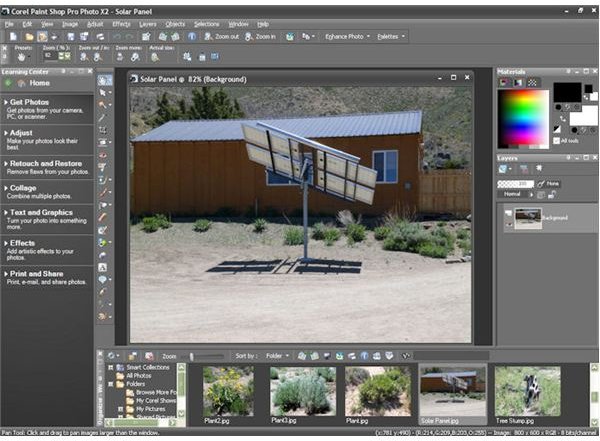
Just as with previous versions of the software, the user interface of the Corel Paint Shop Pro Photo X2 Ultimate package is extremely intuitive and somehow manages to put a ton of tools right at your fingertips without cluttering up the application’s work area too badly.
Of course, each of these tools can easily be hidden with a single keystroke or mouse-click if you do want a larger photo editing workspace. (For more information on how to use these tools and other tips and tricks, check out Bright Hub’s set of Paint Shop Pro tutorials .)
New Creative Content (5 out of 5)
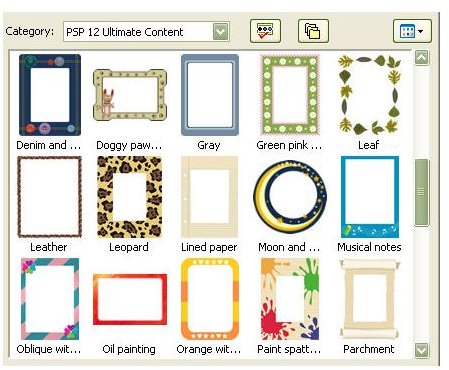
I’ll admit that I love all the fun graphical extras, so I was very happy to see the new frames and picture tubes . With over 150 new toys to choose from, I was in digital scrapbooking heaven. The new options give you tons of ways to dress up your photos for all sorts of projects.
The Ultimate package even includes a copy of Corel MediaOne Plus so you can take these fixed-up photos and plop them right into pre-designed scrapbook pages without worrying about how to design your own. However, if you do want to create your own custom designs, you can use the software to do that, too.
New Background Remover (5 out of 5)
The new background remover plug-in found in the Ultimate edition is simply amazing! This fabulous tool has transformed a process that has taken me up to
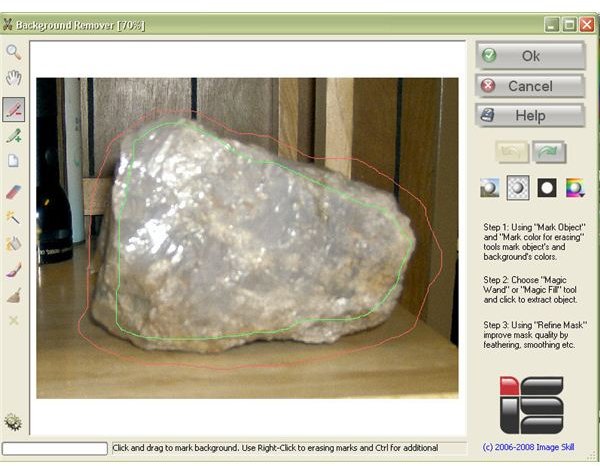
an hour to complete in the past into one that now only takes minutes. Don’t get me wrong, the background remover doesn’t work perfectly in every situation. However, even for those times that I have to do a little extra editing on top of using the tool, I’m still saving tons of time and eyestrain. My only complaint about this new background remover is that it has made me wonder what I could have done with all those hours I spent in the past doing things the old-fashioned way.
Corel Painter Photo Essentials 4 (5 out of 5)
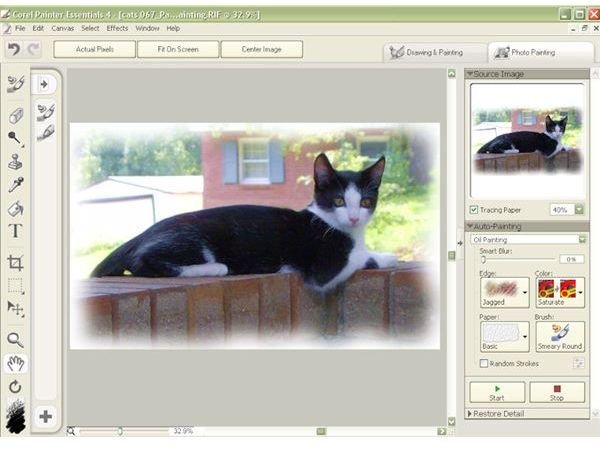
Although the bonus software that comes packaged with the Ultimate Edition is varied enough that each application deserves its own review, I do have to say a few words about Corel Painter Photo Essentials 4. This is one of the most fun programs that I’ve ever used. I found myself sitting for hours just playing around with all the different features like a kid who just discovered crayons.
If all you want to do is quickly turn a photo into a painting, you can use one of the many preset options and let the application do the work for you. On the other hand, if you want to just use your photo as a reference and do all the brushwork and color-choosing on your own, you can.
This software isn’t just for photo transformation either. You’re perfectly welcome to start with a blank canvas and “paint” until your heart’s content. Even if you’re not that artistically inclined, there’s no need to shy away from this option. Accompanying the software are several video tutorials that show you how to get the most out of Corel Painter Photo Essentials 4.
Price and Overall Rating (5 out of 5)
Even though I’ve been a Paint Shop Pro fan for a long time, I just can’t say enough good things about the Ultimate package. The software retails for $99.99, but the standard features along with the new creative content and background remover plug-in alone are worth that much. (Did I mention how cool the background remover is?)
When you throw in all the bonus content, especially Painter Photo Essentials 4 and MediaOne Plus, I can’t imagine how anyone could balk at the price. Even though I haven’t even mentioned much about the media recovery software, raw camera support, and free flash drive, they’re great additions, too. You’re not going to find a comparable deal for any other photo editing software on the market.


