This is a review of AutoFX’s Photo/Graphic Edges 7.0 and its photo enhancement capabilities. It explains the pros and cons of using the software to add effects to digital photographs.
Photo/Graphic Edges 7.0
AutoFX has been making digital enhancement software since 1994 and is now one of the world’s leaders for Photoshop plug-ins. Its newest release of Photo/Graphic Edges 7.0, Platinum Edition, is an amazing product that allows a digital photographer to add edges, borders and frames for their photographs. It comes loaded with over 10,000 ready to use presets and also includes customizable brushes and layer options so that you can create your own effects. Not only is it a simple way to add unique interest to your photos, it is also an interesting and fun program to use.
Usability (3 out of 5)
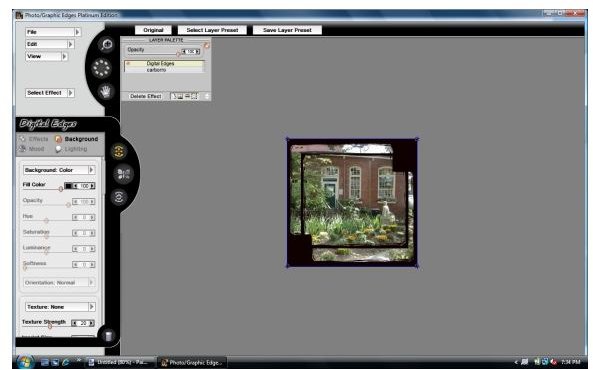
Photo/Graphic Edges 7.0 allows you to take as much or as little control over your photo borders as you’d like. Presets are available which can transform your images instantly, or you can choose an effect and modify the settings to make your own distinct effect. The interface does take a little getting used to, since it doesn’t look like most other photo editing programs. Any necessary information is in the manual, and the manufacturer also has training videos available online. Once you have mastered the interface, Photo/Graphic Edges becomes very enjoyable to use.
This product can be used as a Photoshop plug-in or as a stand alone program. However, using it as a Photoshop plug-in was extremely slow, and it crashed numerous times. When I used it as a stand-alone application, I did not experience any of those problems. Depending on your system’s resources, you may or may not experience the same issues.
Edges (4 out of 5)
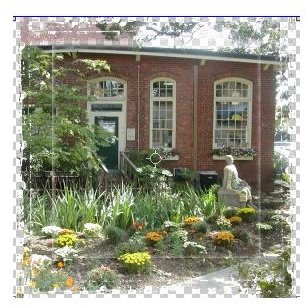
Photo/Graphic Edges separates its image enhancements into 4 types: Edges, Effects, Frames & Accents.
Edges are patterns that creates a border by removing portions of the edges of the photo. These options are a simple and quick way to add interest to your digital photos. You can choose from their large catalog of ready to use borders or create your own by changing the settings for each edge. You also have the ability to layer edges to create even more unusual edges.
Here are the available edge effects:
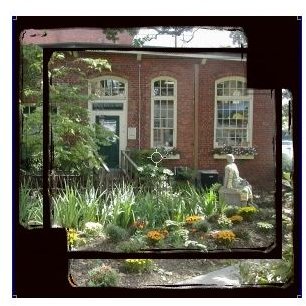
- Darkroom Edges - mimics film edge techniques traditionally created in the darkroom
- Grunge Edges - adds distressed and artistic borders
- Painted Edges - adds a brush stroke edge using various artistic approaches
- Montage Edges - allows to you create multiple images with multiple edges in a single layout
- Geometric Edges - adds edges in various geometric shapes
- Digital Edges - a novel set of digitally altered edges
- Abstract Edges - adds edges in abstract shapes and patterns
- Vignette Edges - creates feathered vignettes
Effects (4 out of 5)
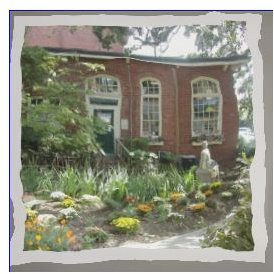
Effects offers many options to add unique visual effects to your photographs. These options fall into the more artistic side of digital photo manipulation. Using these tools is a great way to add extra interest to a photo portfolio or perhaps for use on a website.
-
Transfer - mimics the effects of a photo emulsion transfer
Advertisement -
Edge Brush - removes your photo then use the brush to bring portions back
-
Ambient Brush - adds a patterned texture where you apply the brush
Advertisement -
Acid Etching - works much like the Edge Brush, but it removes portions of the photo instead
-
Burned Edges - creates an edge that looks like you burned your photo
Advertisement -
Photo Border - adds a frame around your photo
-
Photo Tabs - adds photo tabs at the corners of your photo
Advertisement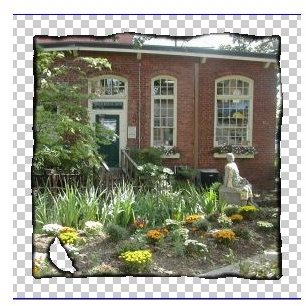
The following effects are used to change an edge that has already been applied to a photo, so be sure to use an edge effect before using any of these enhancements.
- Distort Edges - uses a brush to distort and edges you have added to your photo
- Putty Edges - allows you to reshape edges you have added to your photos
- Smudged Edges - allows to you blend the photo and edge together
Frames (4 out of 5)
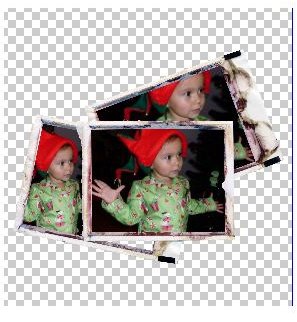
Frames are borders that surround your photo, and several different styles are available. These are great accents to add playfulness and increased appeal to your photos. These frames lend themselves to digital scrapbooking especially well.
They include:
-
Film Frames - applies creative layouts using your photo, with two or more frames
Advertisement -
Grunge Frames - adds distressed frames
-
Natural Media - adds a painted mixed media frame
Advertisement -
Story Boards - applies digital scrapbook-style layouts
-
Thin Borders - adds extremely thin frames in various shapes
-
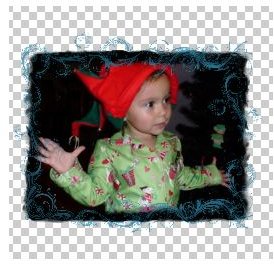
Artistic Frames - adds original patterns over your picture
-
Classic Frames - a collection of frames from previous versions of this application.
-
Dual Frames - creates a 2 frame layout
-
Quad Frames - creates a 4 frame layout
-
Traditional Frames - adds frames similar to those found in a frame store
-
Watercolor Frames - adds frames created with watercolor techniques
Accents (2 out of 5)
Accents is comprised of Overlays and Adornments. These are photographs that are placed over your images. Overlays don’t show up very well on many of the photos I tried, probably because they are very low contrast and look like watermarks more than enhancements. Adornments are a collection of things like buttons, snaps and strips of tape that don’t look realistic when added to a photo. These seem to be made for digital scrapbookers but their use seems to be limited for those users as well as digital photographers.
Overall Rating (4 out of 5)
Photo/Graphic Edges 7.0, Platinum Edition can be purchased directly from AutoFx’s website for $249. They also offer a demo version which has limited content and features.
It is a useful program for digital photographers who are interested in adding edges to their pictures. It has a wide array of features that provides several different looks and styles with something for everyone.


