Spectral Mixing & Audio Frequency Analysis
Understanding the Audio Spectrum
You probably already know that sound is made of a spectrum. The limits of human hearing in this spectrum run from about 40 Hz at the lower end to about 16,000 Hz at the upper end. At the lower and higher extremes the sound may actually be felt rather than heard, but we don’t need to go into that just now.
You might already know this, but do you know how to make use of this knowledge so as to make it work for you in your mixing? The chances are you may never even have thought about it.
Different regions of this spectrum exhibit different characteristics. There’s no absolutely arbitrary way of identifying precise boundaries, but the categories shown below are generally agreed to be there or thereabouts. Along with each category is listed its main characteristics.
Bass: from about 40 Hz to 200 Hz: Booming, full, solid
Low Mids: from about 200 Hz to 800 Hz: Body, fatness, fullness, warmth
Mids: from about 800 Hz to 5,000 Hz: Clear, present, forward
Highs: from about 5,000 Hz to 8,000 Hz: Bright, alive, brilliant
Ultra Highs: above about 8,000 Hz: Crisp, radiant sparkling
The way in which the sounds produced by different instruments use different permutations of these frequencies is one of the aspects which determines the sound of the instrument. One issue that you will need to address in mixing is how to prevent your different instruments (and voices) from fighting each other for ownership of the same frequencies.
Spectral Analysis Tools
There are a number of tools available to help you to do this. One category is the Spectral Analyzer. It is important to understand that unlike the variety of plug-ins that you already own - EQ, Delay, Reverb, Compressor, etc. - this type of plug-in does not in any shape, fashion or form alter or affect the audio signal to which it is applied. It merely gathers information about this audio signal and passes it back to you.
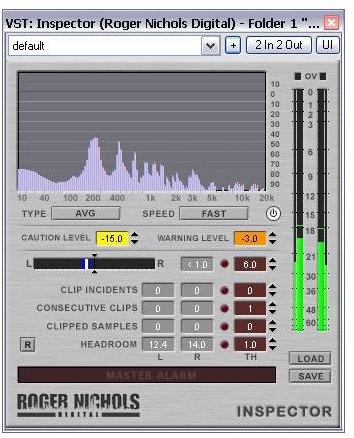
Two examples of such a plug-in are illustrated. These are the MultiInspectorFree and the Roger Nichols Digital Inspector. Both of these area available free. The freeware version of MultiInspector lets you compare the signals from up to three different tracks at the same time (the illustration shows two). There is also a more powerful version available for purchase that lets you compare up to 16 tracks at one time.
These tools can be useful many ways. One such use is to help you in identifying areas where you may need to resolve conflict between different track.
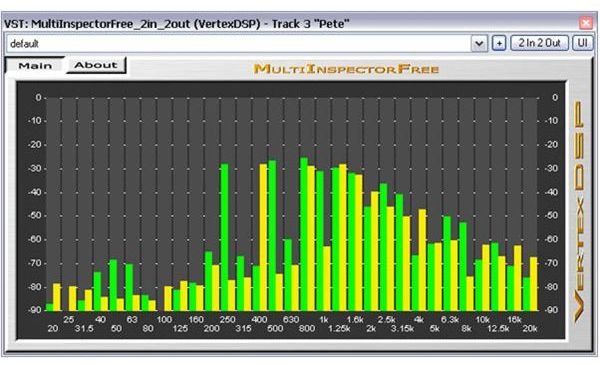
Consider our example of the use of MultiInspector. The illustration on the left shows this plug-in applied to analyse a vocal harmony between two voices. You can observe, for example, that there are some frequencies (for example around 250 Hz) where one voice will clearly cut through above the other. However, there are other areas (particularly from about 1,200 Hz to about 3,000 Hz) where they seem to be locked in mortal combat.
In our next article we’ll look at what methods we have at our disposal for resolving this, and how to apply the EQ tool.
This post is part of the series: Develop Your Mixing Sense
A series of articles intended to help you develop your mixing sense. Includes tips and tricks on finding the right balance in your mix, fleshing out thin sounds and more.