A step-by-step guide on how to setup the BlackBerry Theme Studio and prepare an environment in order to create your own custom BlackBerry themes.
Getting The Necessary Tools
This article will be dedicated to setting up your theme building environment. If you would like to know how to further design theme please visit “How To Create Your Own Personal Blackberry Theme (Advanced Tutorial) ”.
The first step to building or making anything is, of course, collecting the right tools to do so. In this case the bricks and mortar are a little easier to get a hold of and quite a bit cheaper. In order to create your custom theme you will need several things which are listed below.
The necessary tools to continue include:
- A Computer - obviously.
- A Mini-USB data cable - to connect your BlackBerry to the computer.
- BlackBerry Theme Studio Software
- Photo Editing Software - To edit and change the theme files for your device.
- BlackBerry Desktop Manager - To install and remove existing themes and applications on the device.
The very first step we must take is to download and install the BlackBerry Theme Studio.
(Edit: The additional downloads listed may not be needed for the newer BlackBerry Theme Studio. They were however required material for the older Plazmic Theme Creator Software. I will however leave the download links in case the additional material is in fact needed.)
Step 1: Download the BlackBerry Theme Studio (you will have to give your name and address and an existing e-mail address, this is simply to register the software).
Step 1.5: Download and install Java JDK version 1.5 or higher on your computer, the latest release at the time this article was edited was Java JDK version 1.6 .
Step 2: Download BlackBerry JDE (you will have to register for BlackBerry’s development program in order to download this but it does not cost anything).
Step 3: Download the BlackBerry MDS/Email simulator .
Step 4: Download the BlackBerry Device Simulator .
Step 5: Install all the programs in that same order before starting Plazmic. It seems like a long and worthless process but I assure you once the theme builder is up and running you will have tons of custom themes on your phone all made by you!
Welcome To The BlackBerry Theme Studio
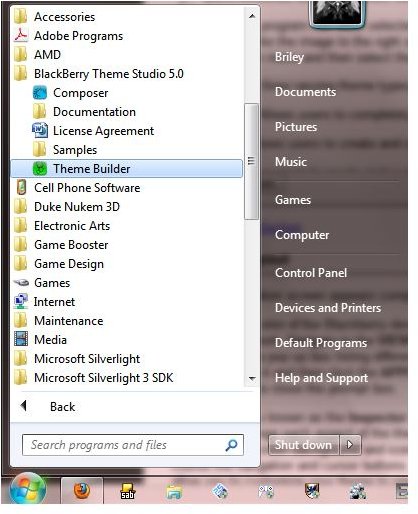
Once everything has been downloaded and installed correctly it is time to boot up the BlackBerry Theme Studio software. The official install should have placed a new folder in your programs (start menu) folder called “BlackBerry Theme Studio 5.0”. If you haven’t already done so navigate to the aforementioned folder and select the “Theme Builder” program with a green icon (see the image to the left if you are lost).
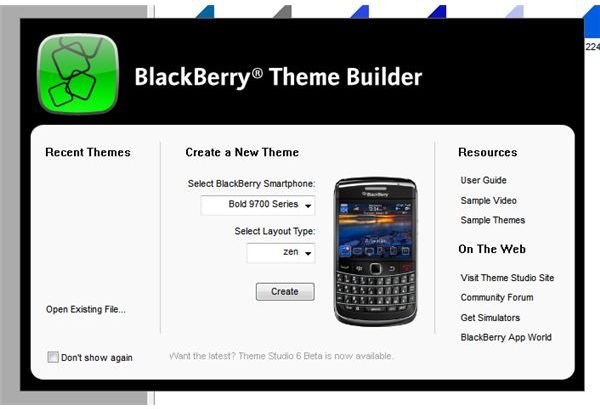
Once the program has been selected and has finished booting up there should be a black setup menu. When you see a popup like the image to the right select the model BlackBerry device you own or wish to create a theme for in the drop-down menu and then select the type of theme you would like to design.
There are three different theme types and each has a different menu and main screen layout.
- Custom- Allows users to completely customize every aspect of the user interface.
- Today- Allows users to create and customize a theme using the Today user interface.
- Zen- Allows users to create and customize a theme using the Zen user interface.
Keep in mind the choice is yours as to which layout you would like to use. I only recommend the Custom layout for users who are very comfortable (on their own) with the program. There is usually a small, or extensive, list of troubleshooting errors when using the Custom layout simply because so much can be altered.
The Workstation Layout
The theme creation screen appears complicated at first but it is actually rather simple. Here is a basic breakdown of the program’s layout.
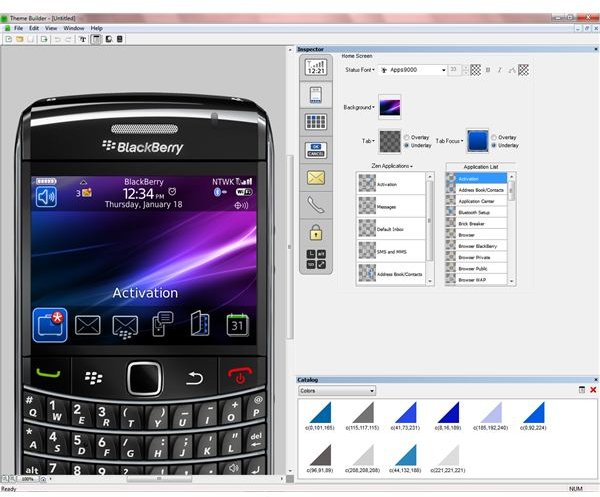
On the left is a skin of the BlackBerry device you are creating the theme for; this can be changed to any corresponding BlackBerry model as you wish. Navigate to the VIEW menu across the top, and then select the Change Face Plate option. You will then be prompted with a pop up box listing different BlackBerry models and their matching skins; once you have found the model you wish to display choose it and then click the APPLY button in the bottom right. The skin on the left should refresh; and then you may click the OK button to close the prompt box.
The right side is known as the Inspector menu, where you can change the different screens of the theme. The buttons on the left will let you change each aspect of the them and are listed as follows from top to bottom; banner, home Screen and application Menu, home Screen background and icons, dialog buttons with menus and title bars, message list, call screens, lock screen, and of course the navigation and cursor buttons. A quick browse through each of the sections proves that this program will completely allow you to customize your theme to your liking. Different pictures can be chosen for the background, lock screen, and incoming call screens. The buttons and icons can also all be altered, and swapped for those you designed specifically for your theme.
More Advanced Tutorial
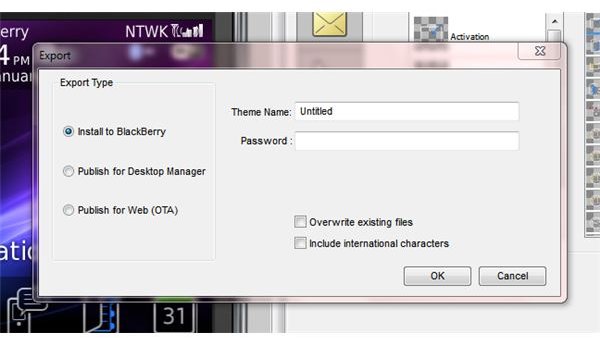
For the more advanced users, who can now continue on their own; you are free to do as you wish with the program and experiment with the different settings independently. Once a theme has been built you can click on the EXPORT button under FILE and then BTS will then begin building the theme once you have chosen whether you want to transfer the theme directly to your BlackBerry, save a batch file for use with the BlackBerry Desktop Manager software, or file export for web posting.
If you created the theme for use on your own device you may select the “Install To BlackBerry” option (make sure your device is plugged into your computer and recognized) and input the theme name and password for your device; the software will then automatically transfer the theme file to the correct directory on your BlackBerry phone.
For beginners who are still lost and would like to know how to advance further with the theme builder you may continue on to the more advanced tutorial: How To Create Your Own Personal BlackBerry Themes (Advanced Tutorial) .
This post is part of the series: How To Create A Custom Blackberry Theme
A guide explaining how to use the Plazmic Theme Builder to design custom Blackberry Themes.


