If you have a complaint or issue with the behavior of someone online, a good way of dealing with this is to contact the owner of their IP address. But how do you find the owner of an IP address?
IP Addresses and Privacy Laws
There are various reasons for finding out the owner of an IP address . Typically you might like to contact the owner with relation to activity hailing from that address, and using one of the various online services that display information for URL and IP address owners, this information can be uncovered.
Note that if you are looking for an IP address currently or recently used by an individual (as opposed to the registered owner) then this information is not available. Such data is protected by privacy laws and therefore cannot be discovered online, and indeed you would need a warrant from your local law enforcement agency or a court order to reveal the physical location of the person using the IP address in question.
Using IP-Lookup to Find the Owner of an IP Address
There are several online services that you can use to discover the owner of an IP Address. IP-Lookup is one popular example, and works by checking the database of registered IP addresses and domain names to check for details relating to the owner of the IP.
Visit https://ip-lookup.net/ to use this service, and enter the IP address in question into the Lookup an IP address: field.
Finding an IP address is simple – on a Windows computer, open the command line (WINKEY + R > type “cmd” and click OK) and then use the ping command. For instance finding the IP address of www.brighthub.com can be achieved with the command:
ping www.brighthub.com
Meanwhile on a Mac you can ping a URL using Applications > Utilities > Network Utility > Ping – just enter the URL and click the Ping button.
Linux users can ping a URL using the Terminal:
ping –c 4 www.brighthub.com
(The –c 4 setting determines how many packets are sent, in this case four.)
One thing that you might find useful with IP-Lookup is that it will accept traditional IPv4 (123.456.789.123 format) IP addresses as well as the IPv6 format addresses (2001:0db8:85a3:0000:0000:8a2e:0370:7334). This should enable you to find out as much information as possible regardless of the IP address information you have found so far.
What the Information Means
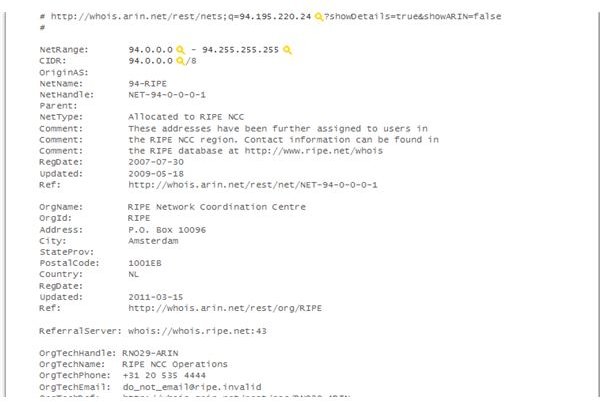
You will find that the data returned when you use IP-Lookup is quite lengthy, and potentially baffling.
On the IP-Lookup website the data is collapsed into six headings, which can be opened in turn to display information such as any related IPs, as well as any relevant email addresses that can be used to contact the owner of the URL.
As far as information concerning he IP address owner goes, however, this is in the IP Owner Info (Whois) section, where you will find the name of the Regional Internet Registry (RIR) that oversees that particular IP address as well as the physical address and owner of the range of IP addresses which the IP you were looking for belongs to.
If you have any complaint concerning the use of an IP address, this is the address that you should contact.
References
RIPE, https://www.ripe.net/
IP-Lookup, https://ip-lookup.net/


