Review of IE9 beta: Is it What the General Public Needs in a Microsoft Browser?
You can download IE9 beta at Beauty of the web. At the site there are links to a number of webpages and sites which have been optimized to

work with the new capabilities of the browser.
In this review, I’ll give you some technical information, and the benefit of all the user experience and reading from my use of the browser. I am not going to show you speed tests - some computers are more equal than other computers. The results I get running tests on a core i3 laptop with Windows 7, over a wireless network, are not going to be indicative of what you would get in a speed test. That said, I will do quite a bit of subjective comparison against older versions of IE and against other browsers I use daily, and let you know how IE 9 beta performs in that context.
IE9 beta does not work on XP operating systems, but it is currently available in 33 different languages; in most languages available for Vista 32-bit, Windows 7 32-bit and Windows 7 64-bit computers.
You cannot keep IE9 beta and an earlier version of Internet Explorer on your computer at the same time - IE9 beta simply overwrites it. You can uninstall it, and Windows will reinstall IE8 for you. A later article in this series gives detailed directions for this.
Be aware that some features and add-ons you were used to do not yet work in IE9 beta. These are not just outside applications like iespell; the option to pull content into Microsoft Office’s OneNote does not work. Some of the options which appear on the favorites bar, if showing, do not work. You can go into manage add-ons through the tools icon, and it shows you that they are enabled, but not available.
Microsoft testing on IE9 W3C standard compatibility (4 out of 5)
Internet Explorer 9 is far more compatible with new W3C web standards than any of Microsoft’s other browsers, despite early claims
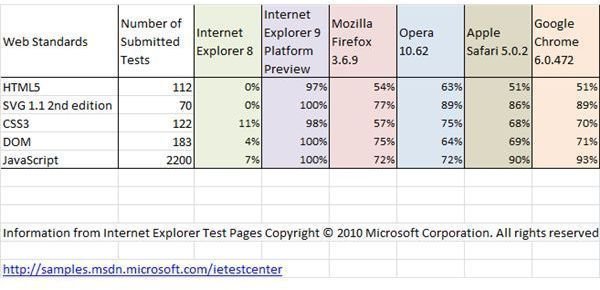
for IE8. While estimates vary, Microsoft’s own testing indicates a high percentage of compliance. What they are not showing is other browser versions’ update compliance, especially for the Firefox 4 beta.
They have made an enormous amount of information available to developers, hopefully creating the possibility of many useful apps and plugins to work with IE9. They have also been releasing early stages to developers - and getting feedback on issues from them. Now, Microsoft is ready to get feedback from the general public, and it is possible that feedback will influence Microsoft in its final version of the browser.
Security in IE9 (4 out of 5)
Security is a concern for many people using Microsoft products. Partially, it is a result of having the largest share of both the operating
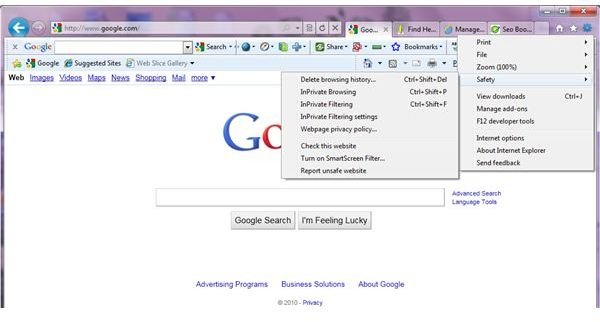
system and browser market, which makes them a target. If someone has a malicious mind, and creates viruses, spyware and other tools to damage computers or steal people’s money, then they work on things that will affect the greatest number of people.
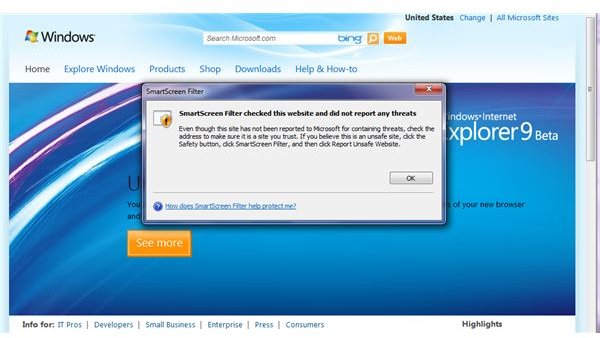
Microsoft also has a reputation for not always searching out security loopholes, and patching them after the fact. However, in IE9, Microsoft is approaching security seriously. As well as the browser precautions we are already familiar with, they have incorporated a SmartScreen filter which you can activate on any website you visit. It takes the URL, checks it against a list Microsoft maintains, and returns a message as whether there have been any complaints or issues with the site. They are playing fair, too. I went to Microsoft’s Windows site and used the SmartScreen, and it reported no problems - and then warned me that, despite the lack of reports about the site, I should look at the URL and make sure it seems trustworthy.
Another feature that I like shows up in the address bar/search box. The default setting is not to allow the search engine you use to
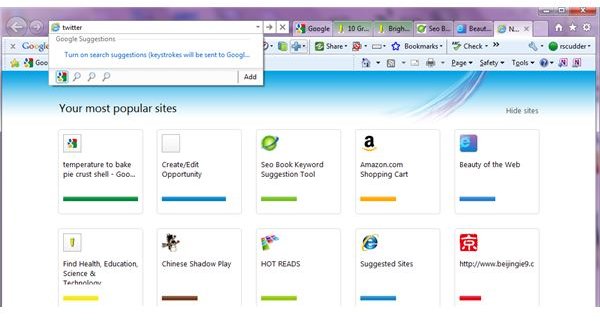
remember your keystrokes. It is often easy to not set security precautions in place if you need to go out of your way to set them up, so having one in place that you must remove deliberately is a nice touch.
It does strongly seem to want you to set up autofill for forms, based on the number of times I got the message. I thought for a bit that the browser was actually reacting to the lock sign in the address bar, and not asking if you wanted your password remembered under those circumstances, but I was wrong. Since the reason most places put a lock sign in their browser for secure signin is because your credit card information may be stored on site, not asking if you want a password remembered would actually be an excellent idea.
I do have a bit of a bone to pick with them, however. They want your feedback on the browser, they have a item in the tools menu to leave feedback, and they insist you have a WindowsLive ID to leave it. I don’t feel they need to know that to receive feedback, or insist you have one.
I am giving them a 4 of 5 for security. I think they are going in the right direction, but I also think they are nosy.
On the next page we look at the faster IE9 beta, and whether IE9 beta has gained this speed at the expense of CPU usage.
Review of IE9 beta speed (5 out of 5)
Internet Explorer has never been noted for its speed. Again, I am not going to time how many seconds and milliseconds it takes to load a page on my laptop, but I will compare it to other browsers I use on the laptop. I stopped using IE7 for several reasons, partially because of my frustration with the tabs, but mostly because IE7 was sooooo sloooooow to do anything. When IE8 came out, I was happy with

regularly using Opera and Google Chrome, which both were much faster, and despite playing around in IE8 for a few sessions, I did not stick with it, but went back to Chrome and Opera. If Microsoft can fix the issues in IE9, I will probably start using it regularly, because besides the speed, Microsoft has added several other features I really enjoy.
Microsoft manged to get this speed into IE9, they said in their developer information; “We have moved all graphics and text rendering from the CPU to the graphics card by using Direct2D and DirectWrite.”
This approach, according to forum and web chatter, is also going to be used in upcoming versions of other browsers.
CPU performance in IE9 beta (5 out of 5)
Internet Explorer has always been known as a CPU hog; although there were some improvements in IE8, it was still the slowest browser out there, and was losing market share, partly because of the speed. It consumes a lot more resources than other browsers running the same websites and activities. Is Internet Explorer 9 beta any different? The speed of IE9 beta has jumped - is it using even more CPU resources to get that speed in the new features?
I went looking for a process monitor application to check this out. I found a couple, and thought that Process Explorer seemed most useful. Using it, I set up two situations on two different computers.
I ran Google Chrome on each one, with around 15 tabs open on each laptop. (They are both running Windows 7 Home Premium 64-bit.) On one laptop I had not installed the beta, so I opened a IE8 browser with the same number of tabs. In each browser, I opened a
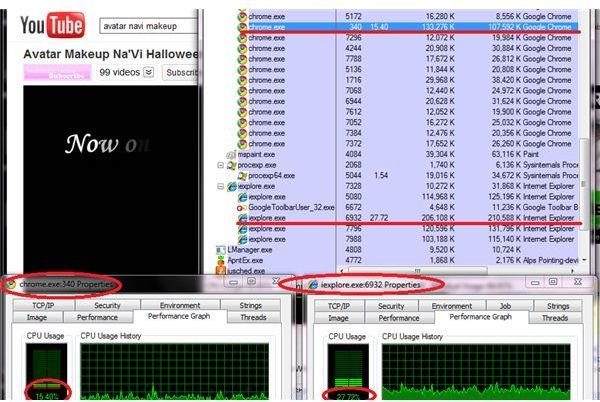
YouTube video, and started it playing, for maximum effect on graphics and processing.
I opened Process Explorer and looked for Google Chrome CPU usage, and then found the same for IE8. Not to my surprise, both browsers were using well over 10% of resources each. The YouTube video seemed to play at the right speed in both, and had no trouble loading. However, Internet Explorer 8 was using a significantly higher percentage of the resources - 27.7% to Google Chrome’s 15.4%.
On my other laptop, where I had installed IE9 beta, I opened up the same number of tabs as I had open in Google Chrome. Instead of YouTube, I opened one of the web sites which Microsoft points you to for content optimized for IE9 in both browsers, and went to the fly the kite page. Google Chrome can play this, so it seemed like a good comparison to see how CPU usage compared.
Looking at Process Explorer, I found the CPU use percentage for Google Chrome and for IE9 beta. The results were significant.
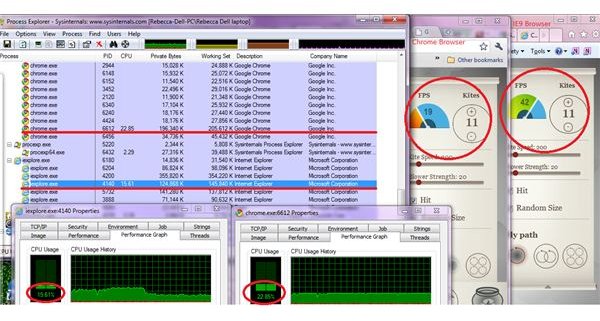
Google Chrome was using a noticeably higher percentage of the CPU than IE9 beta was using, and when I looked at the FPS comparison on the kites page, IE9 beta had a FPS which was much higher than that of Google Chrome. Google Chrome kites looked a little jumpy at times at 19 FPS. IE9 beta had a FPS of 42. Internet Explorer 9 beta used 15.6% of CPU power to do this, and Google Chrome used 22.8% CPU resources. An impressive change form IE8 to IE9.
It seems that by handing graphics processing to the graphics card, rather than using the CPU, Internet Explorer 9 not only was very fast, with an impressive FPS rate, but was consuming much less of the CPU while doing this.
I am giving IE9 a 5 of 5 for this, as it is using significantly less processor power than IE8 needs, is much faster - and used significantly less CPU processing power than Google Chrome did, while keeping a higher FPS.
On the next page we look at the appearance of IE9 beta, and the new graphics capabilities.
Appearance of IE9 beta (5 out of 5)
Internet Explorer 9 looks nothing like previous versions of Internet Explorer. Its extremely minimalist appearance is rather similar to Google Chrome - so much so that at times, with both open, I had to look twice for distinguishing features to decide which browser I was using at that moment. Their tab style is different, with Chrome tabs looking more like truncated pyramids. In a step that makes it more minimalist than Google Chrome, which gives tabs their own row, the tabs in IE9 share the address/search bar row. This has the effect of giving you more space for the webpage you are on.
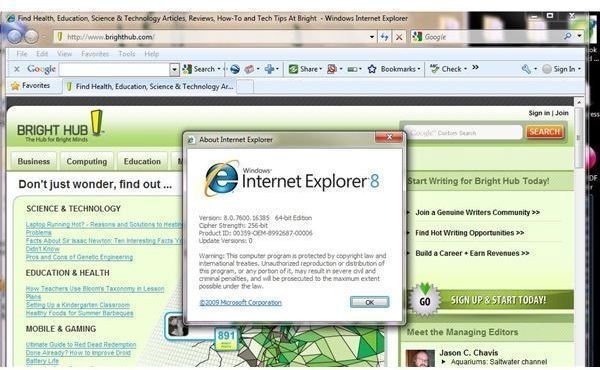
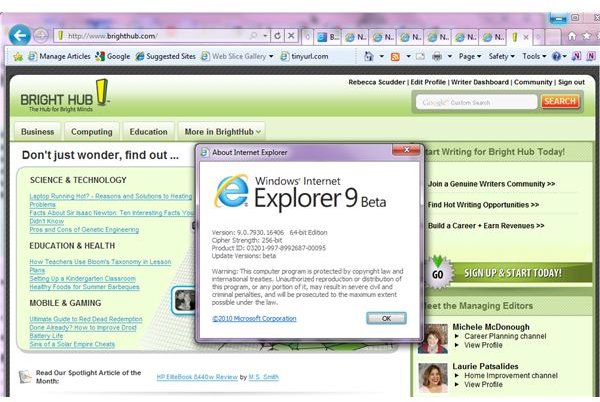

The back button arrow is enlarged, and instead of the Google Chrome multiple tabs getting smaller and crowding one another as you open more tabs, IE9 rolls them under the address bar with an arrow to move them out. This is handy, because it means that at least the favicon for a window is always clear, whereas in Chrome the tabs get so narrow it is impossible to tell anything about them by just looking.
The favorites, bookmark and tools bars are all on one line. It is a very unfussy look, and I liked it. I felt that more of a webpage was showing on the screen at one time, without having to resort to shrinking the zoom.
I think the change in appearance is excellent. 5 out of 5.
Cool new graphic capabilities in IE9? (3 out of 5)
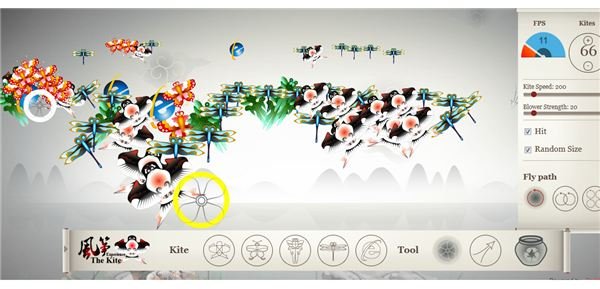
One of the items Microsoft stresses is the new SVG capability, and the really fabulous looking websites people can put together to see in the IE9 browser. They have links to several on the download site for IE9.
I tried some of the websites out in both IE9 and in Google Chrome and Opera. Many features seemed to work as well, although each of the others had some stuttering or inability to handle some of the features in some sites (not the same features.) However, graphics issues are what seemed to be behind most of the times when the tabs in the IE9 browser froze. Perhaps, although Microsoft does not stress it, all computers running IE9 are not created equal.
As IE9 does not work with XP, you need an updated version of Vista to use it (service pack 2). It is optimized to work with
Windows 7, which makes sense moving into the future, but a lot of people have kept their Vista up to date using on a computer with ordinary graphics capabilities. The speed of the browser is, according to Microsoft, a result of utilizing your graphic capabilities. I would really like to know the Windows Experience Index minimum for getting the most out of IE9.
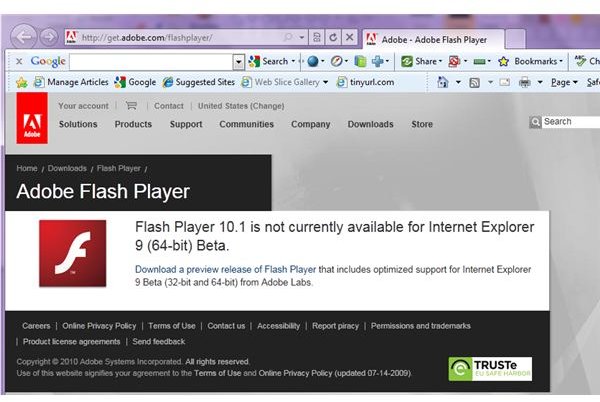
I also tried to watch a flash presentation on a website, and was told I needed to update my Adobe Flash player. They sent me to the site, and it seems Adobe’s latest Flash player does not play well with IE9. They did offer me a chance download an Adobe beta Flash player to use in IE9, but the list of caveats with it was impressive. You need to manually go to Adobe and check for any updates, and once they bring the player out of beta, you need to remove it from your computer before getting the final version. You also need to uninstall any current Flash player before trying their pre-release version. I guess Farmville is going to need to be played in another browser.
My current score for IE9 on graphics is an average 3, which is not what I expected when I first downloaded the IE9 beta release.
On the next page we look at the IE9 beta tabs in general, and the new pin tab feature, and reach a conclusion.
Using the tab bar in IE9 beta (3 out of 5)
As I mentioned above, IE9 handles multiple tabs differently than Google Chrome, so you can always tell what site it is by the tab. The actual width of the tab is dependent on how wide you have made the search/address bar, but the tabs always stay about a centimeter
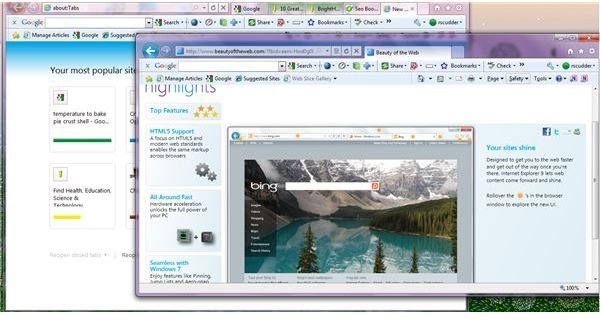
wide, no matter how many are open.
You can grab a tab and pull it away from the browser, and it will begin its own browser window. That is a feature found in other browsers - but I was also able to reinsert the tab from the new window into the original browser, something I have tried unsuccessfully to do in the past. If you open more than one tab in the new browser window, you can insert the new tabs into the older browser window one at a time.
The other tab related feature that impressed me about IE9 was how many tabs I could open without destabilizing the browser. In IE7, more than 5 or so, and I would start having trouble with the way the browser was working. IE8 can handle more, but if IE8 is acting up, one of the first fixes to try is closing most of your tabs. I successfully had well over 20 tabs open in IE9 beta at once, and unless I was using tabs with moving graphics, had absolutely no problems.
I managed to freeze the browser while playing with the tabs, and I think this is an issue Microsoft has to address. If you have animations going on in a tab, and you move to other tabs, leave the browser to take a screenshot, and return to the tab

you left, it will often freeze. I froze tabs several times, and had to close the tab. Part of the time I did get a message from IE9 telling me the tab was not responding (actually, it says Internet Explorer is not responding) and it would attempt to reload it. Most of the time this was successful; the rest of the time I had to close the tab and open a new one to get back to where I wanted to be. And I froze the entire browser solid when I had animations playing in at least two tabs, and was moving in and out of the browser. I also opened up Google Chrome to compare a feature, and when I returned to IE9, nothing worked. I was not even able to send feedback to them about the error. I finally closed IE9 from the taskbar.
IE9 has tried to implement the feature found in other browsers that if there is a problem in one tab, the whole browser does not normally go down, which is an advance. Instead, the single tab will close, and IE9 tries to bring the site up again in the tab without being asked.
While I think that IE9 has made vast improvements to the way tabs work in Internet Explorer 9, multiple cases of tabs freezing detracted from the experience. Presumable this will be corrected in the final release, but for now, it gets a 3 out of 5.
Pinning the tab to the taskbar (5 out of 5)
This is an innovative feature with a lot of potential for websites. IE9 gives you the ability to pull a favicon onto your takbar and pin it, and when you
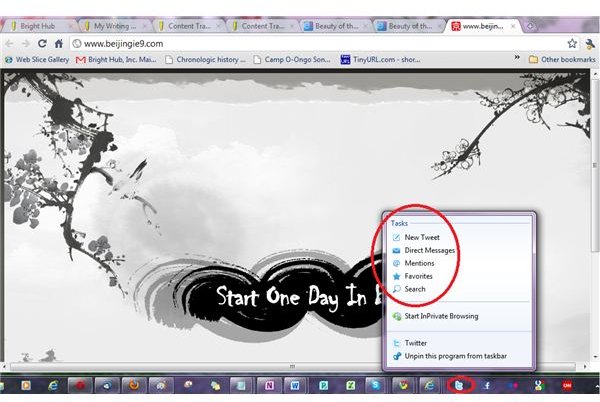
click it, a browser window opens for the site. Buttons on the browser pick up color and sometimes style from the website.
As well as making the browser window look branded for your site, web sites can set up jump windows, accessible with a right click on the favicon, and list specific locations within the site to jump to when the browser opens. A few large sites have added this feature; many have not. Twitter has, Google has not. As IE9 is available longer, I am sure the list of sites taking advantage of this will go up. At release, there were supposed to be about 70, with WordPress making the feature available as well.
IE9 Review (4 out of 5)
I am giving IE9 beta a 4 out of 5, overall. It is a beta release, and so it is expected that there will be some flaws, so the score is actually extremely flattering. It is fast, handles tabs well, is well on its way to being compliant with W3C standards, and has a couple rather innovative features. It also freezes, isn’t very sympathetic toward lower end or older computers, and doesn’t - yet - live up to the hype about the graphic features.
I will keep an interested eye on it.
Leave a comment if you notice a cool feature I have not covered, or a flaw I didn’t see yet.
This post is part of the series: Exploring IE9: Reviews and Features
IE9 beta is Microsoft’s new, fast and innovative version of Internet Explorer. In this series we review the IE9 beta browser, and some of the special features capable through the browser. We teach you to pin tabs on the taskbar in IE9 to act like applications, uninstall it, and more.