Internet Explorer 8 Problems: How to Fix and Repair IE 8 When it Hangs or Freezes
Why Internet Explorer 8 Takes Time to Load
Generally speaking, the problem of slow load time is not specific to Internet Explorer 8 alone. Slow functioning and freezing applies to all browsers—not only the ones from Microsoft—depending upon the circumstances wherein they are used. There may be many reasons for this behavior. However, as most people use the latest version of Internet Explorer, IE8, the complaints are more—indicating slow load time is a major flaw in the latest version of Internet Explorer. On the contrary, there are many users who are enjoying the features of Internet Explorer 8. It does take time loading, but, once loaded, it is good enough for working, gaming, entertainment, and other uses.
Internet Explorer 8 does create problems on some machines, the major one being its nonresponsiveness at times. On some machines, the problem is so recurring that it has led to several discussions in thousands of forums that brand Internet Explorer 8 as a useless browser. However, the latest version of Internet Explorer is the most stable browser among all its predecessors. Before moving towards troubleshooting on how to repair Internet Explorer 8, I would like to inform you of the reason why it takes so much time to load.
If you have used Internet Explorer 8, you will agree that there are many features in the latest version of the Internet Explorer. When you open a fresh window of Internet Explorer, it makes you wait for a long time before presenting you with the menu for navigation. This is because it has to load all of the default accelerators and plug-ins in addition to the ones you must have added to the browser. Most of these add-ons and plug-ins have to be loaded into the electronic memory before you can browse. Other extras (additional plug-ins) are loaded on demand and are cached for further use.
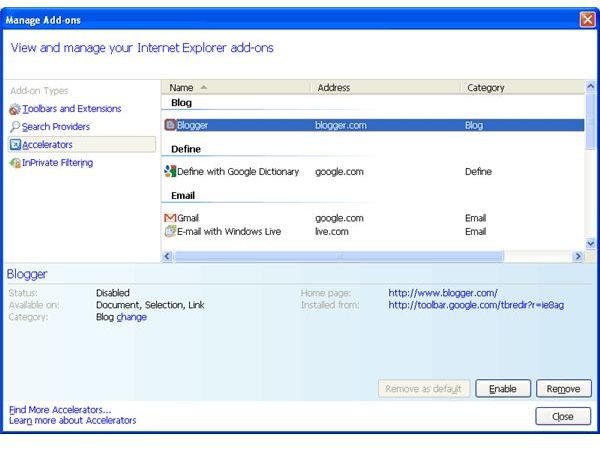
NOTE: If you want to check out the Internet Explorer 8 plug-ins, open the Tools menu, and click on Manage Add-ons. You will be presented with a window (See Image) that will show most of the plug-ins in use by the browser. If you want to speed up Internet Explorer and reduce its memory requirements, you may remove or disable the plug-ins that you don’t need.
The next section takes look at how to repair Internet Explorer 8 when Internet Explorer 8 hangs frequently.
How to Fix and Repair Internet Explorer 8
Step 1
Most of the time, the problem is with your antivirus or antispyware. In fact, incorrect settings in your antivirus and antispyware create problems not only with Internet Explorer but any browser or application requiring data transmission over a network. To check if they are the cause, turn them off. Close all open windows of Internet Explorer 8, and open a fresh one. Use this Internet Explorer window to browse ONLY secure sites. If it works fine, the problem is with your antivirus or antispyware software. You can isolate the problem by turning them off one at a time and seeing which one is causing problem. You may then fix it by updating or reinstalling the antivirus or antispyware program or even by replacing the one creating problem. But, if your Internet Explorer still causes problems, check out step 2.
Step 2
Add-ons or plug-ins are either added manually or are added with the installation of any application such as Adobe Acrobat Reader. Some are default. A corrupt add-in may also cause an Internet Explorer freeze. To check this, right click on the icon of Internet Explorer, and select the option Run without Add-ons. If Internet Explorer begins working properly, one or more of the add-ons are corrupt, and you should follow the method mentioned in the next paragraph to fix the issue. If it is not working properly even with add-ons disabled, you may proceed to step 3.
To locate the plug-in creating problem, start Internet Explorer normally again and disable all plug-ins (see the NOTE and Image in the first section). Enable each plug-in—one by one—after browsing for some time with each plug-in. You can isolate the plug-in causing the problem as Internet Explorer 8 hangs as soon as you enable the corrupt plug-in. Click on the Disable or Remove button after selecting the plug-in in the Manage Add-ons window to fix the problem.
Step 3
There is high possibility that one of the processes on your machine is conflicting with the functioning of Internet Explorer. To check this, you will have to test your Internet Explorer in a clean boot environment. The link also explains how to isolate the process interfering that causes Internet Explorer 8 to freeze. If your problem is not fixed, you will have to go for a reset as mentioned in the next step.
Step 4
Resetting Internet Explorer restores the browser to the state when it was first installed. The first section of the article Troubleshooting and Reinstalling Internet Explorer in Windows XP explains how to reset Internet Explorer 8. If the browser works fine after resetting Internet Explorer, your problem is fixed. Otherwise you will have to re-register all components of Internet Explorer 8. If the problem disappears after re-registering all components, you are done with troubleshooting Internet Explorer 8. If the Internet Explorer 8 freeze appears again, the final resort is to reinstall Internet Explorer 8.
A proper reinstall of Internet Explorer 8 should fix the problem when Internet Explorer 8 hangs frequently. If the problem still persists, you will need expert help. You may either call a local expert technician or contact the MS Help and Support Center to repair Internet Explorer 8.
Tip: An Internet Explorer 8 freeze may also occur when you open too many tabs. Try to keep the number of tabs in Internet Explorer to five or less. If you need more, it is better to open a new window of Internet Explorer instead of more tabs in the same window. Internet Explorer hangs even when you use several Internet Explorer tabs depending upon the machine and the number of active processes.
Also See: Check out Tips to Speed up Internet Explorer 8 and other IE8 problems.
This post is part of the series: How to fix IE8 Problems
Though IE8 is one of the top browsers for Windows, it has its share of problems too. This series aims to pinpoint the most common Internet Explorer 8 problems. While discussing the cause of IE8 problems, it also aims to help you fix IE8 problems.