Find Out How to Recover a Deleted or Lost User Profile in Windows XP
An Intro to User Profiles
A user profile is a personal set of audio, visual and desktop settings based purely on the user’s choice. A user profile may vary from user to user and is indicative of the interests and personality of the user.
Windows XP allows each user to make his/ her profile once (i.e. choose his/ her favorable settings) and then save this profile too. This saves time and energy as the profile once chosen is saved in the permanent storage (hard disk) and is retrieved every time the user restarts the system or logs in.
Windows XP users may encounter a situation where they have a lost user profile, which means that when the user logs in to the system and his/her personal profile does not load.
The following three scenarios may have occurred in such cases:
- A user profile exists in storage but it has disappeared.
- The user name at the Welcome screen doesn’t match with the one in the task manager
- A user profile has been deleted accidentally.
Recovering XP Deleted Or Lost Profiles
Now let’s move on to the solution of these problems; to recover the lost profiles in the three situations stated above. Given below is the procedure that should be followed to overcome each:
1. A user profile exists in the storage but it has disappeared.
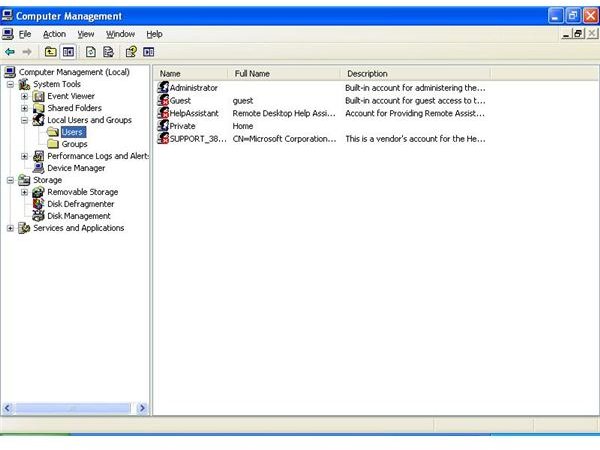
In some cases, the profile exists in the hard disk but it just does not appear at the Welcome screen or in the User Accounts folder in the Control Panel. In such cases, the user may receive the following error message when he/ she attempts to create a new account with the same name; “the account already exists”. This happens when the user account has been disabled or is not active. Such accounts do not appear in the User Accounts or at the Welcome Screen. These disabled accounts can only be accessed in the Local Users and Groups window. To determine whether an account is active or not, follow this:
a. Go to RUN, type in “compmgmt.msc”, hit Enter.
b. Double-click on the Local Users and Groups folder.
c. Double-click on Users.
If a user name is displayed with a red cross in the check box before it, this means that the account is disabled or not active. In order to activate the disabled user account:
a. Double-click the user name.
b. Unclear the ticked check box.
This way, the disappeared profile will show up again at the Welcome Screen as well as in the User Accounts folder in Control Panel.
2. The user name at the Welcome screen doesn’t match with the one in the Task Manager.
It can also happen that the user name appearing at the Welcome screen is not consistent with the one that’s appearing in the Documents and Settings folder or on the users tab in the Task Manager.
This happens because the user has modified the user name in the User Accounts folder in the Control Panel. This effects the name appearing at the Welcome screen. It is changed but the name of the actual account does not change in the hard disk. The user names displayed in the folders Documents and Settings and Task Manager remain the same as before. Modification in the Control Panel folder does not affect them.
To overcome this mismatch in the names of the same account holder, the user needs to find out which account corresponds to which display name. Here’s the procedure:
a. Log on as the particular user whose name is mismatched.
b. Go to the Task manager.
c. Click the Users tab.
d.The user account which is marked as active is the one currently logged in.
e. Now you can easily change the user name to resolve the profile error problem.
3. A user profile has been deleted accidentally
In case the user profile has been deleted accidentally, only the administrator’s login will be shown at the Welcome screen; the user’s personal login icon will not be shown. To recover the lost user profile, we will need to use Windows Registry editor.
Note: The Registry is one of the most crucial components of Windows operating systems, therefore it is important to backup the current Registry prior to making any changes to it. To create a backup, follow these simple steps:
a. Go to RUN and type “regedit”, hit Enter.
b. Open the File menu and click on Export, a new screen will open.
c. In the bottom of the screen, select All under Export range (it is a good idea to backup everything in the registry in case a registry entry accidentally gets changed)
d. Give a name to your Registry backup file and then press the Save button.
Note: To restore the registry, open File menu in the Registry editor and select Import. Browse and select the backup file you created and then press Open. Your Registry will be restored.
Now when you’ve successfully created a backup of Windows registry, follow these steps to recover the lost user profile:
a. Go to RUN and type in ‘Regedit’ then press OK.
b. This will open the Registry Editor - A Windows tool that stores important operating system and users’ information.
c. Navigate to the following registry entry: ‘HKEY_LOCAL_MACHINE\SOFTWARE\Microsoft\WindowsNT\CurrentVersion\Winlogon\SpecialAccounts\UserList’
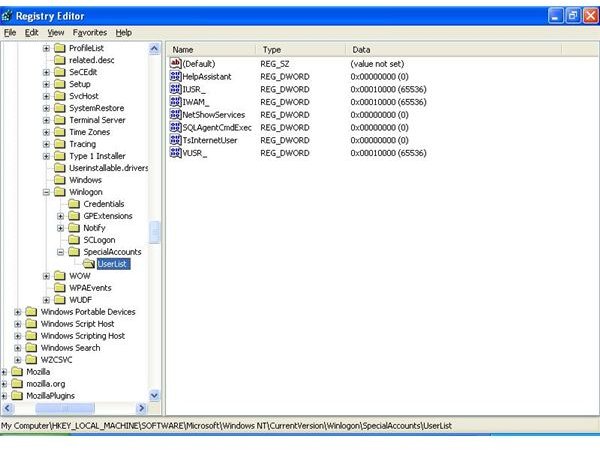
d. On the right-hand side of the window, right-click on the empty space and inside New, select DWORD Value. A new value item will be created and will be shown on the screen.
e. Give it the same name as the user name that had its profile lost.
f. Double-click on this value item and set Value data to 1. This will re-create a new user profile with the given username.
Now when you will restart your computer and log back into your Windows account, you will no longer face the same profile issue.
Conclusion
In this article, we discussed the concept of user profiles and their usability, problems related to lost profiles and their solutions. Following the steps above in these specific scenarios will help the users recover lost user profiles in the Windows XP operating system.
-- Got a deleted or corrupted user profile in Windows Vista? Find out how to fix it in Recovering a Corrupted or Deleted User Profile in Windows Vista
-- Having problems opening the Windows Registry Editor? Find out how to open the disabled Registry Editor, here<br>