Outlook Express gave way to Windows Mail with the rollout of Windows Vista and Internet Explorer 7. However, if you are still running Outlook Express you might find you want to use contacts from an existing Outlook account, or vice versa.
Export from Outlook
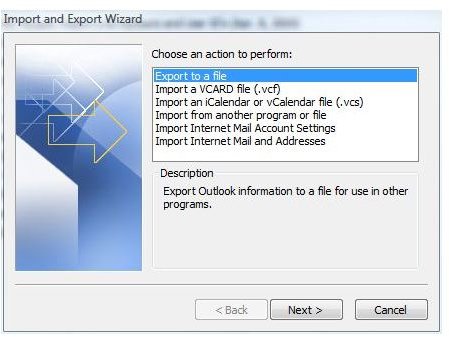
The first step in converting Outlook contacts to use them in Outlook express is exporting them. This may sound like a highly technical step, but you will find it is actually quite simple and straightforward. Open Outlook, and from the main Outlook window go to the File menu. Click Import and Export and the Import and Export Wizard will open. Select Export to a File and click Next.
Select Comma Separated Values and click Next. Select Contacts under Select Folder to Export From and click Next again. Give the file a name, such as Outlook Contacts, and click Browse to select a location where you want to save the file. Save it to your Desktop, My Documents, or somewhere else that will be easy to remember. Click OK, click Next and then click Finish.
Import into Outlook Express
Once you have exported the contacts file, you can continue converting the file to Outlook Express in just a few simple steps. Open Outlook Express and go to the File menu. Point to Import and select Address Book. Select Text File or CSV (Comma Separated Values) and click Next.
Click Browse and find the file you exported from Outlook. (You saved it on your Desktop or My Documents, remember?) Select it and click Open. Click Next. The fields should be mapped correctly automatically, meaning Outlook’s First Name field should be matched up with the First Name field in Outlook Express. If any of the fields are mapped incorrectly, click the Change Mapping button to make changes. When you have made any desired changes, click Finish. The Outlook contacts will be converted to the Outlook Express address book.
Import Outlook Express Contacts into Outlook
Converting Outlook Express contacts to be used by Outlook is even simpler. In fact, you can import Outlook Express contacts into Outlook without even opening Outlook Express.
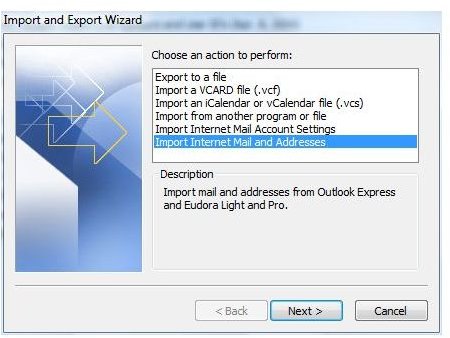
Start Microsoft Outlook and go to the File menu from the main Outlook window. Click Import and Export to start the Import and Export Wizard. Select Import Internet Mail and Addresses and click Next.
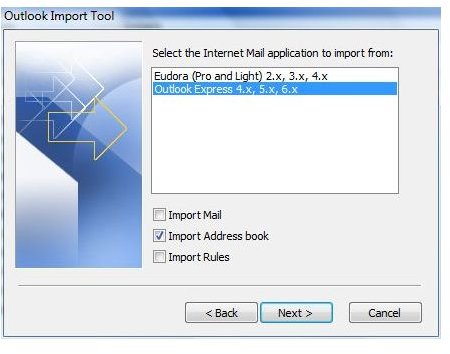
Select Outlook Express from the Outlook Import Tool. Clear the Import Mail and Import Rules checkboxes if you only want to convert the contacts to Outlook. Click Next again.
Determine whether you want to allow or replace duplicates and click Finish. If prompted, select the location of your Outlook Express application and click OK. When the files are converted, a message will appear summarizing the number of contacts imported into Outlook.


