Prevent unauthorized users now from intercepting and viewing the emails you want to exchange with others by reading about some of the available freeware (listed here in the article) to help safeguard your emails.
Protecting E-mails
Using an encrypted software program allows you to protect any confidential emails. It will help keep information private and data protected. There are freeware available to help protect emails, so users have no reason to worry.
Advise: As part of recognizing the importance of email communications, users need to rely on protecting their electronic mail (possibly with one of the freeware programs mentioned in the next section).
How it works:
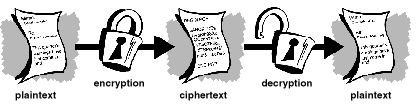
The process requires encryption ; this entails taking the plaintext of the email and scrambling it, so it won’t be legible if intercepted. In order for the recipient to read the email, it must be decrypted by using a password (or key). For example, public key encryption uses a key to encrypt the data and another key to decrypt it.
Figure 1. Network Associates - Introduction to Cryptography
Freeware Programs
Users need email protection they can trust. The freeware applications mentioned next can be trusted for safeguarding emails.
1_._ iSafeguard Freeware 6.2 - This program can safely secure your files and e-mails. It uses a strong encryption and digital signature. Supports the following e-mail clients: Microsoft Outlook, Microsoft Outlook Express, Yahoo Mail, Hotmail, Gmail, Juno Mail, Lycos Mail, Eudora Webmail, Brinkster WebMail. It also supports Text, RTF and HTML e-mails.
2_._ HushMail - This is a Web-based email service that uses a Java applet to encrypt and decrypt messages. It is able to encode emails using a 1024 bit public key encryption. E-mails attachments are also encrypted.
3_._ Safe Express Home 5.5 - It is the free version of a commercially available product. The features are the same, but an ad window is added. This software is an e-mail client that is easy to configure and features automatic e-mail encryption and anti-spam filters.
4. Sbwave - This program allows users to send and receive encrypted email via a web form. It requires no software to install. It also doesn’t have users sign up for anything and does not place ads in the e-mails.
Remark: Each link contains information that is pertinent to the software. Read before downloading and installing.
Here is the information on where to download each program…
- iSafeguard Freeware 6.3: https://download.cnet.com/iSafeguard-Freeware/3000-2092_4-10188979.html
- HushMail: https://www.hushmail.com/
- Safe Express Home: https://www.softpedia.com/get/Security/Encrypting/Safe-Express-Home.shtml
- Sbwave: https://www.sbwave.com/enkryptor/encrypt.html
Other useful but less popular free email encryption programs:
-
Izemail 1.7 - Available at cnet.com . It encrypts and sign emails just by pressing the Send button in the email program.
Advertisement -
TextKrypt 1.1 - Available at softpedia.com . It allows the secure sending of plaintext emails through Outlook Express.
Alternative solution: Users can decide not to run any software at all and send a secure email via Sendinc (Send Technology Inc.) who offers an easy-to-use, free email encryption service. “Sendinc creates a secure key for your recipients and encrypts your message using the same algorithm the NSA has deemed fit for the encryption of TOP SECRET documents.” [1]
Other options: Users can choose a secure email client like Mozilla Thunderbird, which is a cross-platform client software package that is compatible with Windows, Mac, and Linux. With Thunderbird, it can safely protect emails by discovering scams. It offers filtering, phishing, and encryption capabilities. A similar email client that is very flexible and secure is Claws Mail. Tip: Use an email client that can interpret HTML email.
Freeware program in the spotlight: Gold Lock Desktop offers email encryption for mobile phones and computers. It is a suitable freeware email encryption program for wireless network email communications. It uses RSA and AES encryption algorithms to securely protect electronic mail. (site: https://www.gold-lock.com/app/en/Home )
Protecting Apple Mac OS Emails
Try: GPGMail - contains no encryption coding; instead, it uses PGP (Pretty Good Privacy) keys to be able to encrypt/sign a message. And, it will encrypt and decrypt mails using the OpenPGP standard. (Site: https://www.gpgtools.org/gpgmail/index.html )
Current version: Version 2.0a30 (release date: 13 February 2012)
Requirements: OS X 10.7 (Note: the older version does support 10.3, 10.4, 10.5, 10.6)
Download: 6 MB
Protecting Linux Emails
Try: GnuPG - is an open source replacement for PGP. The GNU Privacy Guard (GnuPG) is a command line too for secure communication that allows encryption and decryption of documents. Available versions: 1.4.12 (referred to as GnuPG-1) and 2.0.19 (referred to as GnuPG-2). Both are compliant with the OpenPGP and S/MIME standards. (Site: https://www.gnupg.org /)
Reference Section
[1] Send Technology Inc. (Send a Secure Email Now): https://www.sendinc.com/
Email Software: https://emailsoftwarepro.com/
Freeware PGP versions: https://www.pgpi.org/products/pgp/versions/freeware/
Image: Network Associates - Introduction to Cryptography
This post is part of the series: Learning Everything About Encryption
Utilizing encryption will safely protect and secure computer information. There’s lots to learn about the topic, as well as to know which encryption software programs will work best.


