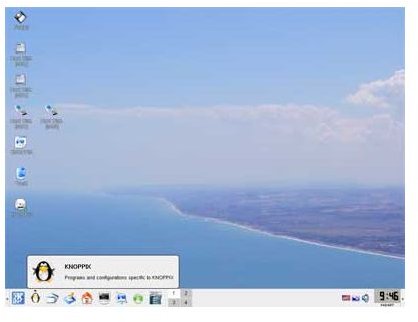
The Knoppix CD serves as a rescue disk that allows a computer user access to applications and utilities that allow him to fix hard drive errors. The graphical user interface makes the hard drive tools in this Debian-based distribution easy to use.
Knoppix: An All Purpose Rescue Disc
Few people select a Linux distribution because its boot CD offers good disk utilities for many other operating systems. Even when tools like QT partition manager and good disk drive formatting tools are available, most people choose a Linux distribution because they wish to install it on their own computer.
A few fanatics have installed the Debian-based Knoppix distribution on their computers, but it is not the intended purpose of the discs. The initial Knoppix CD gives the user a system that can run entirely off of a compact disc. The Knoppix live disk lets you use an operating system and fix the file system errors of the computer’s hard drive.
The best part about all of the tools that Knoppix includes is that the user does not have to pay a dime to use them. Well, that is not entirely true. He has to buy the DVD or flash drive to place the operating system on.
Knoppix Cannot Fix Physical Hard Drive Errors
Almost all computer users know that physical errors cannot be repaired by hard drive utility software. Severe errors on any of the platters may make hard drive replacement necessary. The software that comes with this Debian-based distribution can repair boot sectors, write 0s to the hard drive to remove the most persistent viruses, and partition existing hard drives. The GUI based interface makes this task straightforward. You do not need to be a PC expert to use Knoppix’s utilities. The utilities are straightforward, although a user should know the consequences of what he intends to do before making any changes.
Using Knoppix to Restore the Master Boot Record
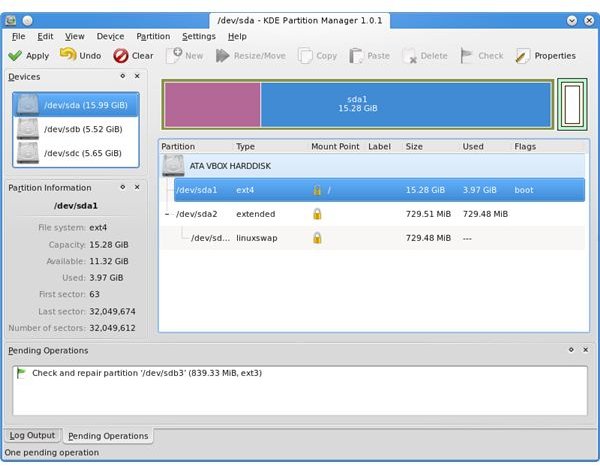
The tools offered by Knoppix are found in the QT Partition manager. You start any intended repair to a computer by making sure that the computer you intend to repair can boot from the optical disc drive. Check the boot settings in the computer’s BIOS. Make sure the optical drive is listed before the hard drive in the boot order.
Restart the computer. The Knoppix live disk will load itself into the computer’s memory. When the KDE desktop manager loads, start the QT partition manager program. If you are using Gnoppix, you will have a Gnome desktop instead of a KDE desktop.
The first thing a new user might realize is that the program offers a bunch of options. You can change the partition sizes, clear the master boot record, fix the master boot record, change the file system on a certain partition, reformat the partition for many Linux, Windows, and even Macintosh systems or simply write zeroes to the drive. Which option you want to choose depends on which repair you need.
Warnings About Using Knoppix’s Linux Tools for hard Drive Repair
Linux comes with a variety of tools to help fix errors in the file system. These tools work well for native Linux file systems. They will not work on drives that use the file allocation table, NTFS, or Macintosh file systems. Using the native tools will damage these partitions.
It is also a good idea to have any important information backed up before making any changes to the hard drive. Making any changes to a hard drive is a risky proposition. Use Knoppix before going to the repair shop, but after you exhaust all other options.
Using Knoppix to Restore the Master Boot Record
Restoring the master boot record using the QT partition manager takes a few seconds. The master boot record is a small file used by the computer before it loads the operating system. Select the restore master boot record option from the menu, select your operating system and follow the onscreen prompts. Remove the Knoppix CD and reboot. The primary advantage of using the Knoppix over Windows is that Knoppix takes less time to do this than the Windows recovery CD.
Use Knoppix to Write Zeros to the Hard Drive
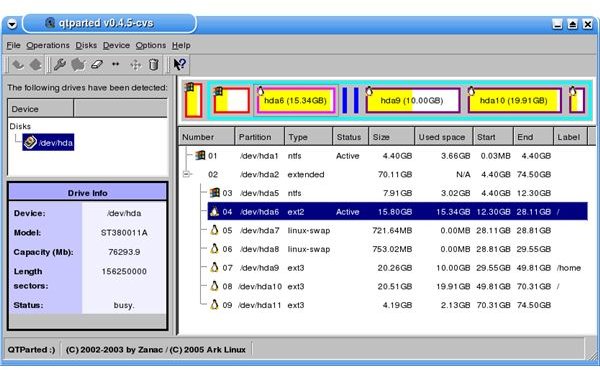
Writing zeros is not quite a low level format. It removes any information on the drive, including the boot sector information. Select this option to remove the most permanent of viruses. You will have to reinstall everything after performing this option. The amount of time it takes to complete this formatting option depends on the size of the drive.
Using Knoppix to Fix File System Errors
Knoppix’s tools do not work well for the NTFS or Macintosh OS file systems. The hard drives utility does give you a graphical user interface for the native Linux tools . The GUI calls the command line functions. Whether a Knoppix user chooses the GUIs or the command line tools is a matter of personal preference.
Can I Install Knoppix on My Computer?
There’s nothing stopping a user from installing this Linux distribution on his hard drive, but that is not its intended purpose. The designer intended the distribution CD to be used as a rescue CD for when all other options have failed. Download the CD ISO and burn it. Keep it until you need it.
Before making any changes, it is a good idea to back up important data on the target computer’s hard drive. You will not be able to take files off of a Windows hard drive after loading Knoppix. The files get mounted in read only mode.


