Replacing Windows with Linux or Running Linux Alongside Windows
Introduction
Operating systems use different file systems. The Windows series up to the XP release used FAT32, and the NT series used NTFS. Linux can read and write to those file systems, but runs on a different file system itself – in fact several of them are available. The main file systems that Linux uses are ext2, ext3, reiserfs, xfs, and jfs. However, most of the time ext3 is now preferred, which we will continue with throughout the article.
In order to have more than one operating system on the same disk, the disk should be so arranged that there is a separate space for each operating system, plus the space to be formatted by the operating system’s native partition. So, if we will have two operating systems, Linux and Windows on the same hard disk, then Windows space will be formatted with NTFS (if NT, XP or Vista to be installed), and the Linux space will be formatted with ext3.
In order to avoid tweaking with the boot loaders after the installation, I recommend that you install Windows first and then Linux afterward. The reason is that Linux can recognize and change the Windows boot loader accordingly, but this is not true the other way.
Making Space to Run Linux with Windows
If you have already dedicated all of your hard disk to Windows, then you have to free up some space. For all Windows operating systems, before attempting for making space defragment your hard disk first. Then back up all of your important files. Making space involves partitioning and it is a low level activity that has the potential to damage your data in case of any failure.
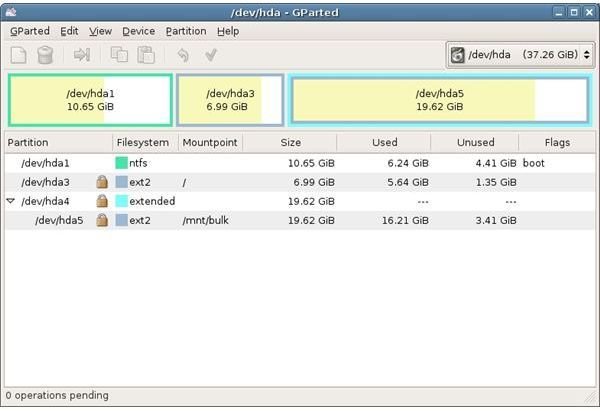
If you have Windows XP installed, download GParted and burn it as an image to a CD. When you boot your computer from GParted, you will be shown the partitions in your hard disk. You can resize your existing Windows partition and create an empty space. To do that move the slider by clicking and dragging to the left to shrink and right to extend. When you are done, save your changes and reboot.
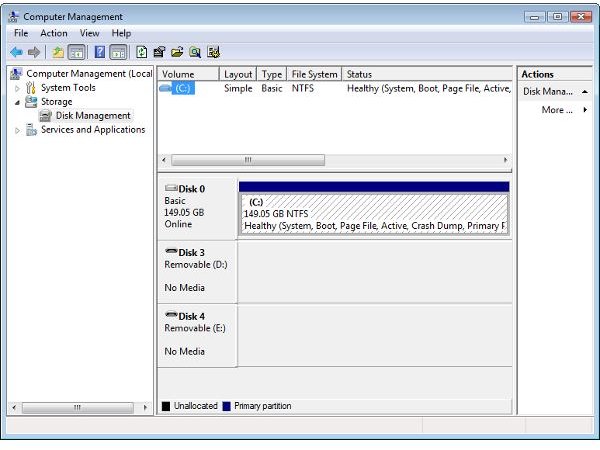
If you have Windows Vista installed, right click on “My Computer” and select “Manage.” In the “Computer Management” window, select “Disk Management” on the left pane under “Storage.” At the bottom pane, right click on the partition and select “Shrink Partition.” The tool will check how much space it will be able to free up. If you have followed my advice and defragmented your hard disk, the freed up space will be higher. If the available space is about 10 Gigabytes, click the “Shrink” button. Depending on the size of your disk, you can configure the amount to your liking. When Vista finishes, you will see a partition in the bottom pane named “Unallocated” which will be the space in which we will install our Linux distribution. Reboot the PC after shrinking the Windows partition.
Installation - Running Linux Alongside Windows
You can go back to our previous article about the installation. The Linux installer will take note of the empty -unallocated- space and will present you the option to use this space during the installation. Ubuntu installer has the “Guided - use the largest continuous free space” option in the “Prepare disk space” window; just make sure this option is selected when prompted.
Installation - Replacing Windows
You do not need to do anything if you will replace your Windows installation and use only Linux on your hard disk. In all Linux installers, there is a partitioning section and in all partitioning sections there is an option to use the entire hard disk. It can be either under “Prepare Hard Disk” or “Disk Partitioning” title or something very similar and you can recognize it immediately during the installation.
Conclusion
As you have just seen, running Linux together with Windows is not rocket science. Like most computer-involved tasks, you have to know the basics and then apply them carefully to get the results you want.
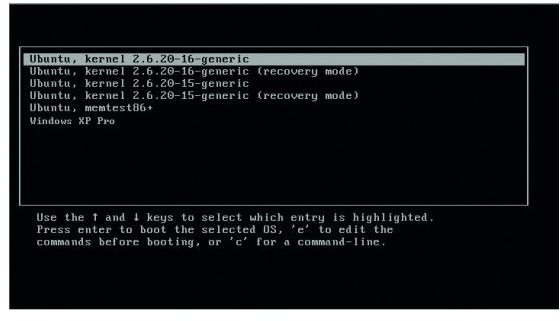
When you have done everything right and installed your Linux distribution, you will be greeted with a menu that will let you choose which operating system you want the computer to run. Basically this is what “dual booting” is.
This post is part of the series: Getting Started with Linux
We have created a “Getting Started with Linux” series to assist all the new users in their quest to start working with the most enjoyable operating system. We have some tips and tricks along the way so make sure you read everything carefully.