There are many reasons to find out what type of motherboard you have installed in your computer, especially if you have plans on updating it or replacing it. Here are some tips on discovering the motherboard information.
PC Motherboard
Knowing your motherboard information is an important part of not only updating a motherboard, but upgrading one too. Information about the motherboard can include its form factor, type of processor it is able to use, its speed, what type of components can be used, and what type of onboard material it uses. These are important aspects when updating the BIOS information or if you are looking to replace your current motherboard for a faster and newer one.
Having the motherboard information is essential when need to update the BIOS information. The BIOS is what starts the test that ensure your computer is working properly and alerts you to any errors. Updating the BIOS requires you knowing some of the information on your motherboard, like the current BIOS and sometimes the make and model of your motherboard. Read this article to learn more about a computer’s BIOS .
It is also equally important to have this information when purchasing a new motherboard to replace your current one. Knowing this information allows you to discover if the components you currently use will work with a new board, as well as knowing if a new motherboard will be faster for your computing needs.
Motherboard Identification
There are a few ways to check your motherboard information.
The first place is to check any materials that came with your current motherboard. If you have built your own computer, you may still have the motherboard’s user manual laying around. This will give you the general specs of the motherboard, like the ones mentioned above. If you didn’t build your computer or if you purchased it from a retailer, you still may be able to check on the information regarding the manufacturer of your computer on their website.
Another way is to look within System Information on your computer itself. Most operating systems will have an option to view statistics regarding your machine, like what type of OS is running, what type of video card, processor, etc. If you’re just looking for the basics - like processor type - this is a good place to go. Again, depending on your OS, System Information may be found within the Administrative Tools folder.
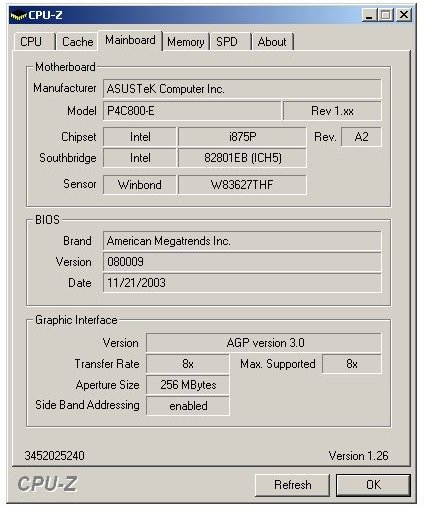
A third way to check is by using third party software. These types of software scan your computer before sending you the results in a user friendly interface. A good program to use is CPU-Z . CPU-Z gives you important information like the name of the manufacturer, the BIOS brand and version, the model number, the chipset, and many other important information. CPU-Z and other products are usually free to download and free to install.
Looking for the motherboard information is quite easy and doesn’t take much time. Having this information at hand will make it easier for the next update or upgrade that you do.
Image content - CPU-Z interface @ CPUID.com


