DVI vs. VGA - Big Screen Monitor Connections and Cabling
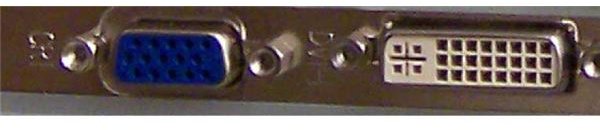
VGA connectors, or more accurately D-sub connectors, or even more accurately DE15HD connectors (D for D-subminiature, because the connector’s end is D-shaped; E for the size of D-Sub connector, from A to E, E is smallest; 15 for the number of pins; HD for high density, since it has 3 rows of pins) have been around for a long time - perhaps, even longer than it took to explain their nomenclature.
So why is this connection being replaced by DVI?
Oh VGA, You’re So Analog
First, we will explain how a VGA can garble data. VGA connectors are analog. Computers are obviously digital. Some data gets lost in translation (digital to analog conversion, or DAC). This was no big deal when we were using CRT (cathode ray tube) monitors, since these are analog as well, and the data had to get lost somewhere. If you have a digital monitor, which are almost everywhere by now, it is obviously better to preserve the signal as digital. This prevents errors as the data goes from digital to analog and back to digital on the screen
The other problem is harder to nail down. This digital to analog fudging means we can’t really compare apples to apples in terms of bandwidth and resolution. But we can see if the apples are starting to rot and we should get oranges instead. The maximum resolution claimed for a VGA connector is 2053 x 1536, which sounds like a lot. The 4:3 aspect ratio, while indicative of the age of the standard, is not important; we’re looking at how many pixels it can carry. For reference, if we apply the current 16:10 standard, that puts it about halfway between the 1920 x 1200 WUXGA specification used for 22-28” monitors and the 2560 x 1600 WQXGA spec used for 30” and larger screens.
So (ignoring DAC issues) VGA should be plenty unless you have one of the highest resolution screens available, usually found only in front of graphics editing professionals, right? If you have the hardware for it, you can definitely turn your settings up that high, but it won’t look very good. Maybe if you were using a 6” long gold cable with 3” wide lead shielding it would look pretty good, but still not as good as DVI.
The analog signal carried by a VGA cable is subject to significant degradation. You don’t just lose on the DAC; the data that comes out of your computer is then assaulted by all kinds of electrical noise and every inch it travels along the cable. In most cases, you will actually notice a difference if you use a 6 or 3 foot long cable, particularly if the longer one spends more of its trip running around alongside other cables behind your computer.
Since the VGA signal loses a lot of the data’s finer points, it is only suitable for far lower resolutions, as we explain later on.
Digital Video Interface: Emphasis on Digital
The first and obvious benefit is no DAC: the signal produced by your computer is digital, stays digital, and ends up at a digital screen. There is no conversion to mash the signal together then pull it back apart. Another advantage is that while any electrical signal is subject to interference, the digital signal carried by DVI is far less affected by it than the analog VGA one.
Even if you live in the middle of nowhere, you need electrical power to drive a computer, and probably have a few things like lamps, cooking appliances and so on. I’m not mocking rural dwellers, but pointing out that if anyone has a computer, they probably have household wiring and other electrical devices, all generating electrical noise. Plus your graphics cable is in the particularly noisy environment created by the computer, monitor, and all the other devices and cables on and behind your desk. Start urbanizing the environment with radio and mobile phone towers, and there is even more noise.
DVI is also nice because you know what you are getting. Appropriate hardware will run a certain resolution and look the same way doing it under almost any circumstance. VGA relies on best case scenarios: it will look worse if you use a longer cable or your spouse starts the microwave.
DVI vs VGA: Is the Difference Noticeable?
Good point. We have explained why DVI is theoretically superior to VGA, but if your eyeballs can’t tell, why bother? The fact is that, depending on your hardware, eyesight, quality of your monitor, lighting in the room and so on, the difference is almost always noticeable, to varying extents.
Put Away the Wipes, the Screen Won’t Get Any Cleaner
Depending on electrical and visual factors, the difference is quite noticeable, in most cases, starting at resolutions of 1280 x 1024. The picture is slightly less clearly defined and colours appear slightly faded - washed or grayed out. It is almost like you were looking through the screen through an impossibly thin sheet of incredibly sheer gossamer or gauze, or a very fine layer of dust had settled uniformly across the screen.
Turn up the resolution and it gets worse: the gauze or gossamer or dust or whichever of my clever similes you prefer (maybe you have one of your own) gets thicker. One person who runs two screens side-by-side at 1440 x 900, and has to run one on DVI, said it was a big difference. In my experiment, at 1680 x 1050, the difference was immediately noticeable, but I wouldn’t have quite called it big. However, I suspect that if I spent some time working using the VGA signal, my eyes could tire more quickly than with the clearer picture delivered by DVI. Someone using a VGA connector with a larger or higher resolution screen could find the difference “huge” when switching to DVI.
The question of whether you are better off with VGA since you can adjust the refresh rate is a complicated one, which will be dealt with fully in a coming article. For now, please accept that: while the fixed refresh rate of an LCD/DVI connection can indeed cause tearing (unless you use vsynch, which can lower your frame rate), this problem is not worth the difference between DVI and VGA. And, there are other ways to fix the problem, which we will also cover in the coming article.
So What Should I Do?
Before you run out and buy a digital monitor, note that no one questioned felt the difference was large enough to warrant an immediate upgrade. You should, however, plan the move to digital in future purchases. It was also felt that a $10-$20 cable is worth it if that is the only thing you would need to buy to make the change.
To figure out the best upgrade path, we need to understand the subtle differences between the various DVI connectors. The next article explains the options and which is best for your route to digital clarity and colour.
This post is part of the series: PC Video Connections
VGA has almost been replaced by DVI, but DVI is losing ground to HDMI. We explain all the differences and tell you if, when, and how to upgrade to what depending on your needs and budget.