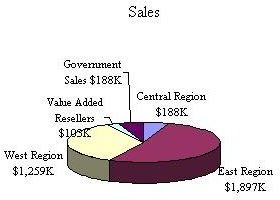
Problem: On a three-dimensional pie chart with several small pie slices, the labels for the smaller pie slices will often overwrite each other, as shown in Fig. 1089. Improve the look of the chart.
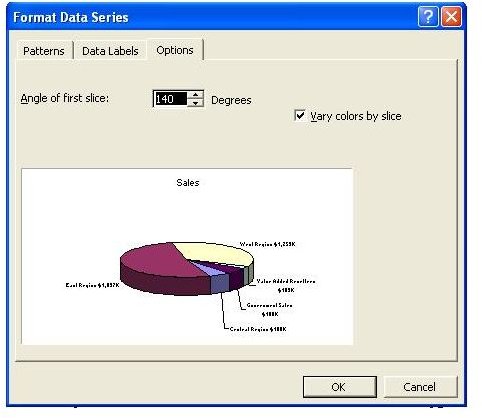
Strategy: You can rotate the pie chart so that smaller slices are near the front corner. Follow these steps.1) Right-click the pie chart. From the right-click menu, select Format Data Series.2) There are three tabs on the Format Data Series dialog. Choose the rightmost tab – Options.3) Use the Angle of First Slice spin button to rotate the pie in 10-degree increments, as shown in Fig. 1090. Look in the preview window to find spots where all of the labels fit without overlapping.4) Choose OK to close the Format Data Series dialog.
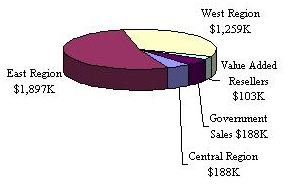
Result: All of the data labels are visible, as shown in Fig. 1091.
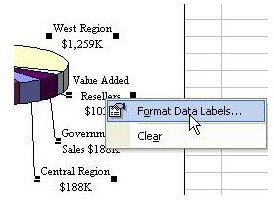
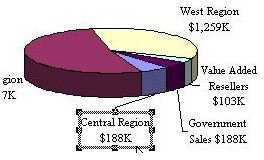
Alternate Strategy: Using the mouse, click on one of the data labels. Black Fill handles will surround all of the labels. Right-click any label and choose Format Data Labels, as shown in Fig. 1092. You can now change the font of all labels.
Alternate Strategy: Single-click on a data label to select all data labels. Wait long enough to not qualify as double-click, and do a second single-click on just one data label. Now, only one label is selected, as shown in Fig. 1093. You can now use the mouse to drag the label to a new position.
Summary: The Angle of First Slice setting on the Format Data Series dialog allows you to find the best angle, where the fewest labels overlap. You can then use the Format Data Labels to change the font or simply move one data label out of the way.
Commands Discussed: Format Data Series; Format Data Labels
Images
References and Additional Resources
If you’re looking for more tips and tutorials, check out 91 Tips for Calculating With Microsoft Excel . This collection of easy-to-follow guides shows how to customize charts and graphs, different ways to make complex spreadsheets easier to update, and even how to play games like Craps in Excel.
Other Resources:
Microsoft Excel Official Site, https://office.microsoft.com/en-us/excel/
Bill Jelen, Microsoft Excel 2010 In Depth, Available from Amazon.com .


