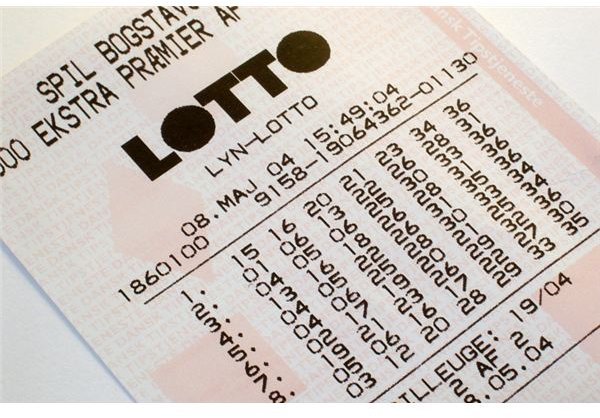
Are the lottery odds ever in your favor? If you know the top prize, you can use Excel to figure out the lottery probability and see if it’s worth buying a ticket.
Calculating Lottery Odds in Excel
**
While the lottery is rarely a “good bet” mathematically, there are times when it’s better than others. In fact, there are actually times when the lottery odds are in your favor. With Excel, it’s possible to calculate lottery probability and figure out exactly what your chances are of winning. First, let’s look at an example.
Problem: The Super Lotto jackpot is $8 million this week. Should you play?
Image Credit: sxc.hu/upn
Doing the Math
Strategy: It depends on how many numbers are in the game. You need to figure out the number of possible combinations there are in the game. You can use the COMBIN function to figure out the number of combinations by selecting six numbers out of a group of 40.
- Set up a spreadsheet with the number of balls in your lotto game in cell C2.
-
Identify how many numbers you need to select correctly in cell D2.
Advertisement -
Enter the formula =COMBIN(C2,D2) in cell E2, as shown in Fig. 451. (Click image for a larger view.)
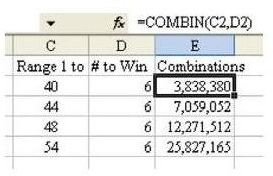
If your state lottery game requires you to select six numbers out of 40, then the odds against you winning are 3.83 million to one. For a $1 bet and an $8 million payout, the odds are in your favor.
For a game with 44 numbers, the odds are 7 million to one. This payoff is only slightly in your favor.
For games with 48 or 54 numbers, the payout is not worth the long odds of the game.
Additional Information: COMBIN figures combinations. Here, the sequence in which the balls are drawn in is not relevant. If you had a game where you had to match both the numbers and the order in which they were drawn, then you would want to use the PERMUT function to find the number of permutations of drawing six numbers in sequence out of 40.
Summary: Use the COMBIN or PERMUT functions for figuring the number of combinations or permutations.
Functions Discussed: =COMBIN(); =PERMUT()
More Excel Tips
Interested in learning more Excel tricks and strategies? Be sure to browse through the hundreds of other Excel tutorials and user guides available at Bright Hub, including the following collections.
-
91 Tips for Calculating with Microsoft Excel – With this selection of calculating tips, you can learn everything from how to play craps in Excel to how to calculate a monthly loan payment. In addition, several shortcuts and formula customizations are discussed.
Advertisement -
Excel Formatting Tips from Mr. Excel – This collection of 72 formatting tips offers several tricks and techniques for organizing, analyzing, and presenting data in Excel.


